
ASUS Transformer Book T100 Review: Redefining the Entry-Level Windows Notebook
CPU Performance
The Atom Z3740 in the T100 features a 9% lower base clock and 22.5% lower max turbo frequency than the Z3770 we previewed back at IDF. Given how good of a job Bay Trail does turboing up to max frequencies under normal use, I’d expect proportionally lower scores in our tests.
I’ll start with our cross platform browser based benchmarks before moving on to a look at the Z3740 vs. Z3770.
Note for all of these benchmarks I’ve used Google’s Chrome browser. IE11 integrates well into the modern UI of Windows 8.1 but is otherwise a pretty terrible browser by comparison. I think the modern UI Chrome experience on 8.1 isn’t as good, but it’s a better/faster/less-finicky option. Out of all of our tests only SunSpider seems to run quicker under IE11, whereas Chrome wins everywhere else. I think it’s a bit insane to switch between browsers based on the benchmark being run, so we’re sticking with Chrome across the board.
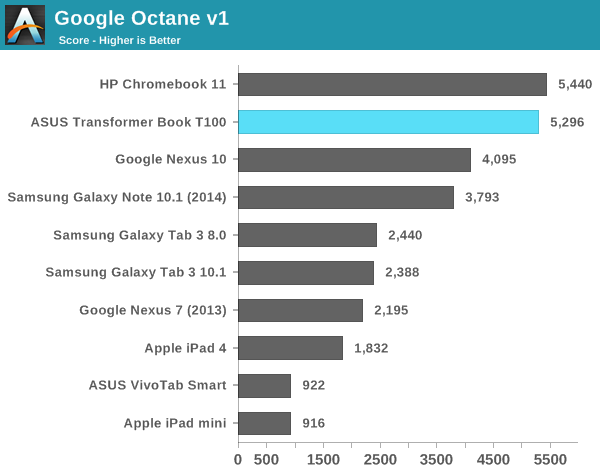
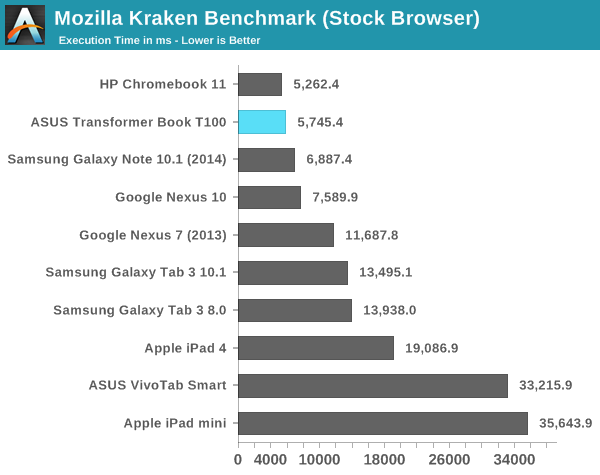
Lightly threaded performance is actually quite comparable to the Chromebook 11, which was a bit surprising. Throw a multitasking workload at the two notebooks and you'll separate the boys from the men though:
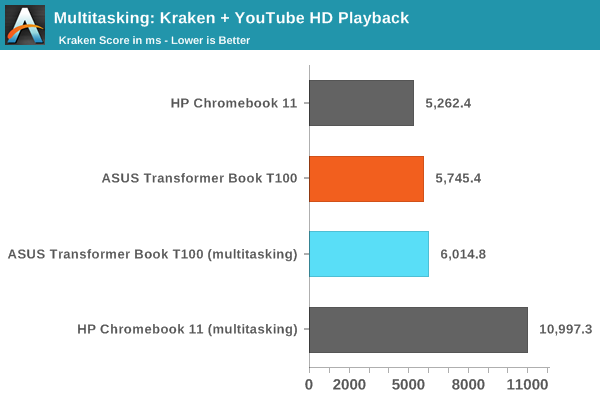
Chrome under Chrome OS performs extremely well for obvious reasons. But here the T100's additional cores and solid memory interface really come in handy when multitasking, there's hardly any performance penalty for this sort of multitasking on Bay Trail while the dual-core Cortex A15 based Chromebook needs serious help.
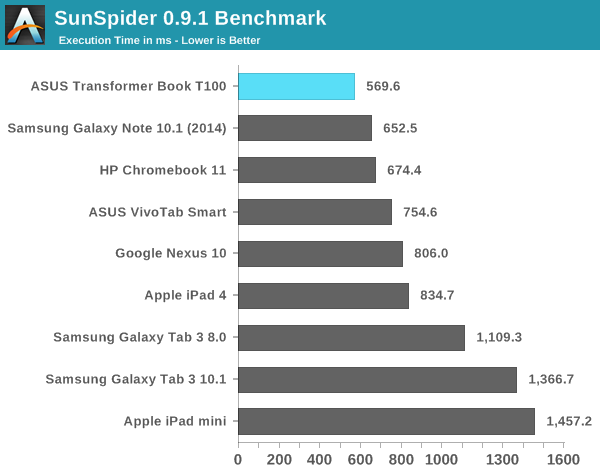
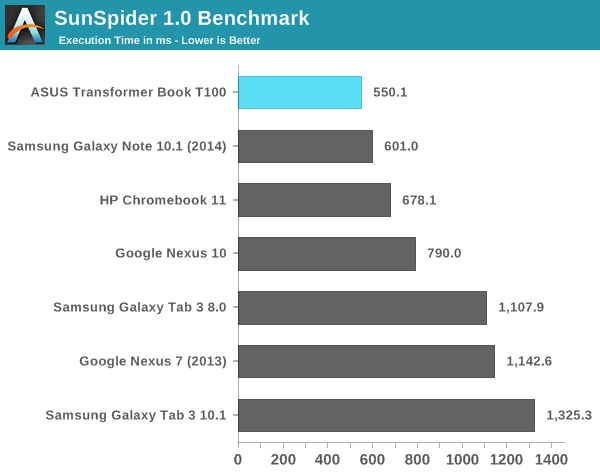
The T100 remains extremely competitive compared to the Chromebook 11 and definitely compared to Android tablets.
Next up is putting the Atom Z3740's performance in perspective compared to our earlier FFRD data:
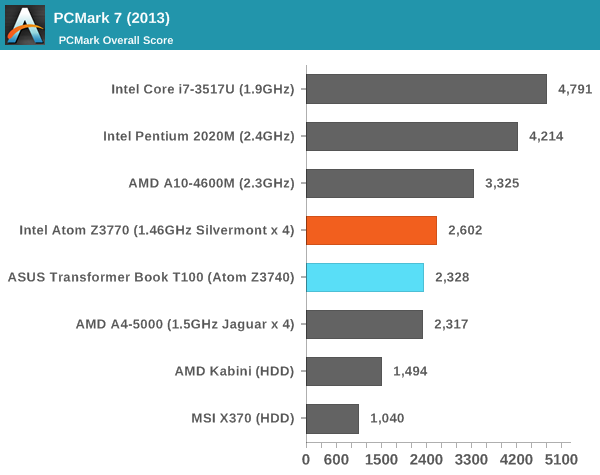
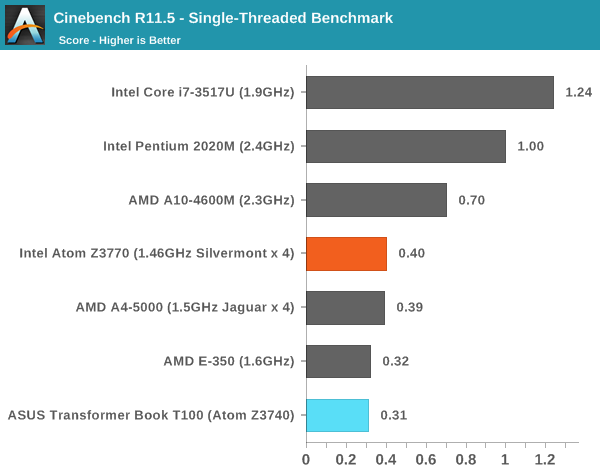
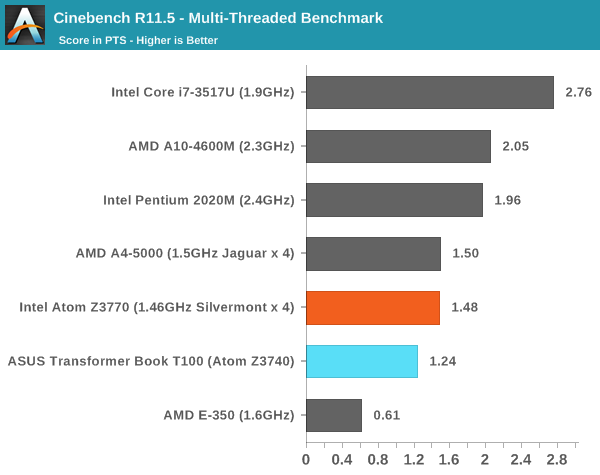
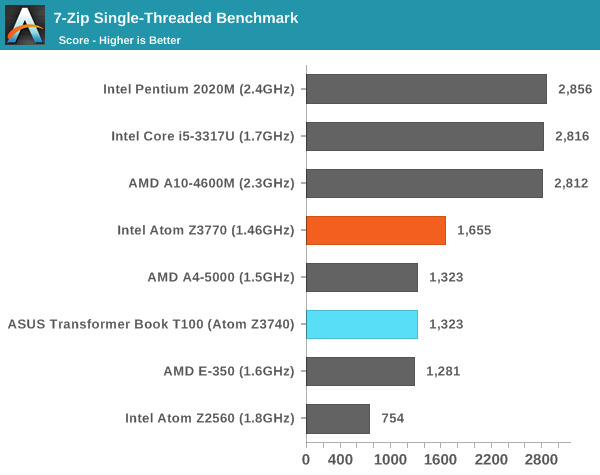
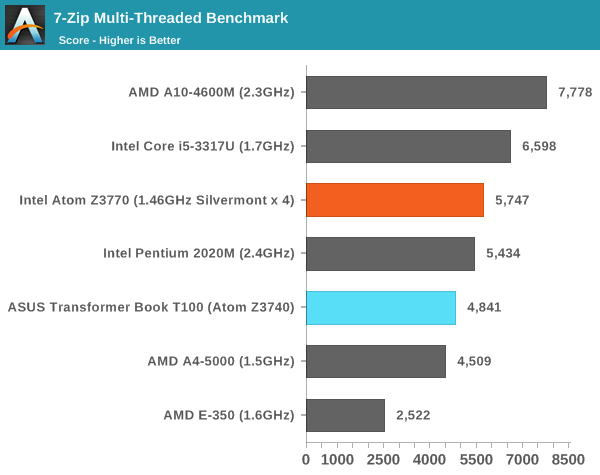
In all of these tests we see nearly perfect scaling compared to the Atom Z3770. Turbo frequencies are regularly hit when under load, and as a result see see proportionally lower performance from the T100. I would’ve liked to have seen the Z3770 used in the T100, but not if it meant a higher price, an optional dock or a worse display.
GPU Performance
I didn’t have a ton of time to go through gaming performance on the T100, but with a quarter of the EUs of Ivy Bridge it’s clear that you shouldn’t expect a GPU monster out of Bay Trail. In our cross platform graphics tests however the T100 is quite competitive, although not industry leading by any means.
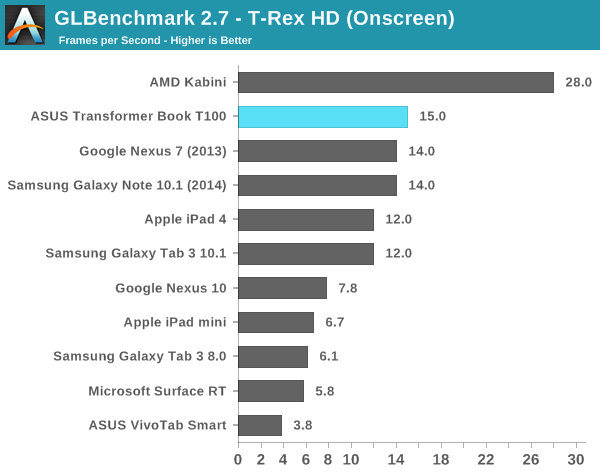
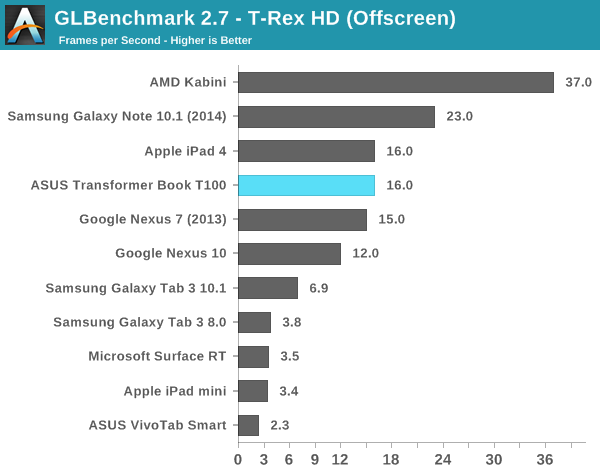
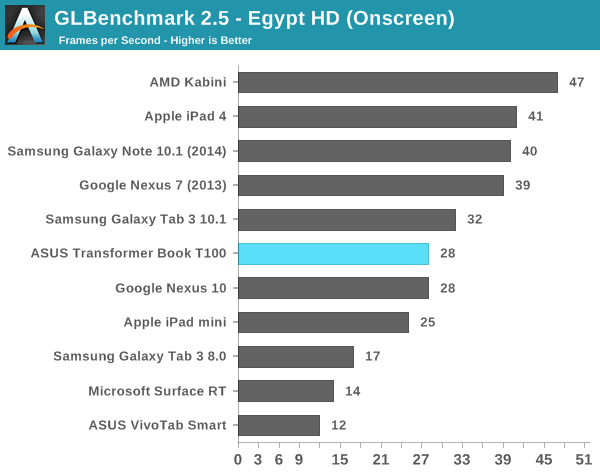
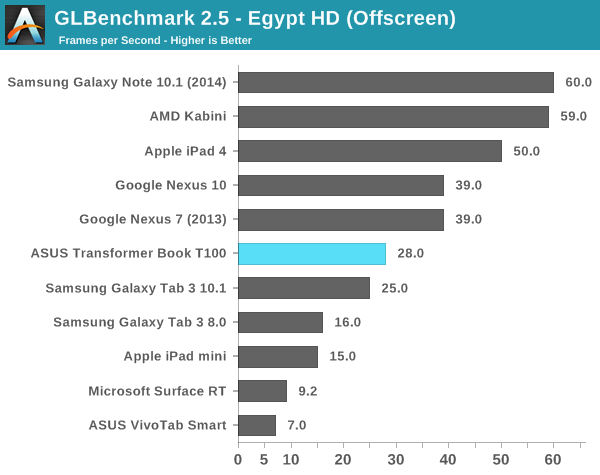
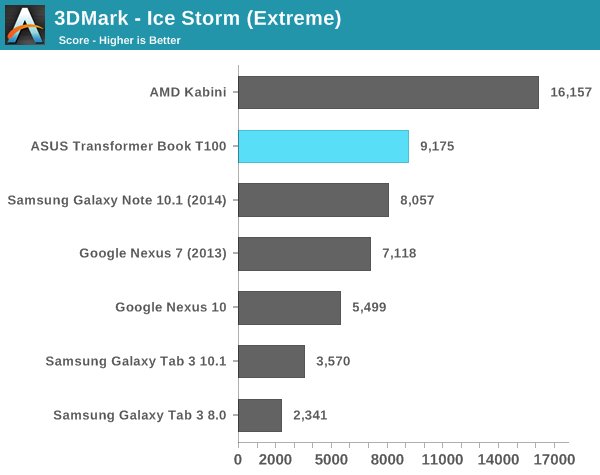
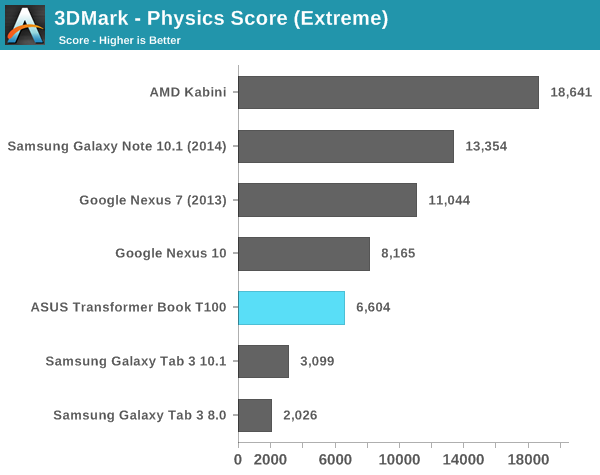
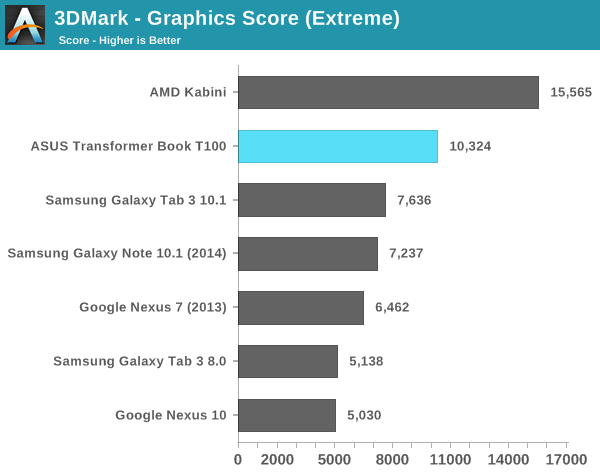
I did see some choppy animations at times and indications that the GPU (or its drivers) weren’t up to snuff, but that’s exclusively in classic desktop mode. In the modern UI, the Atom Z3740 was very smooth.
Storage Performance
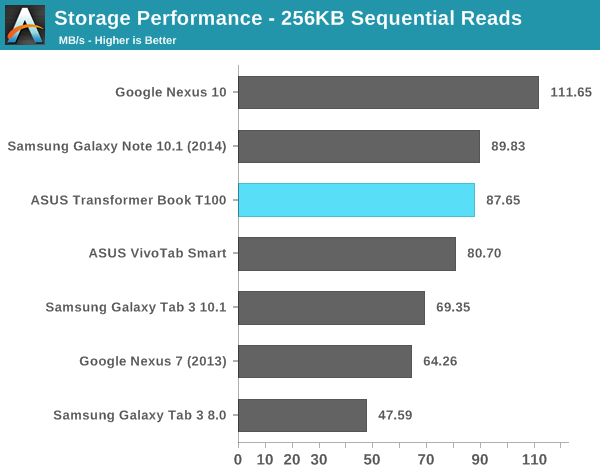
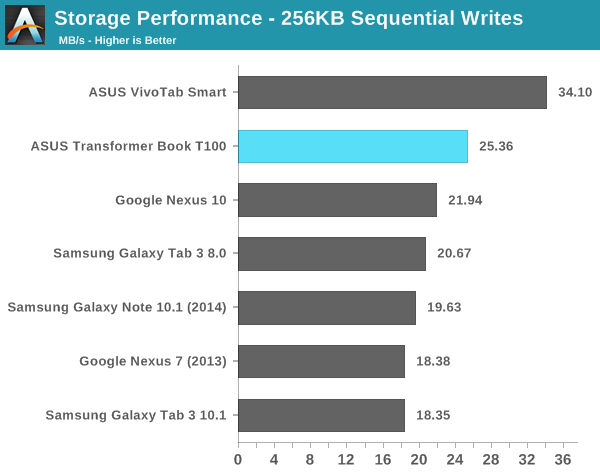
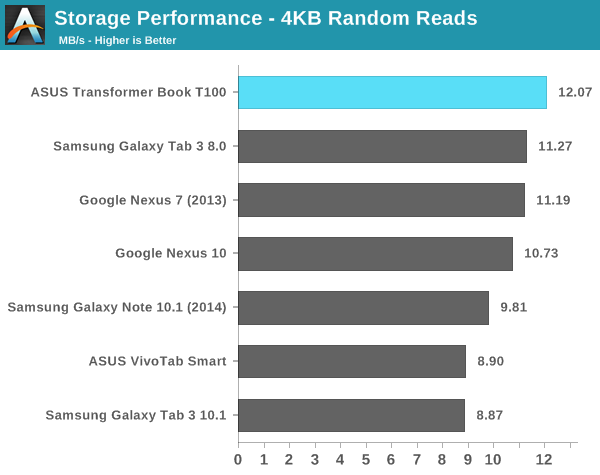
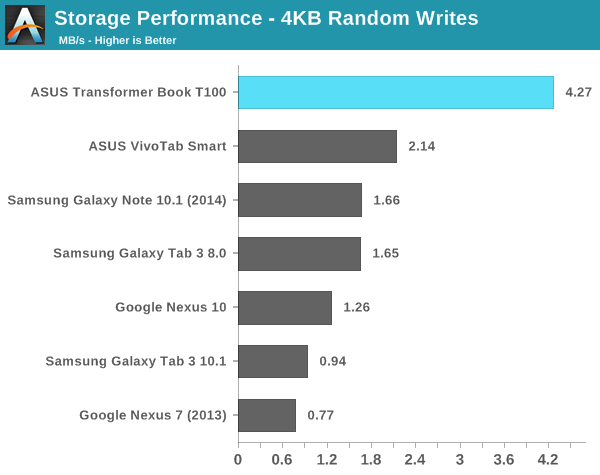
Our Android IO tests rely on Androbench with a relatively limited LBA span. I increased the difficulty of the test a bit under Windows 8.1 but still kept it reasonable since we are dealing with eMMC solutions. I’m testing across a 1GB LBA span and testing for a period of 1 minute, which is an ok balance between difficulty of workload and sensitivity to the fact that we’re evaluating low-class SSDs here.
Sequential read and write performance is competitive with the high-end examples we’ve seen in the Android space. Random read performance is similarly good, while random write performance is appreciably better than what we’re used to in Android tablets. It is good to see ASUS/Intel/Microsoft concerned about random write performance, but I’d still like to see a 5 - 10x increase in these numbers with a focus on sustained performance before I’m truly happy.
Originally published at https://www.anandtech.com/show/7428/asus-transformer-book-t100-review (Wayback Machine).