
Alienware 18 Gaming Notebook Review
If you read the review of the Alienware 17, this part is going to be pretty familiar to you. While the original Alienware M18x looked like they took the M17x R3's chassis design and just stretched it out, the 18 looks like a more proportional super-size of the 17. It's really about as attractive as an 18.4" behemoth is going to get, but users who aren't interested in a 12 pound notebook need not apply.
As with the Alienware 17, we have an aluminum lid with accent lighting, bevelled body with lit trim, and soft touch plastic used on the majority of the touchable surfaces. I know a lot of you don't like how Alienware notebooks look, but I really have to stress that photos don't do them justice. I wasn't a fan either until I actually laid hands on and spent time with the M17x R3, and the same was true of the 17 and now the 18. Once you sit there and use the notebook, you start to dig it. The configurable lighting can be as ostentatious or mundane as you like; I configured mine magenta simply because you never see anyone with a magenta-backlit notebook.
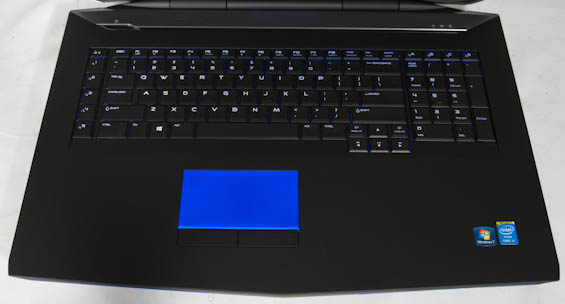
With all that said, my reservations about the Alienware 17's keyboard and touchpad continue to apply to the 18. I'm not a fan of the revised keyboard layout as the programmable keys above the number pad make virtually no sense, and I never liked the column of programmable keys next to the primary keyboard on the original M18x. If you navigate a keyboard by touch, you're used to feeling for the Control key by finding the bottom left of the keyboard. On this keyboard, you'll wind up hitting the 5th macro key instead of Control. If Alienware is going to continue to include these keys, they need to adjust their position so that they're more distinct from the rest of the keyboard.
I'm also still not a fan of the backlit touchpad and vastly prefer the lit trim on the old model. Backlighting the touchpad just creates this giant block of light whenever you use it, and while you can certainly disable it, you can't disable paying for it.
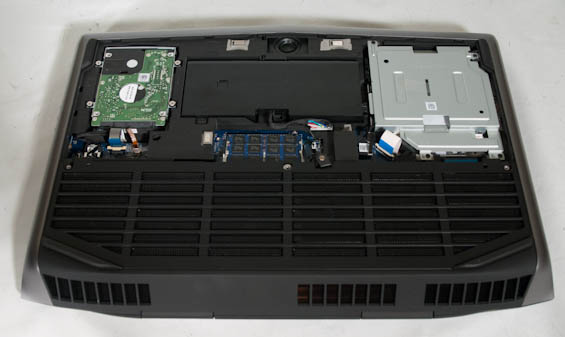
The interior is also a lot less user friendly than it used to be. The primary panel only reveals the drive bay and two DIMM slots. Thankfully, one of the major benefits of Dell owning Alienware is that detailed service manuals for end users continue to be readily available for Alienware notebooks.


I like how the Alienware 18 looks a lot more than I did the M18x and M18x R2, even if it feels even bulkier than those beasts. As far as I'm concerned, something like this is basically an all-in-one in a different shape and without the touchscreen. I'm still more bullish on the Alienware 17 for the majority of users, but at least the 18 is more justifiable than its predecessors were.
Originally published at https://www.anandtech.com/show/7332/alienware-18-gaming-notebook-review (Wayback Machine).