
Mythlogic Pollux 1613 / Clevo P157SM Review
Mythlogic Pollux 1613 / Clevo P157SM Battery Life
If there’s one weak spot in terms of objective measurements with Clevo’s gaming notebooks, it’s almost always battery life. Regardless of what power profile or other settings you might use, it’s simply not as good as what we’ve seen with gaming notebooks from other vendors. Most of this is due to the tuning of the BIOS/firmware with a focus on performance rather than power efficiency.
The scores in the charts below include our initial testing results from the MSI GT70, but as one example of what’s possible with further BIOS tuning, with an updated BIOS I measured 373/286/224 minutes on a GT70 – that’s a 63% improvement in our Light testing, a 38% improvement in our Medium testing, and a 23% improvement in our Heavy testing. Performance (gaming performance in particular) dropped slightly in most titles along the way, but reducing performance by a few percent to get significant increases in battery life is definitely a worthwhile compromise on a notebook. Whether or not Clevo can duplicate that feat with an updated BIOS remains to be seen, but past experience isn’t very encouraging.
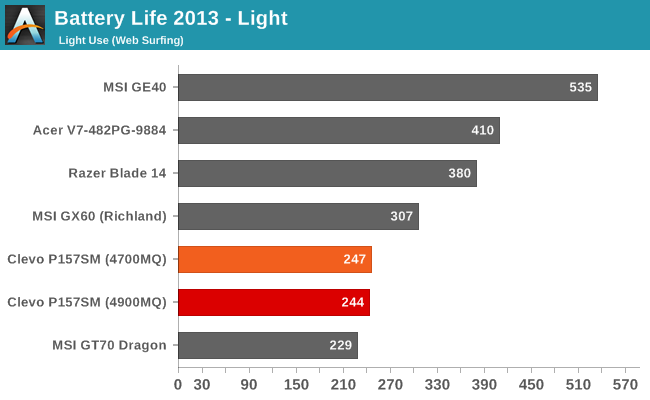
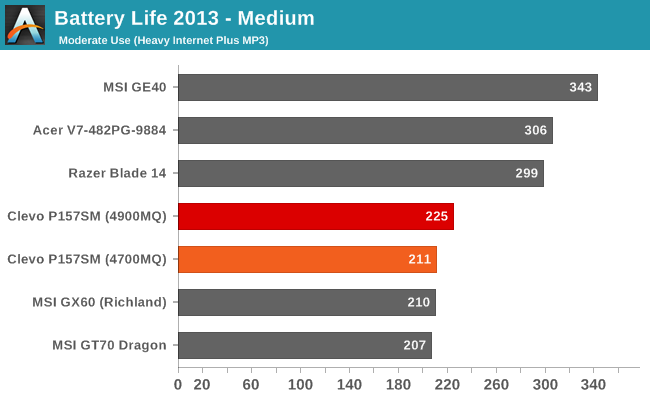
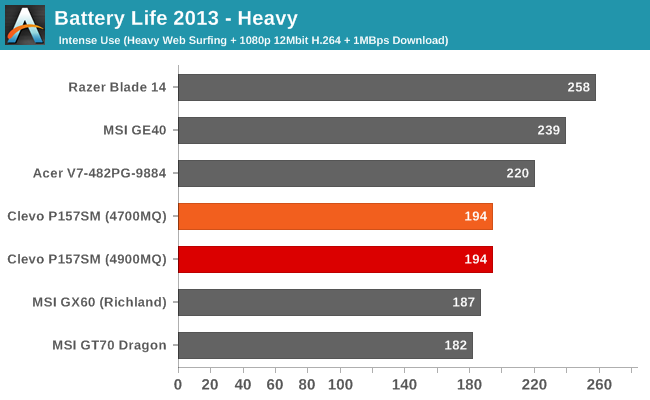
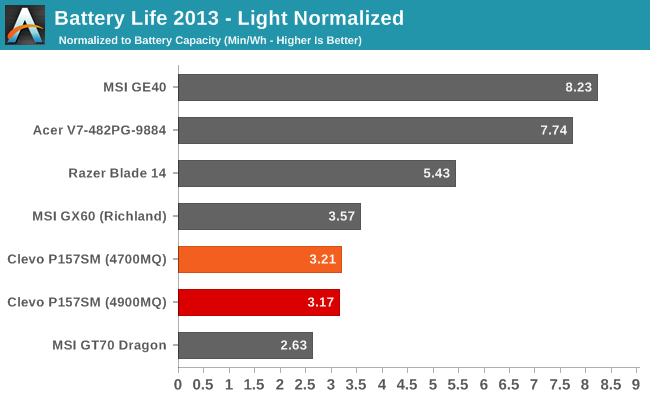
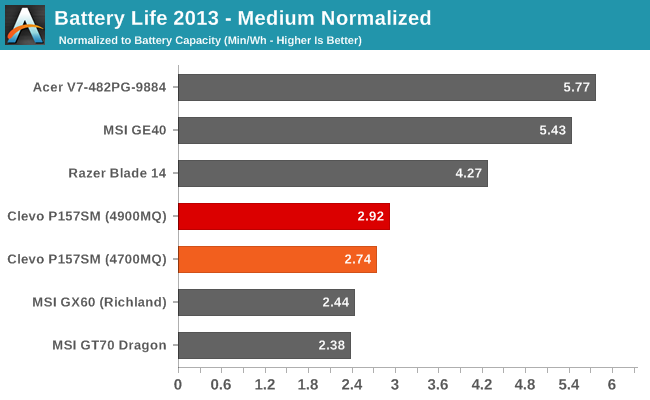
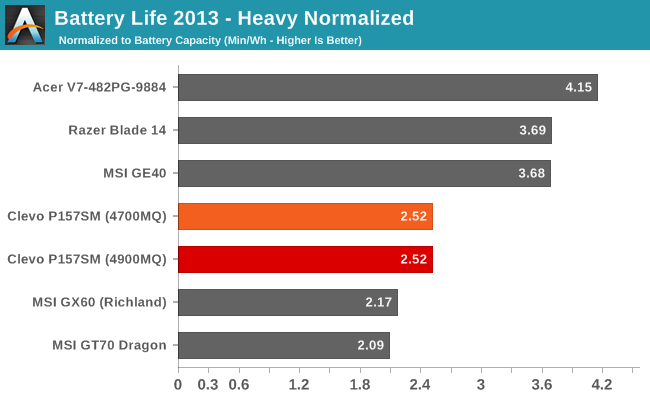
The good news is that battery life is still better than what MSI achieved with our initial sample, but it’s a far cry from what we’ve seen with other laptops. MSI’s GE40 in particular delivered some stellar results, with relatively similar hardware all told (other than the smaller and lower quality display). Keep in mind that for all of these tests, the discrete GPU is inactive, so we’re only looking at the power and battery life with the iGPU and other components. Also interesting to note is that the choice of an i7-4700MQ or i7-4900MQ doesn't appear to impact battery life much at all.
I’m always asked for battery life while gaming, so I did run some tests there as well. First, as with most gaming notebooks, the dGPU throttles pretty heavily under load. I looped 3DMark11’s demo at 1366x768 “Performance” settings until the battery went dead, and frame rates were around 30-50% of what you’d get while on AC power. The GPU clocks in a game are 850MHz+ on the core and 5000MHz on the GDDR5; unplug the notebook and the core clocks drop to 405MHz while the RAM drops to 1600MHz – not that you need 5000MHz RAM to feed a 405MHz core, but it’s still a major castration of performance under battery power. What that means is that you can actually get nearly the same gaming performance on battery power from the Acer V7 with its GT 750M (which doesn’t throttle as much), or the MSI GE40 (again, less throttling).
Battery life of course is going to be better than if you were running the GPU full tilt, but even with the reduce clocks the P157SM only manages 75-80 minutes before the battery is drained. Put another way, unplugged and running a game the P157SM draws about 63W. Plugged in, I measured 185W power draw at the outlet, so even if we assume an 80% efficiency power brick (and hopefully it’s better than that), the laptop is using around 150W when plugged in, or more than twice as much power. Would someone be happy to get twice the performance but less than half the battery life with a gaming notebook? I doubt it, so the decision to throttle the GPU clocks on DC power is probably the right thing to do.
Originally published at https://www.anandtech.com/show/7250/mythlogic-pollux-1613-clevo-p157sm-review (Wayback Machine).