
Monoprice Zero-G Slim 27" IPS Monitor Review
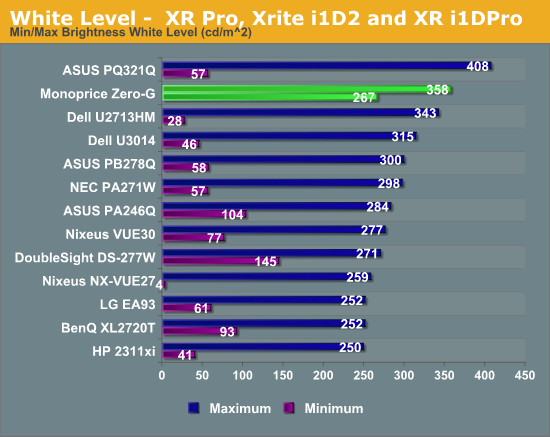
The Zero-G is rated for 440 cd/m^2 of brightness, but with the default contrast setting I couldn’t get close to that. I only managed to produce 348 cd/m^2 of brightness with the Brightness at max and Contrast at 50. Pushing the Contrast higher might push that value higher, but it also introduces clipping that makes those settings unusable.
The curious value with the Monoprice is the minimum white level. At the default Contrast setting of 50 and the Brightness at 0, we still see 267 cd/m^2 of light output. That’s over 30% higher than our bright target for calibration and pre-calibration readings! I like to see the minimum level be closer to 80 cd/m^2 or below, so this is a small range. As you see on the chart, the Monoprice really sticks out here.
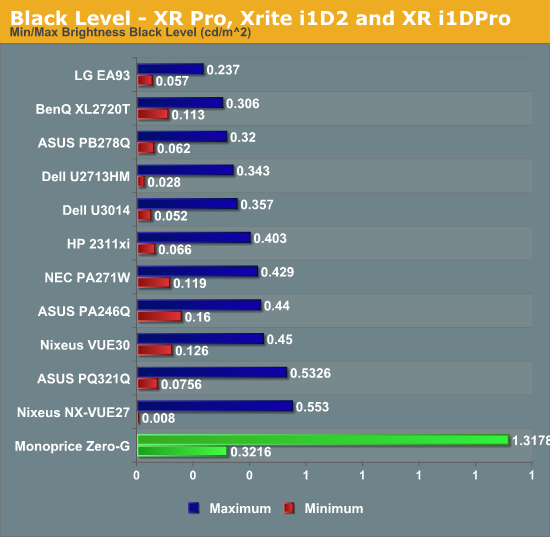
Black level also has issues. With the Brightness at 100 and Contrast at 50, we see a black level of 1.3178 cd/m^2. We really look for a value of 0.300 cd/m^2 or below to be excellent, and past 0.500 cd/m^2 is not great. Beyond 1.0 shows that we have grayish blacks, not black-blacks, and the contrast ratio is going to really suffer.
At the Brightness level of 0, our black level is a more respectable 0.3216 cd/m^2. The minimum brightness levels are what I’d expect to see at maximum brightness on a typical display. As almost everyone is using LG panels in their 27” 1440p monitors, there is something in the electronics of the Monoprice that is certainly strange.
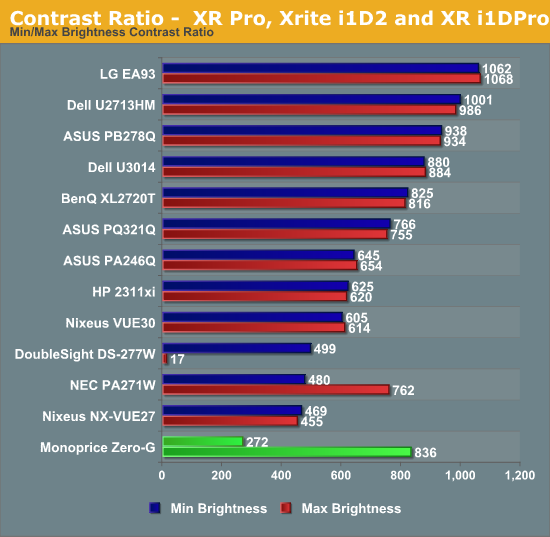
The contrast levels, as you can imagine from that maximum brightness reading, are strange. We see a respectable contrast level of 836:1 at minimum brightness, but a maximum brightness contrast of only 272:1. When these values don’t line up with each other, or with the 200 cd/m^2 calibrated values, I go back and run this at multiple levels to see what is going on. Below is the data for the light output and contrast ratio at different brightness levels.
|
Brightness Level |
Light Output (cd/m^2) |
Contrast Ratio |
|
0 |
267 |
836:1 |
|
10 |
290 |
888:1 |
|
20 |
312 |
944:1 |
|
30 |
330 |
992:1 |
|
40 |
352 |
1054:1 |
|
50 |
354 |
1054:1 |
|
60 |
354 |
1055:1 |
|
70 |
354 |
1054:1 |
|
80 |
355 |
830:1 |
|
90 |
356 |
520:1 |
|
100 |
358 |
272:1 |
As we see the light output doesn’t really change from 40-70, and past 70 the black level rises causing the contrast ratio to fall. Contrast Ratio should be constant, with small fluctuations due to reading error. Because of the behavior seen here, I chose to do all my calibrations at the default settings of Brightness 50 and Contrast 50. However, there is something going on with the electronics inside the Monoprice display, and it doesn’t look right.
Monoprice looked into this and informed me that the backlight level is controlled by the scaler and not by the pcb mainboard. This is causing the brightness controls to not function as I expect them to, and it sounds like it won't be changed.
Originally published at https://www.anandtech.com/show/7240/monoprice-zerog-slim-27-ips-monitor-review (Wayback Machine).