
Phanteks Enthoo Primo Case Review
The biggest obstacle to building your system in the Phanteks Enthoo Primo is actually the sheer size of it. The case weighs in at 17.9 kilograms, or roughly 40 pounds, and you can easily get it to 50 or 60 pounds after installing a full system inside.
Phanteks uses hinged instead of notched side panels (much appreciated for a case this large), held in place with two thumbscrews each. Remove those panels, and there are standoffs preinstalled in the motherboard tray for an ATX board. I found the I/O shield and the motherboard went into place fairly easily, but you'll want to wire up the motherboard before you do anything else. This is where a modular power supply is handy; you can connect the leads before the power supply itself is even connected.


Installing drives is easy enough. The entire front panel of the Enthoo Primo snaps on and off easily but securely, but you only need to remove the bay shields for the 5.25" drives. Toolless clamps are on one side of the bays and they're reasonably secure. Phanteks includes a pair of trays that hold two 2.5" drives each; these use a similar mounting system to what Lian Li employs, with four grommeted screws that enter the bottom of the tray. Slide the tray to the right to lock it into place.
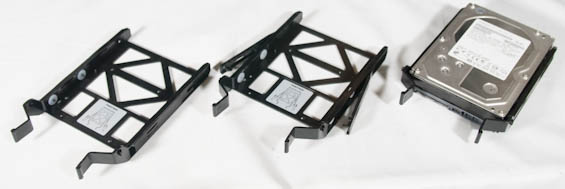
I've often felt there's been a lot of room for improvement as far as 3.5" drive sleds go, and the solution Phanteks employs is incredibly slick. Each tray has small pegs that enter the bottom screw mounts of the 3.5" drive and then winged pegs that snap into the sides. It's a smart and secure installation method. Of course, if you don't need six 3.5" drives (and end users rarely do), the drive cages are held into place by thumbscrews and can be removed.
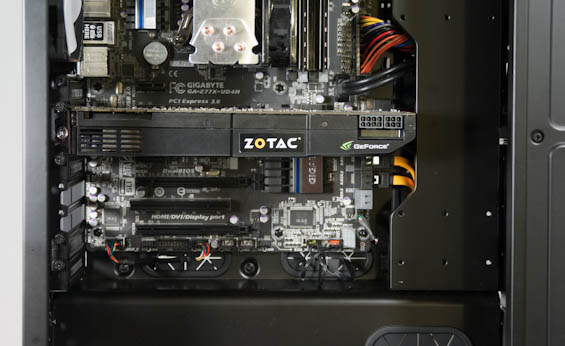
Mounting a power supply to the bottom interior of the case is very easy, but where we run into trouble is in mounting video cards. Simply put, the reservoir plate just doesn't seem to be especially well thought out. Our GTX 580s aren't unusually long for the types of high end video cards you'd expect to find a home inside the Enthoo Primo, but you have to remove the top part of the reservoir plate just to get clearance for one card. Installing a second or third card necessitates removing the plate entirely, and it's obvious the notch in the plate for high end cards just isn't lined up where it needs to be. This is a missed opportunity.
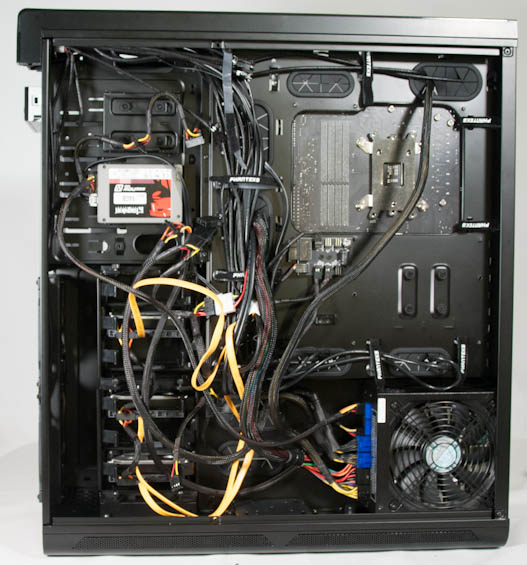
Wiring up the Enthoo Primo is made a heck of a lot easier by the combination of velcro bands behind the motherboard tray, smart placement of routing holes throughout the enclosure, and the PWM-controlled fan hub. The cabling side of the case isn't attractive but it's not supposed to be, really; I appreciate that you can just stuff the cables inside this area and call it a day.
Apart from the quirks of the reservoir plate and the general largesse of the Phanteks Enthoo Primo, I felt like assembly was reasonably simple. You have to adjust to the way Phanteks has laid out the interior, but it's not especially absurd and most of it does make sense. I like cases like this one that deviate from the norm because even if they don't get it totally right the first time, they're most of the way there and one or two revisions away from perfection.
Originally published at https://www.anandtech.com/show/7212/phanteks-enthoo-primo-case-review (Wayback Machine).