
Nixeus VUE 30: 30" 2560x1600 IPS Monitor Review
AdobeRGB has a much larger gamut than sRGB. Even if we can’t control the gamut on the Nixeus VUE 30, moving to a larger gamut target should result in smaller errors overall. If this improves things this might work well for those doing color work, as they may want the larger gamut anyway. For normal use like gaming or web browsing, very few applications use AdobeRGB so it won’t be improved.
| Post-Calibration, 200 cd/m2 | Post-Calibration, 80 cd/m2 | |
| White Level (cd/m2) | 199.7718 | 81.959 |
| Black Level (cd/m2) | 0.3455 | 0.1473 |
| Contrast Ratio | 578:1 | 566:1 |
| Gamma (Average) | 2.1975 | 2.351 |
| Color Temperature | (missing) | 6521K |
| Grayscale dE2000 | 0.8217 | 0.8328 |
| Color Checker dE2000 | 1.3821 | 1.5443 |
| Saturations dE2000 | 1.5282 | 1.6211 |
Besides the gamut, I left every target the same as with our sRGB calibration. As we can see, we get far, far better results for the color than we did before. The performance for the 80 cd/m2 target has also improved a lot with the grayscale. That shouldn’t have been affected, but it could be a better calibration run, as sometimes the software does better than other times. The visible difference with an average dE2000 of 1.33 vs. 0.83 for the grayscale is pretty minimal and hardly noticeable in real life.


The big change is the colors. While Red still falls outside of the AdobeRGB gamut, Green, Cyan and Yellow all line up nearly perfectly now. Magenta is still affected by the Red, but even those two colors are much closer to accurate than before. A quick look at the saturations table shows that the dE2000 stays below 3, or the visible error level, for every color except for highly saturated Red and Magenta. The 96-point Color Checker chart shows the same results, with those highly saturated red shades providing the only errors that really fall into the unacceptable realm.
One key chart to look at that I’ll pull out here separate from the gallery is the Delta Color Error on the Color Checker chart. As you can see, the Red shades are highly affected by an over-abundance of color here. If I were to pull out the other charts that break down the individual color errors, Delta Luminance and Delta Hue, you would see that those errors are virtually non-existent. The issue is that red has too much saturation, but the light level and the tint on it is correct.
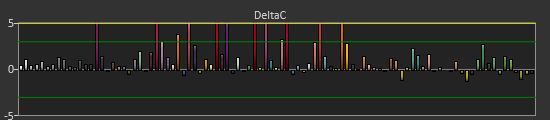
Moving to the AdobeRGB target really improved the performance of the Nixeus VUE 30, but that isn’t without a caveat or two. Most people don’t use AdobeRGB color, and most applications don’t support the larger gamut. For those applications you are still going to see overly saturated colors on a regular basis and this won’t correct them. However, for people that can use AdobeRGB, color accuracy might be more important to them than it would be for someone that doesn’t use it.
If you are only gaming or doing general office productivity on this display, you might not care about the over-saturated gamut. If you are going to be doing photo work you certainly would, and hence this AdobeRGB target might solve your issues. If you want to have accurate colors on the Nixeus, this is the only way you can really get there, and you’ll likely know if this will work for you.
Originally published at https://www.anandtech.com/show/7201/nixeus-vue-30-30-2560x1600-ips-monitor-review (Wayback Machine).