
Choosing a Gaming CPU October 2013: i7-4960X, i5-4670K, Nehalem and Intel Update
Metro2033
Our first analysis is with the perennial reviewers’ favorite, Metro2033. It occurs in a lot of reviews for a couple of reasons – it has a very easy to use benchmark GUI that anyone can use, and it is often very GPU limited, at least in single GPU mode. Metro2033 is a strenuous DX11 benchmark that can challenge most systems that try to run it at any high-end settings. Developed by 4A Games and released in March 2010, we use the inbuilt DirectX 11 Frontline benchmark to test the hardware at 1440p with full graphical settings. Results are given as the average frame rate from a second batch of 4 runs, as Metro has a tendency to inflate the scores for the first batch by up to 5%.
One 7970
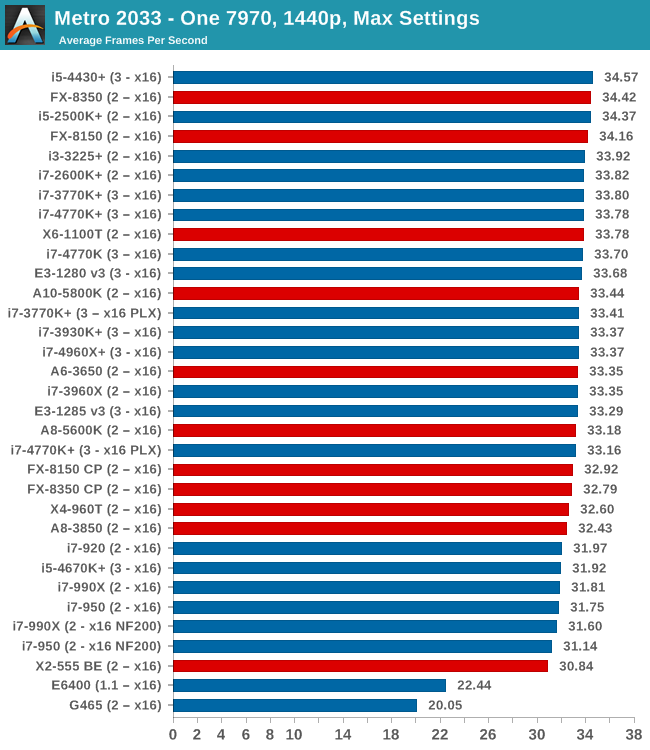
Almost all our test results fall between 31-35 FPS, which technically means a 10% difference between Nehalem CPUs and the latest Intel and AMD CPUs.
Two 7970s
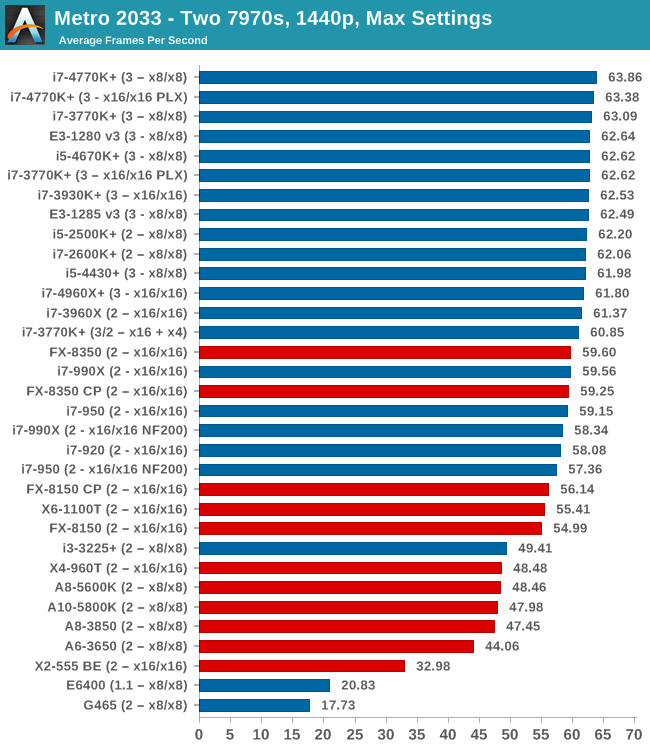
Doubling up to two 7970s and the Nehalems are in the ballpark of the Piledriver CPUs, but for comparison the quad core i5-4670K is similar to the full fat i7-4770K. Anything quad core and Intel, Sandy Bridge and above, hits 60 FPS average.
Three 7970s
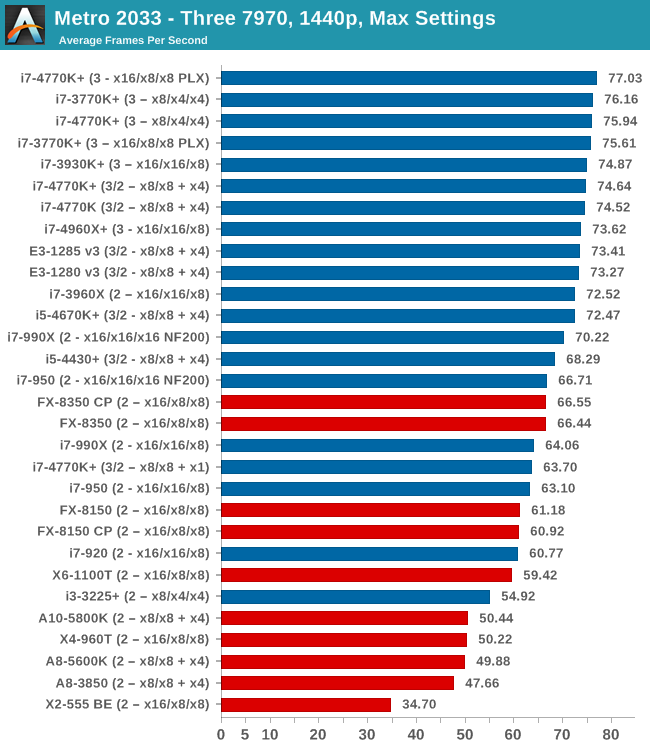
At three GPUs we have a bit more seperation going on, with the Nehalems losing out due to IPC - only on the NF200 enabled motherboard do we get 70 FPS. There are no benefits moving to the hex-core Ivy Bridge-E i7-4960X, but the jump from 4670K to 4770K nets five FPS.
One 580
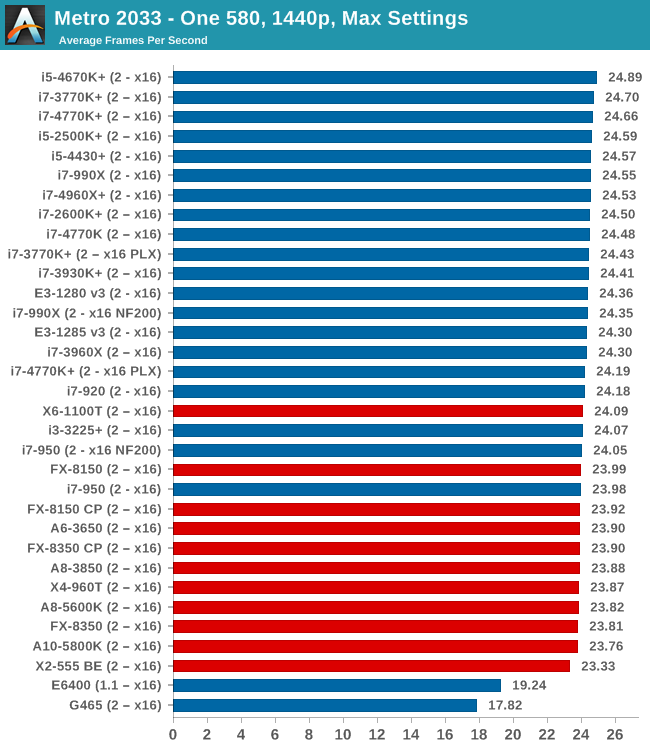
Similar to the 7970s, most modern CPUs perform the same. Beware of single core CPUs however, with the G465 not fairing well.
Two 580s
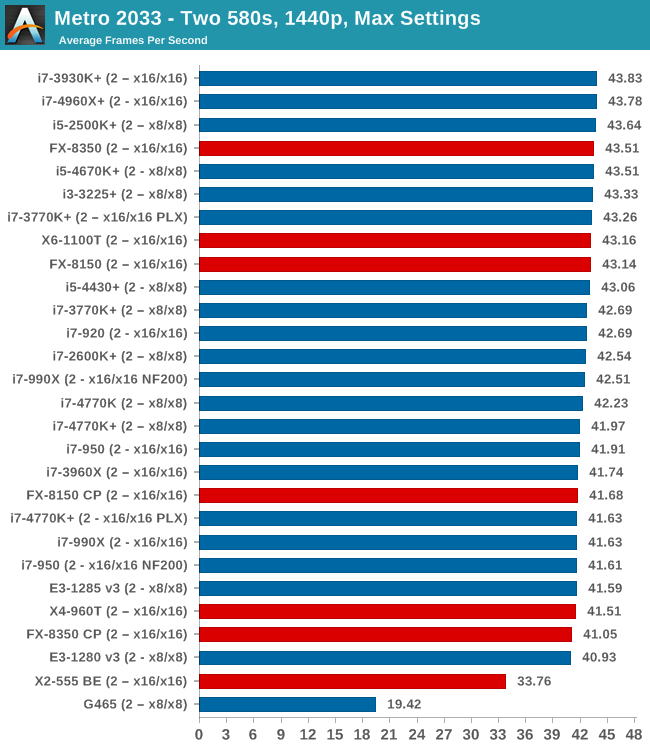
Similarly in dual NVIDIA GPU, there is not much difference - ~3 FPS at most unless you deal with dual core CPUs. Interestingly the results seem to be a little varied within that 41-44 FPS band.
Metro2033 Conclusion
In terms of single GPU, almost all the CPUs we have tested perform the same within a margin. On dual AMD GPUs we start to see a split, with the older Nehalem CPUs falling under 60 FPS. On tri-GPU setups the i5-4430 performs close to the Nehalems, and moving from 4670K to 4770K merits a jump from 72.47 FPS to 74-77, depending on lane allocation.
Originally published at https://www.anandtech.com/show/7189/choosing-a-gaming-cpu-september-2013 (Wayback Machine).