
The 2013 MacBook Air Review (11-inch)
The performance story is a bit interesting. There are two sets of 15W Haswell ULT parts, some with HD 4400 (GT2) and others with HD 5000 (GT3) onboard graphics. The GT3 parts, in order to hit the same TDP, run lower clock speeds. Apple chose to go for GT3 across the board. This isn’t the first time that Apple has made the decision to sacrifice CPU performance for the sake of GPU, but this was probably a pretty easy choice for them compared to 2010, when they skipped Arrandale on the 13” MacBook Pro and Airs for Penryn-era Core 2 Duo and Nvidia’s G 320M. That particular IGP was pretty fast, so much so that the substantially improved HD 3000 that came with the Sandy Bridge mobile parts was actually a bit of a downgrade on them.
The CPU tradeoff here is substantially less than it has been in the past, so this is a bit of a no-brainer. The i5-4250U in the base 2013 MacBook Air is clocked at a low 1.3GHz but has the same 2.6/2.3GHz (single core/dual core) turbo clocks as the 1.6GHz i5-4200U with GT2 graphics. The clock speed difference is even less at the high end: the optional i7-4650U is clocked at 1.7GHz and turbos to 3.3/2.9GHz while the fastest GT2 ULT part, the i7-4500U, runs 1.8/3.0/2.7GHz. The hit you take on base clock is pretty easy to justify for the more powerful GPU.
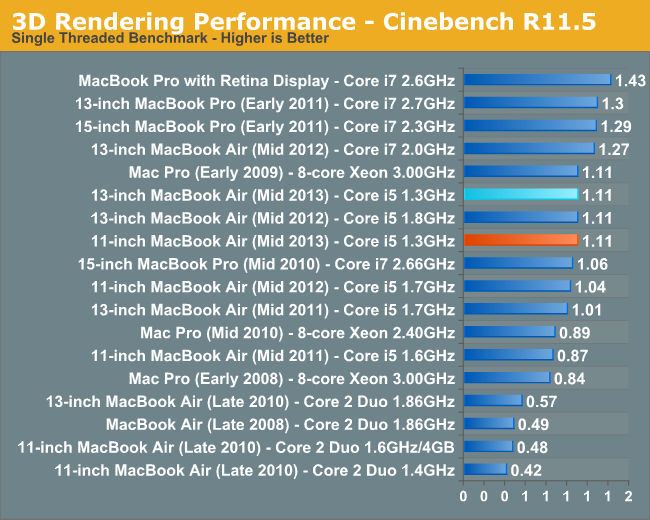
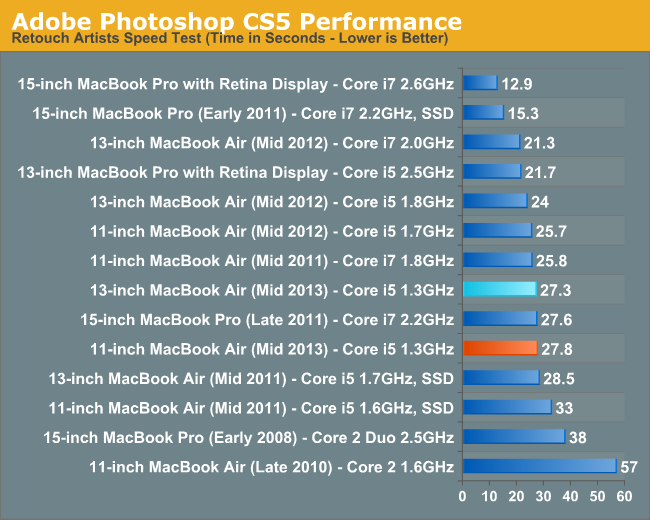
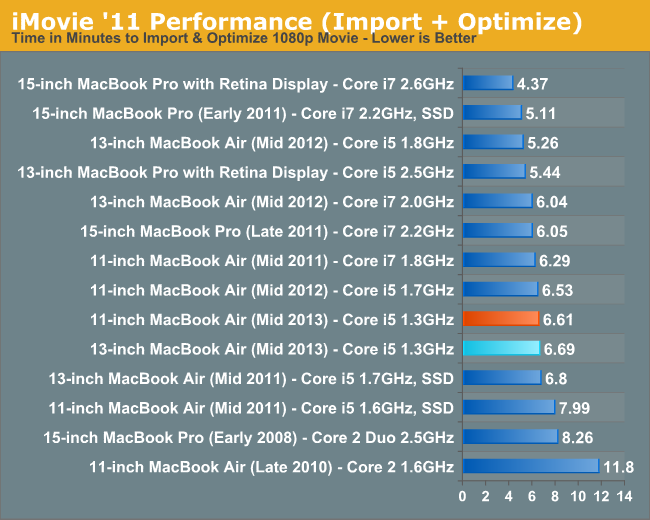
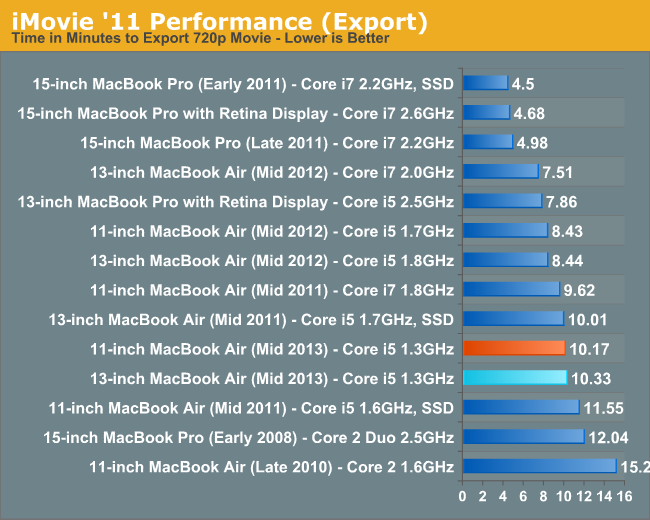
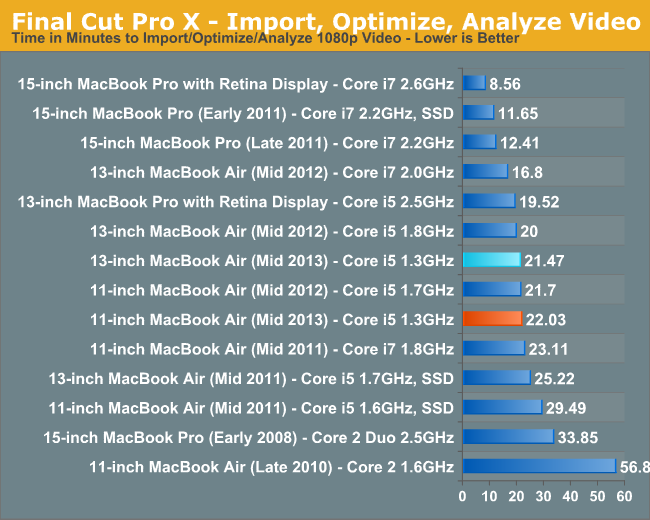
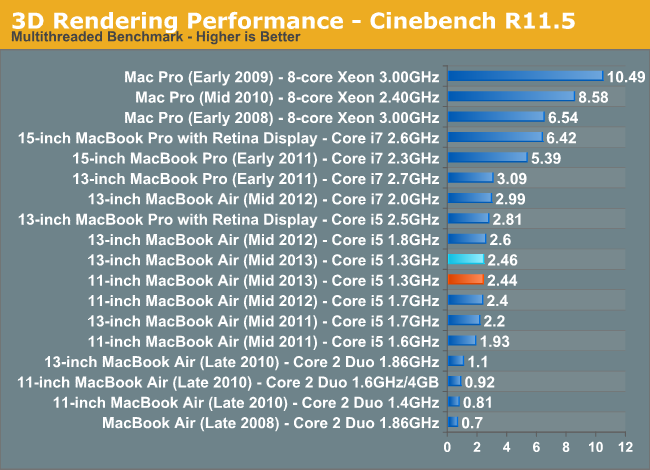 With that said, the raw performance isn’t really that great. The 13” Air that Anand reviewed was slower than its immediate predecessor, which used a 1.8GHz i5-3427U. The base 11” last year used an i5-3317U (1.7GHz) and that’s actually not a whole lot faster than the 11” Air I have here. The results are basically all within margin of error for the tests, so I’m content to call it basically even with last year’s model. The Air isn’t slow, but it can certainly get pokey at times. This is no different than any Ultrabook-class machine, but worth noting. Turbo and the very fast SSD keep things going smoothly in normal day-to-day tasks, but anything substantially more intensive than a browser and iTunes is going to be outside the comfort zone of a system like this.
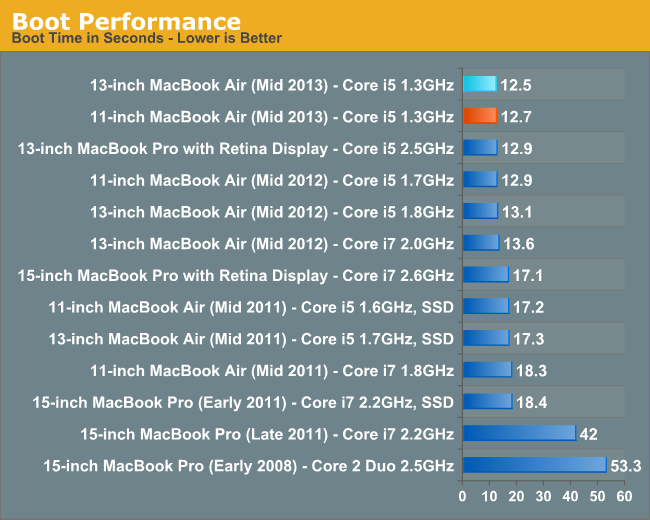
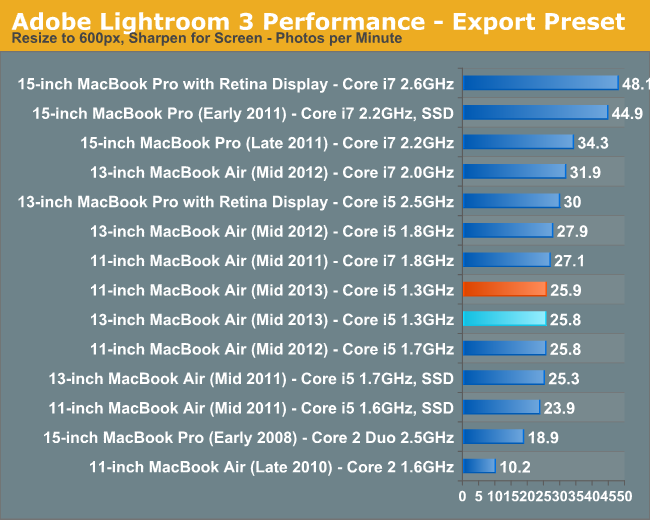
Considering the power efficiency though, getting similar performance to the old model even with 30% slower base clocks is a decent bargain, particularly when accounting for the increase in GPU and storage performance. I’m not going to go too far into those, since Anand did a really deep dive in his 13” Air review. It’s worth noting that while his Air had a Samsung SSD, the supplier lottery churned out a SanDisk SSD in my unit. The switch to PCIe SSDs really does make itself felt in day to day use, particularly in sleep/wake situations, as well as when launching particularly large applications (that then crawl their way through the power-sipping i5 ULT). I honestly didn’t expect that, given how accustomed I’ve become to the responsiveness of fast SSDs in general, but it’s pretty important to the MacBook Air simply in terms of keeping the system feeling quick to the touch.
Originally published at https://www.anandtech.com/show/7180/apple-macbook-air-11-2013-review (Wayback Machine).