
Nokia Lumia 521: Quality Smartphone on an Extreme Budget
I was surprised to see that the 521 (and 520) had an IPS display when the specs were finalized, because I fully expected the display to be one of the biggest sacrifices made for the sake of the budget. I suppose it’s not too much of a surprise, given that the 620 has quite a good display.
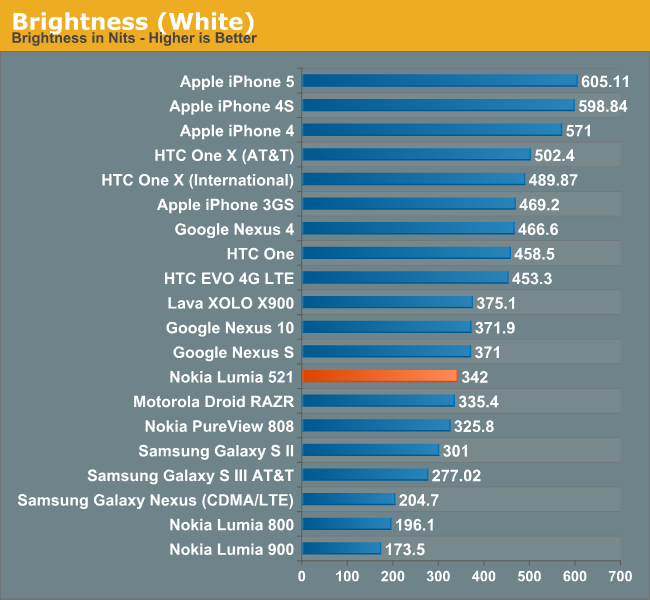
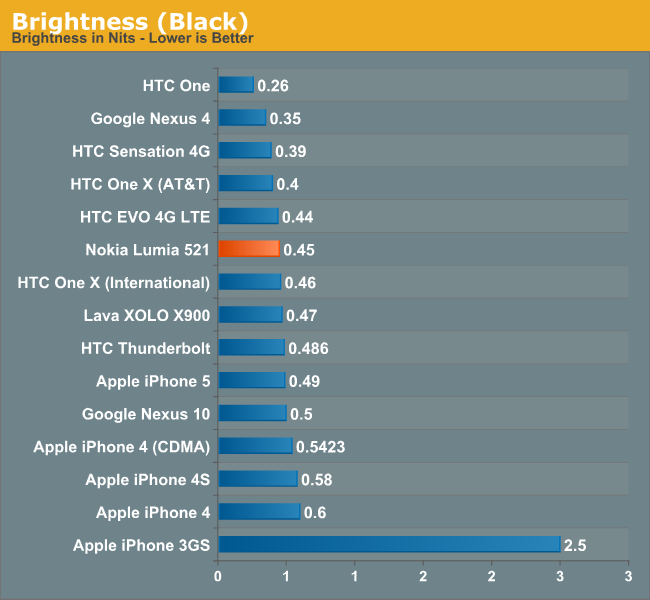
In person, the 521 display is pretty middling. It’s not a bad panel, but it’s not that fantastic either. Maximum brightness isn’t that great at 342 nits—that’s decent enough for most situations though not quite bright enough for comfortable viewing in broad daylight. The black levels aren’t anything to write home about either, so contrast ratio is pretty low by the standards of the phones we typically look at, though its worth pointing out that we focus primarily on far higher end smartphone hardware. Compared to a contrast ratio chart from a couple of years ago, the 521 is about average. The white point of 6336K is very close to neutral, and color reproduction is pretty solid as well.
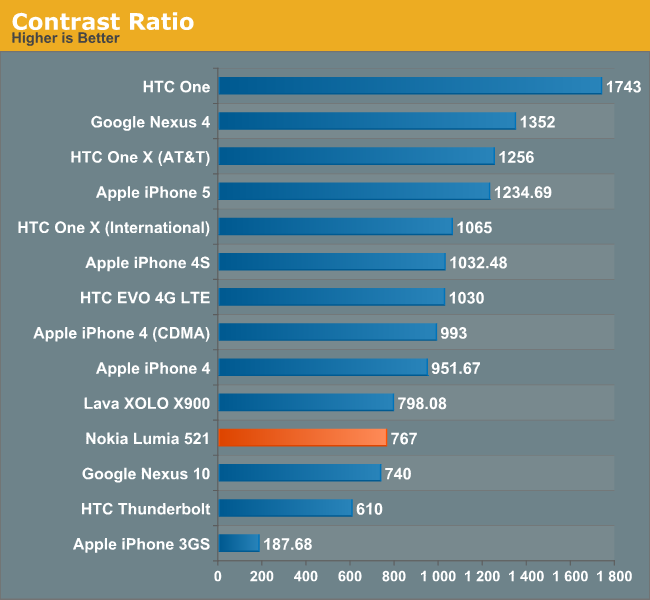
 What kind of kills the 521 display experience though isn’t the panel itself, since that’s pretty decent; it’s the gap between the LCD and the glass. That turns what would be a very respectable viewing experience into an ultra reflective mess anytime you venture outdoors. As a result, you end up wanting to crank the display brightness higher than normal (which is why I rarely used the automatic brightness setting). The extra glare brought on by the air gap is rather distracting and ends up being quite the downer in a lot more usage scenarios than just outdoor. In office-style overhead lighting, too, the glare can be quite terrible and generally ends up degrading display quality by a noticeable amount.
 Given the price point, it’s hard to fault the 521 too much and I must admit that I have somewhat of a skewed perspective. When you’re used to carrying a One, an S4, or another device with a screen of that caliber, the step down to a far lower quality WVGA panel seems pretty drastic. But the colors are vibrant, viewing angles are predictably stellar, and overall the panel looks pretty good, so there are a lot of positives to focus on.
The brightness controls for Windows Phone are a bit finicky—you only get four options: low, medium, high, and automatic. The brightness steps are pretty reasonable, starting with low at 74 nits, medium at 191 nits, and high at 342 nits. There is no iOS or Android style brightness slider, so you’re basically stuck trusting the light sensor or one of the three presets.
Originally published at https://www.anandtech.com/show/7177/nokia-lumia-521 (Wayback Machine).