
BenQ XL2720T Gaming Monitor Reviewed
With TN panels you are of course subject to the problem of poor viewing angles in comparison to other monitor technologies. The problem also accentuates itself on larger displays like the XL2720T, where the viewing angle is larger for your vision, and so the edges start to have color shifts even when you are directly centered on the screen. Even with regular content on the screen, I can notice shifts in contrast and color at the edges of the screen in general use, which I find distracting. I didn’t notice it vertically as much, but the angle isn’t nearly as large as with the horizontal position.


I also found the overall look of the XL2720T to be a bit worse than with other displays I have had in recently. Perhaps it’s the anti-glare coating, but everything looks slightly fuzzy, even the simple black text in this document that I’m typing right now. With the lower resolution I’d expect to see more sharp angles and pixels, but everything looks a bit too smoothed out because of this issue. I have to say that for general use, I can’t imagine living without an IPS monitor at this point.
The BenQ has a lot of preset modes available for calibration, but the best data was obtained with the sRGB mode. Standard was a bit better for grayscale, but color accuracy was better in sRGB making it the overall best choice. Surprisingly, Photo mode was far and away the worst preset on the BenQ when it comes to accuracy, even more than the FPS modes are. Perhaps they meant to call it “Galaxy S3 Photo Mode”, but I’d usually expect a mode for viewing photos to be accurate. So just don’t use it, unless you want a really vivid Instagram filter applied to all your photos on your PC.
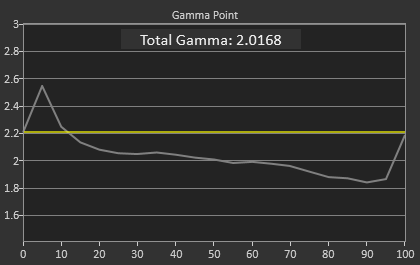
The uncalibrated grayscale performance for the BenQ is decent though not outstanding. The average dE2000 is just below 3.0, which is the visible threshold. As you look at the RGB balance you can see there is a distinct blue-green tint to the grayscale, which you can easily see on screen as well. The gamma comes out just above 2.0, well off our 2.2 target, and it isn’t linear at all which will lead to images that are a little dark in the shadows and too washed out in the highlights. The contrast ratio of 706:1 is on the low side, but the gamma issue really leads to a bit of a washed out image.


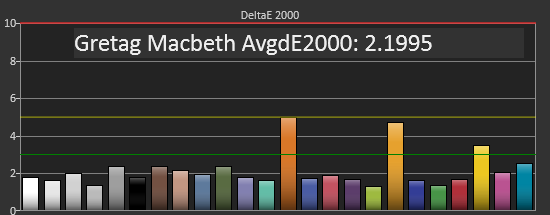
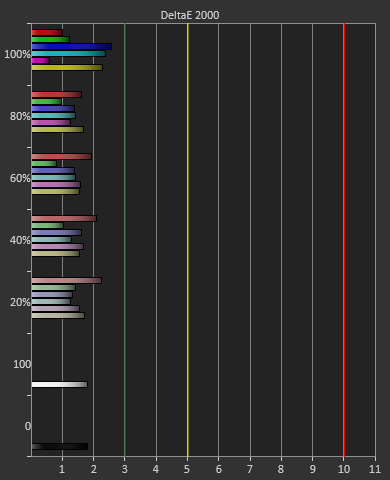
The color points are much better, with a dE2000 of 2.1 and most luminances are pretty close to correct, with all the colors having a dE2000 below 3. The worst issue is the 100% saturation, 100% luminance white that throws the average off a bit, and that will be noticeable as that’s your background white in most applications. Overall you get good numbers for a preset mode.


The colorchecker tests look good overall with the exception of two orange shades that are well off their target. Every other color has a color error that is practically invisible, as long as it isn’t right next to a correct sample. The biggest issue is that the luminance levels are too high across the board, and luminance is the most noticeable error in color.
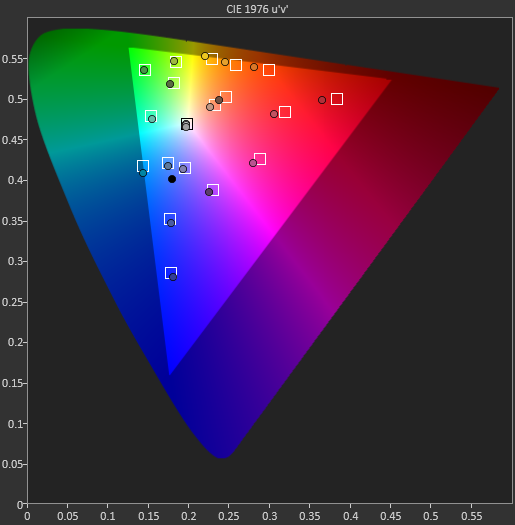
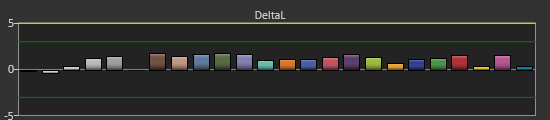
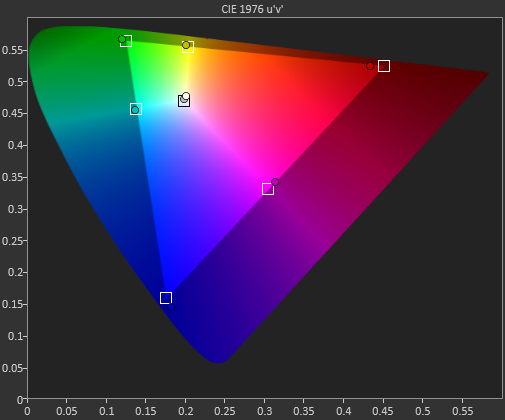
Our saturations data is also very good, showing very uniform errors across the spectrum, and no really large spikes to be heavily concerned with. Overall for a pre-calibrated mode, the sRGB does a good job on the BenQ XL2720T.
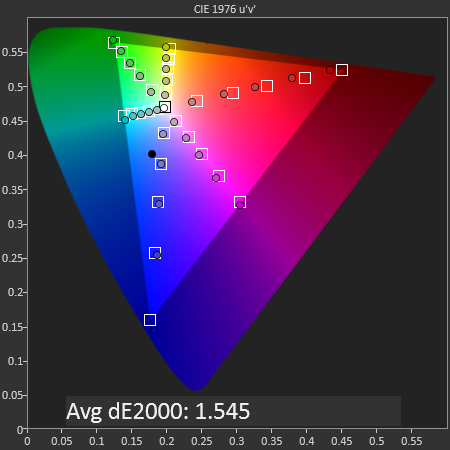
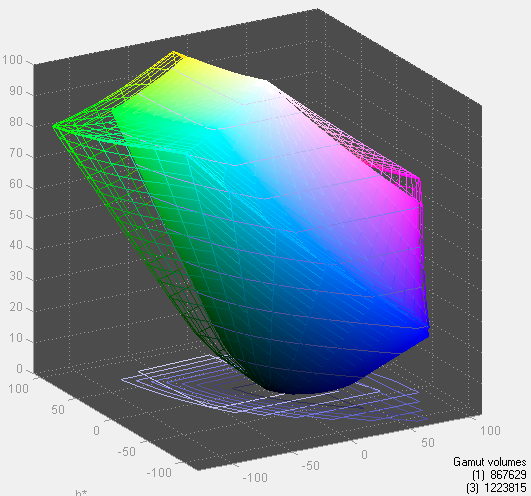
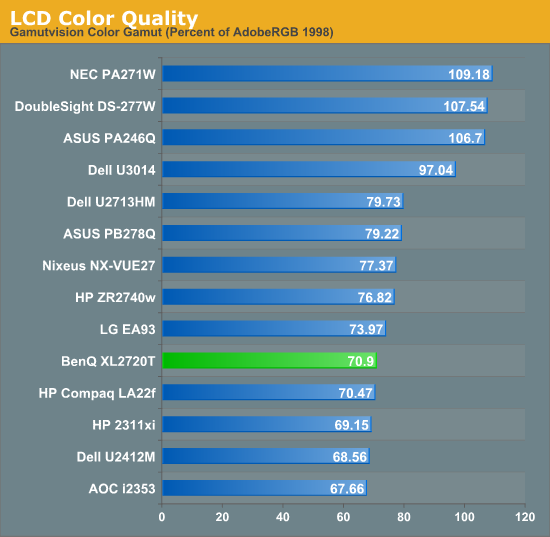
Looking at the gamut, we see just below 71% of the AdobeRGB gamut, which is what sRGB should measure out at.
Originally published at https://www.anandtech.com/show/6963/benq-xl2720t-gaming-monitor-reviewed (Wayback Machine).