
Corsair Obsidian 900D Case Review: Think Big, That's Only HALF as Large
Assembling the Corsair Obsidian 900D
Assuming the Corsair Obsidian 900D is right for you, be ready for a workout. I've only tested one or two other cases in its weight class, and manipulating a case that's copious in both weight and mass is tiring to say the least. Thankfully Corsair has made working with their giant case very nearly as painless an affair as possible.


As I've come to expect, the 900D comes with standoffs for a standard ATX board already installed in the motherboard tray, along with a guiding stud for the center of the board. That made getting our test board into the case a breeze, and with the healthy amount of space on virtually all sides, screwing in the board was easy and done with minimal scratches or abrasions.
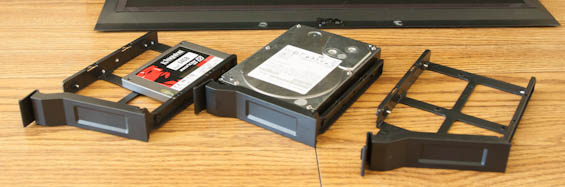
Installing drives proves to be a very simple matter as well. I removed the drive cage from the primary chamber (held in place by a rail and four thumbscrews behind the motherboard tray) since there were still six drive bays in the bottom chamber. The 5.25" bay shields are easily removed; pinch the wedges on the backs of them from inside the case and they pop out. From there, Corsair uses a toolless mechanism to hold the 5.25" drive in place and it works well. The individual drive trays are almost cages unto themselves; they feature four pins that pop into the sides of the 3.5" drives, and you can remove one of them to screw a 2.5" drive into the bottom of the tray. All very simple and easy to do, and they lock into place securely in a fashion similar to the SilverStone FT02.
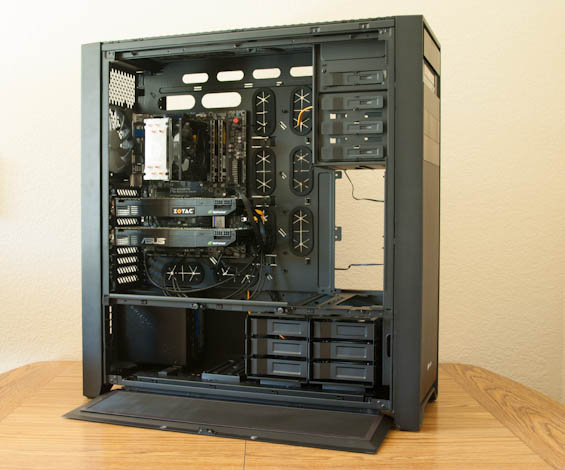
While mounting the power supply was a non-issue, expansion cards prove to be the 900D's achilles heel when it comes to usability. Because of the way the side of the case's frame overhangs the expansion slots, you have to use an included (and frustrating) L-shaped screwdriver to loosen the thumbscrews. Expect to take off about a layer of skin from your fingerprints and about a year of useful life from your wrist. I'm not sure how Corsair could've made this easier; perhaps some kind of locking mechanism instead of the garden variety thumbscrews?
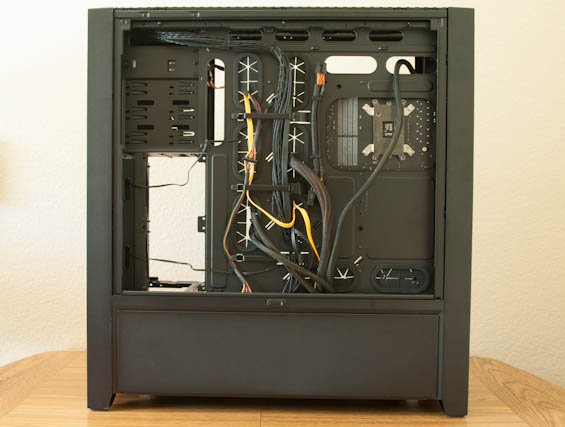
Wiring up the 900D is comically simple. Part of this is because the backplane for one of the drive cages has the three SATA data leads coming out of it along with a single SATA power lead, but the rest has to do with how easy it is to latch cables into place behind the motherboard tray, as well as the gap between the back of the motherboard tray and the crossbar that separates the two chambers. None of this should surprise you; Corsair cases are historically among the cleanest and easiest to build on the market, and the 900D continues that fine tradition. Where I do think they missed an opportunity is with the fans, though; Corsair doesn't include a fan controller (which given the nature of the 900D is probably an appropriate omission), but they don't include any molex adaptors for the fans either, which meant stretching the cables for the front fans to the connectors on the motherboard.
Assembling a liquid cooling system in the 900D will undoubtedly be more complex, but the case is spacious and fairly modular, and Corsair did a lot of work to make it as easy as possible. The most confusing part may actually be figuring out how to remove the top panel; you press up on a notch from inside the top of the case and then slide the panel towards the motherboard side. As a whole, though, I'd be surprised if end users had much trouble getting a system installed in the 900D beyond the typical difficulties.
Originally published at https://www.anandtech.com/show/6900/corsair-obsidian-900d-case-review-think-big-thats-only-half-as-large (Wayback Machine).