
Dell U3014 LCD Review
Unfortunately, as I went to test this display using SMTT, which I’ve used for the past year, I found my license has expired. Furthermore, the author has stopped selling licenses right now, so we can’t use it anymore. This is unfortunate as it let us easily determine input lag versus pixel response time, and nothing else does that as well. With that gone, I went to three different options to test the lag on the Dell U3014:
- The Leo Bodnar Lag Tester
- FlatPanelsHD lag timer
- 3DMark03
Using the FlatPanelsHD test, it was a straight 49 or 50ms each time on the U3014. Since you have to mirror this on a CRT, that means running at 1920x1080 resolution on the Dell so the usual caveats apply, though it was the same lag with 1:1 pixel mapping or with scaling, so at least that introduces no additional penalty.
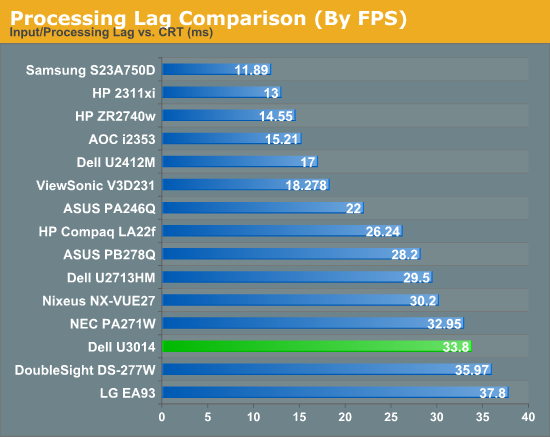
Using 3DMark03, I managed to measure right around 37.3ms, and with the Leo Bodnar lag tester I measured 33.8ms. All of these were while running in Game Mode, so the least input lag that I saw was two frames. Because I don’t live in a vacuum, I also looked at the results that TFT Central managed with the same display, since they have an oscilloscope that I don’t and they found virtually no lag at all. I think the 50ms number is really off, as there are issues with using a Flash timer for measuring lag. The Leo Bodnar actually gives three results, 28.4, 34, and 38.9, depending on if you are high, middle, or low on the screen, and so that low one more closely matches up with the 3DMark one, where the FPS counter is at the bottom.
Because of this, I think the Leo Bodnar average of the three is the most accurate number that I can produce right now. Of course, that is over HDMI and not DisplayPort or DVI, and at 1080p, so the reliability of that number is admittedly low, but there is no better solution available to me to measure it right now. I’d like to produce a better number than that, but sadly I can't at present. Hopefully SMTT will come back, as it produces a much better number with more verifiably accurate data, but right now I’m stuck with this method.
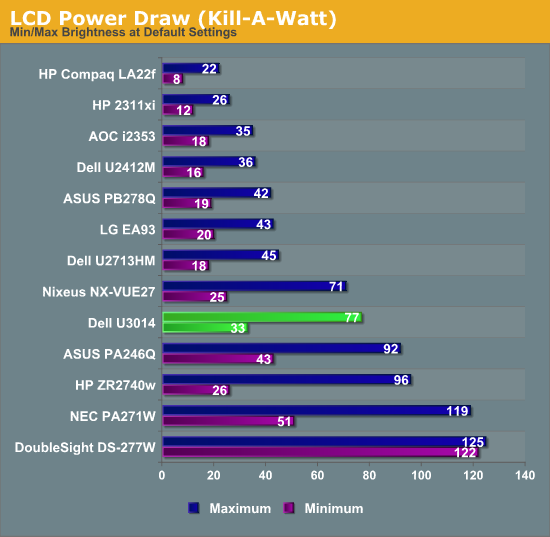
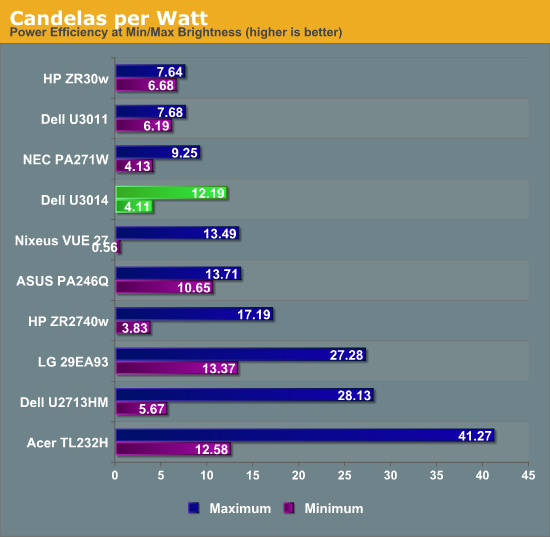
Power Use on the Dell is pretty good, considering the size of the panel. With an all-white screen at full backlight, it uses 77 watts of power. With the same screen and minimum backlight, it uses 33 watts of power. Given that 27” CCFL monitors can use well over 100 watts, to get this out of a 30” LCD is very good and a testament to the GB-LED backlighting system. To put this into a new way of measuring, at maximum backlight the U3014 produces 12.19 Candelas per Watt, and at minimum it produces 4.11 Candelas per Watt. I’ll try to use Candelas/Watt going forward, as it allows for uniform evaluations of power efficiency across all screen sizes. There are only a few monitors in here now, but I will try to go back and add more as I can.
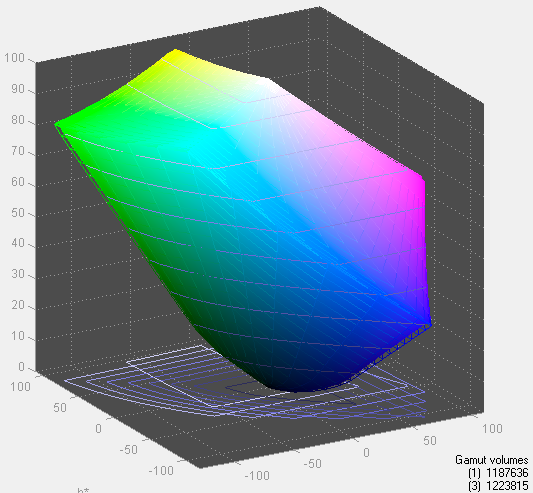
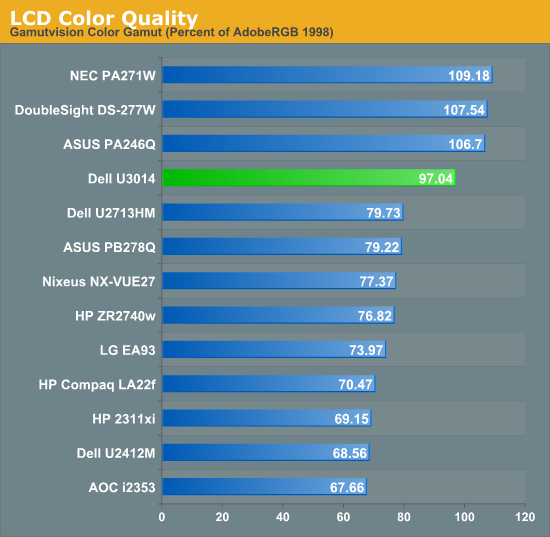
We’ve already looked at Gamut a bit with the AdobeRGB charts, but I’m going to use the Gamutvision chart to see exactly how much of the AdobeRGB gamut is covered. According to its data, we see that 97% of the AdobeRGB gamut is accounted for. The Dell specs call for 99%, but with our slight under-saturation in red that probably accounts for the difference. It is still a very good number overall and should satisfy those that need the expanded gamut of AdobeRGB.
Originally published at https://www.anandtech.com/show/6890/dell-u3014-lcd-review (Wayback Machine).