
HP EliteBook Folio 9470m Ultrabook Review: Ultrabooks in Enterprise
In and Around the HP EliteBook Folio 9470m
If you've kept up with my reviews of HP's EliteBook line you're not going to find any surprises here with the Folio 9470m. The current styling has been working out fairly well for HP and still feels like it stands head and shoulders above what Dell is doing with their notebooks. Outside of the XPS line I feel like Dell's aesthetics on virtually all of their lines, consumer and enterprise alike, have gone almost completely off the rails. The current generation Inspirons look like Speak-and-Spells, while Precision notebooks look like cheap knock-offs of ThinkPads from ten years ago. Placed in that company, the EliteBook line looks positively futuristic.
With all that said, though, the current design motif of HP's EliteBooks is beginning to wear out its welcome. The machined aluminum lid and body is coupled with black plastic on the keyboard and display bezel. The bottom of the body is comprised of what feels like black carbon fiber, though it could just as well be well-treated plastic. Either way, the machine as a whole feels very sturdy, but I do feel like it's time to move on.
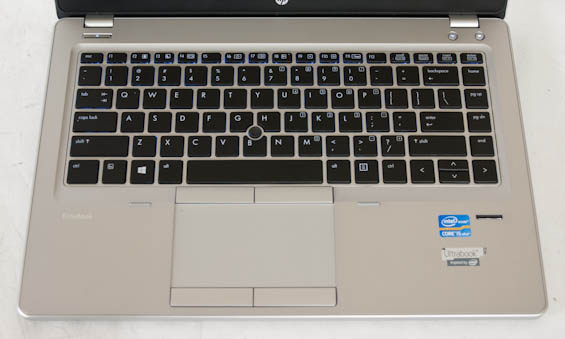
I continue to be pleased with how HP has been handling the backlit keyboard and especially the smooth glass surface of the touchpad; HP's keyboard layout is traditional, comfortable, and easy to use. Key depth is good, flex is minimal. There's a trackpoint in the center of the keyboard, traditional for enterprise notebooks, and the touchpad is large and roomy. Ironically, the recessed touchpad was more desirable in the Windows 7 era; with Windows 8, edge gestures are harder to perform. Truthfully, though, I'm kind of done with chiclet keyboards. They work fine for the most part, but I'd like to see at least enterprise systems go back to traditional keyboards.


HP really takes care of the enterprise customer with the 9470m, though, and they do that in four ways: continuing to employ SmartCard readers, offering a side-mounting docking bay (the notebook is too thin to use the bottom-mounting ones, so HP is transitioning to these), offering a bottom-mounting slice battery, and making the ultrabook totally user serviceable (complete with replaceable battery).
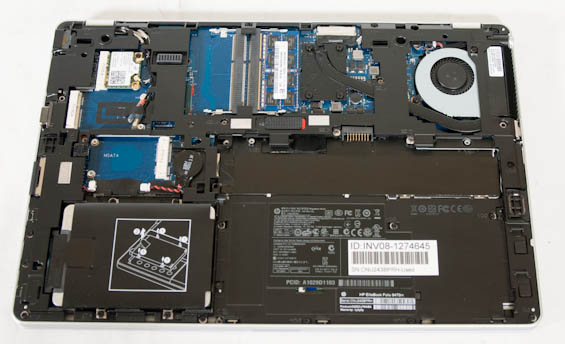
Opening up the 9470m is a bit of a chore as you have to unscrew and remove the panels in a specific order, but you can see that overall it's a pretty smart and efficient layout. Everything you'd be able to replace in a traditional notebook, short of the CPU, can be replaced in the 9470m without too much hassle. Honestly this is one of those things I wish I'd see a little more frequently in consumer notebooks; only enthusiast-class units are really this user friendly anymore.
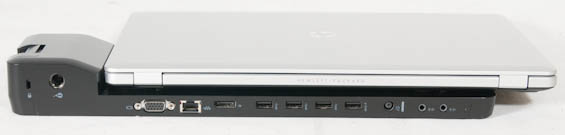
I also had a chance to try out the slice battery and dock. The dock feels just a touch loose, but it only blocks the VGA and ethernet ports on the notebook (which it replaces), and in exchange brings a tremendous amount of flexibility, including four USB 3.0 ports and an additional DisplayPort. I also like how the bottom of the dock allows you to mount it to the wall if you're so inclined.
The slice battery, on the other hand, can be a lot more fiddly. Once it's locked in, it's locked in, but getting the notches to line up and securely tilt in was abnormally frustrating. I was able to, and I suspect with practice it wouldn't be an issue, but the difficulty is nonetheless worth mentioning. The 60Wh slice battery does add at least a pound of heft to the 9470m; this was already a pretty light notebook so that's not a huge deal, but it's very noticeable.
Originally published at https://www.anandtech.com/show/6852/hp-elitebook-folio-9470m-ultrabook-review-ultrabooks-in-enterprise (Wayback Machine).