
ASUS Maximus V Formula Z77 ROG Review
- Posted in
- Motherboards
- Asus
- ROG
- Z77
Rightmark Audio Analyzer 6.2.5
In part due to reader requests, we are pleased to include Rightmark Audio Analyzer results in our benchmark suite. The premise behind Rightmark:AA is to test the input and output of the audio system to determine noise levels, range, harmonic distortion, stereo crosstalk and so forth. Rightmark:AA should indicate how well the sound system is built and isolated from electrical interference (either internally or externally). For this test we connect the Line Out to the Line In using a short six inch 3.5mm to 3.5mm high-quality jack, turn the OS volume to 100%, and run the Rightmark default test suite at 48 kHz, 96 kHz and 192 kHz. We look specifically at the Dynamic Range of the audio codec used on board, as well as the Total Harmonic Distortion + Noise.
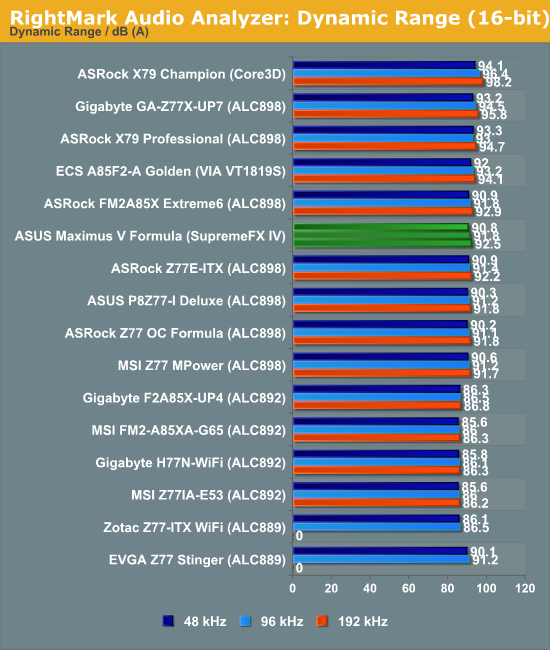
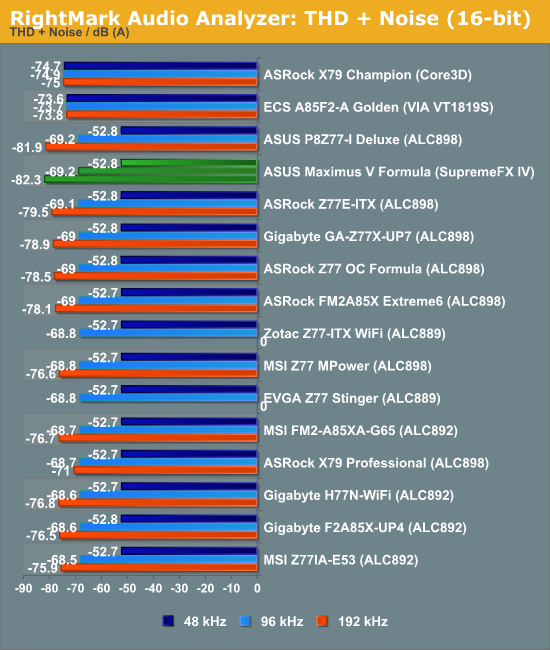
As part of our audio testing, ASUS spent a day with me discussing their audio setup. The majority of the talk has already been mentioned in the review, but a small part of it related to how we test audio. Audio is a very subjective experience, and very difficult to quantify in such a way that X > Y for all scenarios – especially so for me, as I will always admit to being tone deaf and singing karaoke like a deaf horse with a throat infection, So our RMAA results should always be taken with a pinch of salt.
Because our test uses the Line-In and Line-Out of the motherboard audio, we are ultimately limited to the lowest factor in this test. Thus if either the only either output or input has an advantage, the whole system comes across bad due to the part without the enhancement. Also regarding out testing, typically we do not modify any sound settings except volume, although there are enthusiasts that will tweak everything to the hilt. It is this tweaking that lets the audio solution ultimately shine, and get better numbers than what we do here.
ASUS rate their SupremeFX IV solution at 110dBA output with -95 dBA THD+N, which just so happens to be the rating the codec provider gives in their whitepaper. Specifically the codec is rated 110dBA SNR output and 104 dBA SNR input, which is far away from the results we achieved above. Talking with ASUS, we took heed from the advice on the RMAA website regarding setting up the test for the ASUS Xonar D2 sound card. This involves specifically changing the input/output quality in driver settings, as well as testing at 24-bit rather than the default 16-bit.
With these settings, we achieved a Dynamic Range value of 103.3 dBA SNR, and -86.5 dBA THD+N. Ultimately the best value we could get with our equipment was going to be 104 dBA, due to the input recording specifications having that maximum value, so to get 103.3 dBA input from an up-to 110 dBA SNR output as a premium result is something rather special.
USB 3.0 Backup
For this benchmark, we run CrystalDiskMark to determine the ideal sequential read and write speeds for the USB port using our 240 GB OCZ Vertex3 SSD with a SATA 6 Gbps to USB 3.0 converter. Then we transfer a set size of files from the SSD to the USB drive using DiskBench, which monitors the time taken to transfer. The files transferred are a 1.52 GB set of 2867 files across 320 folders – 95% of these files are small typical website files, and the rest (90% of the size) are the videos used in the WinRAR test.
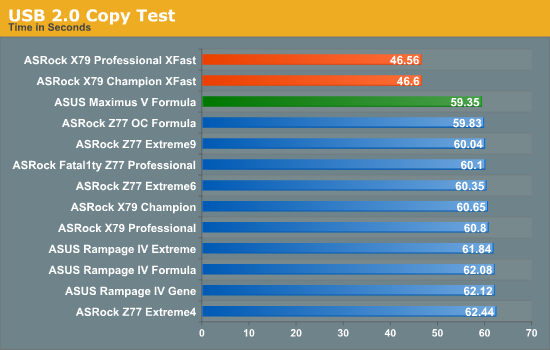
The ASUS MVF does a great job in our USB 2.0 test, beating almost every other motherboard (minus XFast), and coming top in our copy test by almost half a second from the ASRock Z77 OC Formula.
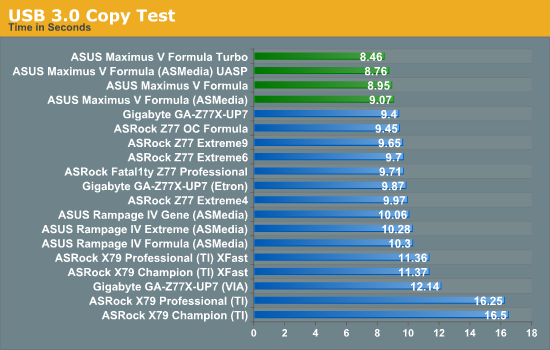
Similarly in the USB 3.0 testing, the copy test is where the MVF lives, with all variants competing for top spot.
DPC Latency
Deferred Procedure Call latency is a way in which Windows handles interrupt servicing. In order to wait for a processor to acknowledge the request, the system will queue all interrupt requests by priority. Critical interrupts will be handled as soon as possible, whereas lesser priority requests, such as audio, will be further down the line. So if the audio device requires data, it will have to wait until the request is processed before the buffer is filled. If the device drivers of higher priority components in a system are poorly implemented, this can cause delays in request scheduling and process time, resulting in an empty audio buffer – this leads to characteristic audible pauses, pops and clicks. Having a bigger buffer and correctly implemented system drivers obviously helps in this regard. The DPC latency checker measures how much time is processing DPCs from driver invocation – the lower the value will result in better audio transfer at smaller buffer sizes. Results are measured in microseconds and taken as the peak latency while cycling through a series of short HD videos - less than 500 microseconds usually gets the green light, but the lower the better.
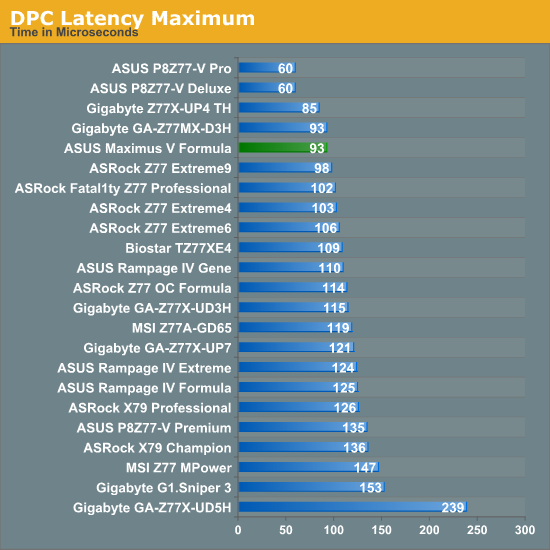
The MVF hits under 100 microseconds for DPC Latency, which is a great result, however it comes at a cost. As is usual for the high end all-singing all-dancing motherboards, DPC is horribly affected by monitoring software, which jumps up the queue in processor priority. With AI Suite enabled, the peak DPC Latency rises to ~1200.
Originally published at https://www.anandtech.com/show/6850/asus-maximus-v-formula-z77-rog-review (Wayback Machine).