
Cooler Master Storm Scout II Advanced Case Review: Falling Behind the Curve
- Posted in
- Cases/Cooling/PSUs
- Cooler Master
- ATX
In and Around the Cooler Master Storm Scout II Advanced
Like most of you, I'm not a big fan of the "gamer" aesthetic. While I have the benefit of being able to rotate my build between cases as awesome new ones come out, my history is pretty self-explanatory: Antec P182, Corsair Graphite 600T, SilverStone FT02, Nanoxia Deep Silence 1. Clean lines, clean builds. But the gamer styling can be done with some elegance and class; NZXT has been working their way towards it, and I think Cooler Master has it right with the Storm Scount II Advanced.
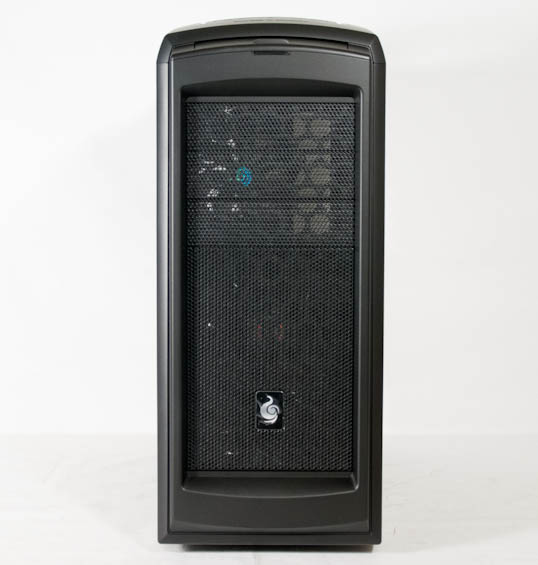
The front of the chassis is all clean lines and curves, and it has kind of a nice shroud around the ventilation and 5.25" drive bays. There's a single combination power/IDE LED at the top, and the two red LED fans are hidden behind the front vents. I think the fans are actually a nice accent, but if they're too much for you, there's a button to toggle the lights on and off on the top of the case. When we do get up there, we find the port cluster hidden by a door, the trio of power, reset, and LED buttons, and three handles. The top vent is also removable, and it snaps on and off (as opposed to traditionally spring-loaded mechanisms).
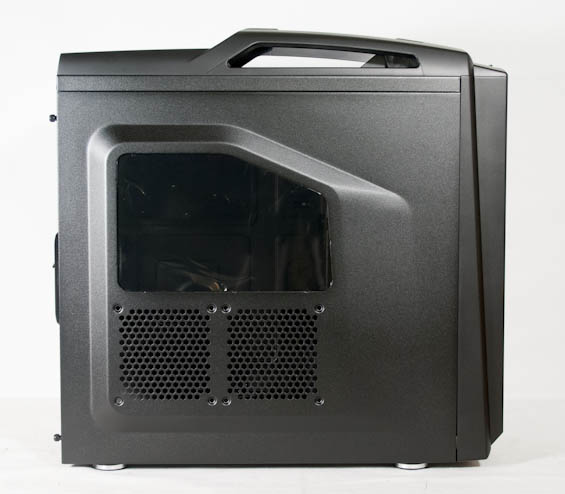
Both side panels are extruded as is becoming common, with the left side panel sporting a window and a pair of side-by-side 120mm fan mounts, while the right side panel is solid. The back of the Storm Scout II Advanced is also pretty basic (do we even need the radiator hose routing holes anymore?), although I'm always fond of the extra horizontal eighth expansion slot for routing cables or installing USB backplates.
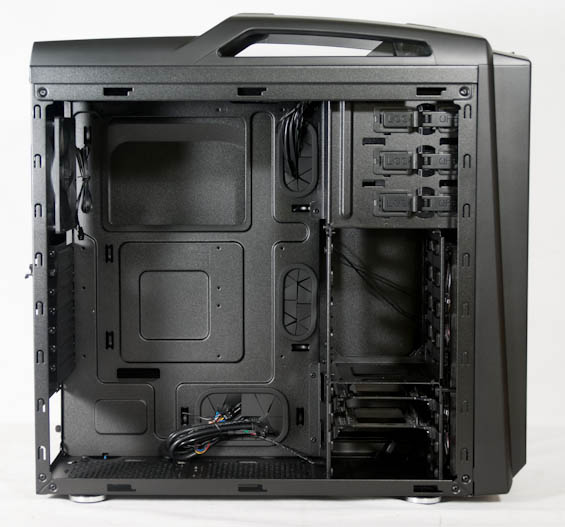
Those panels are held into place with four thumbscrews per tradition, and again we're dealing with notched panels. When they're removed, the interior of the Storm Scout II Advanced reveals few surprises. There's a removable cage panel inside to allow for extended length graphics cards, and Cooler Master includes the usual rubber-lined routing holes in the motherboard tray. They also have toolless mechanisms for the 5.25" drive bays, and two adapter trays to allow you to fit a pair of 2.5" drives into a 3.5" drive bay. There's copious space behind the motherboard tray for routing cables as well.


Honestly if I have a major problem with the Storm Scout II Advanced's internal design, it's that it's...been done. I've said this before, but sometimes things become tradition out of habit. The current bog standard ATX case layout is not a good one, and I have scores of data to prove that assertion. This is something that often benefits greatly from innovation, whether it's culling 5.25" drive bays, rotating the motherboard...any number of things. Cooler Master should be keenly aware of this; their Cosmos II is a beast, but a frosty one, and their HAF xB is a testament to thinking outside of the box. In comparison to a lot of the smarter, more esoteric designs in their lineup, it's hard not to feel a little underwhelmed by the Storm Scout II Advanced.
Originally published at https://www.anandtech.com/show/6841/cooler-master-storm-scout-ii-advanced-case-review-falling-behind-the-curve (Wayback Machine).