
BitFenix Raider Case Review: All These Little Things
- Posted in
- Cases/Cooling/PSUs
- bitfenix
- ATX
Assembling the BitFenix Raider
By now you've seen me vent enough about the design flaws inherent to the BitFenix Raider that none of the frustrations I ran into during assembly are going to be much of a surprise. Still, it's worth going through assembly step by step anyhow; the review wouldn't be complete without it.
Installing the motherboard was actually pretty easy. BitFenix includes some of the standoffs built into the motherboard tray by default, which was appreciated. Conveniences really do make cases these days; when cheap cases (especially those in Corsair's line-up) make assembly as easy as possible, there's no reason for any manufacturer not to include them.
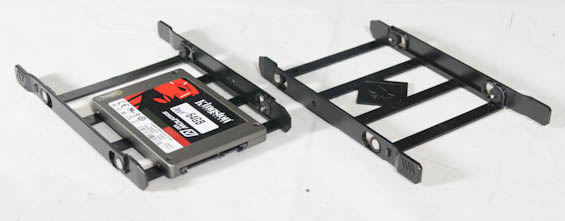
The drive trays are unfortunately on the flimsy side. This is a pretty common problem with most manufacturers, and really they just need to use more rigid trays. Fractal Design and Antec have historically dodged this bullet by using metal drive trays, and those definitely get the job done. As for the 5.25" drive bays, the toolless mechanism works really well, but the bay shields pop inward instead of outward. Moving the case, I've already accidentally knocked shields inside a couple of times.
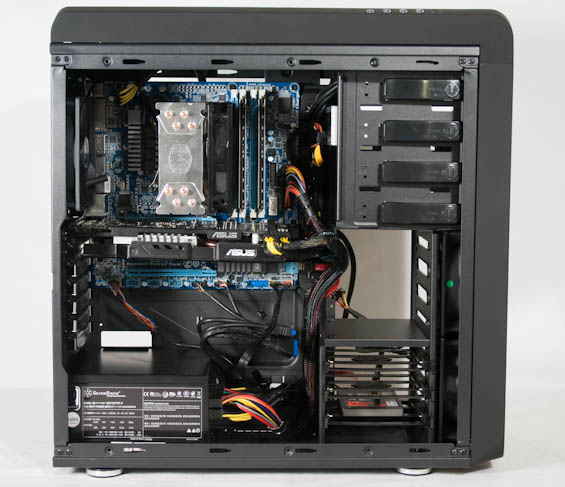
Getting the power supply in was thankfully very easy, as BitFenix includes a set of four rubber standoffs in the bottom of the case that make it simple to line up. Lining up the video card, on the other hand, was more difficult. It seemed like the board/card needed to be about a millimeter closer to the back of the case. I can take or leave a problem like this since it falls into the traditional "wiggle room" problem, and to BitFenix's credit, the Raider is actually really sturdy. You can usually finesse mounting a card by bending in the back of the case some, but the Raider wasn't having it.
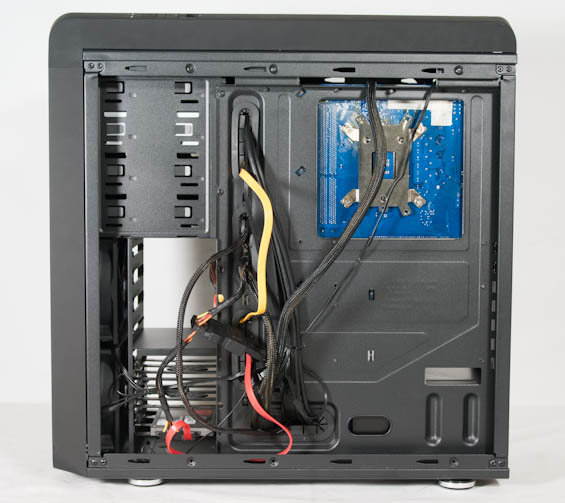
As I mentioned earlier, though, cabling the Raider was a red nightmare. It's one thing to assemble a case like the Rosewill Line-M, where you just know going in that cabling is going to be precarious, but it's another entirely to try cabling a case that should be easy to cable but isn't. The routing holes surrounding the motherboard tray are just too small, full stop. I had to run the 24-pin power lead through the interior of the case instead of through the routing holes because the holes themselves are all too small. Even the one next to the power supply bay, where all the leads should eventually lead, is needlessly small.


I probably seem like I'm being too harsh on the Raider. Certainly BitFenix includes a healthy amount of space behind the motherboard tray, and that's always appreciated. But my reason is simple: it's one thing when something's just a poorly designed piece of crap, like the Moneual Sonamu from way back in the day, or Lian Li's unfortunately named PC-A55. It's another thing entirely when something looks like it should be good, looks like it should be well-designed, but isn't. The Raider is the equivalent of a Rob Liefeld; it's identifiable what these design decisions are supposed to be, but the execution fails because it's lacking fundamentals. Routing holes are great, but they need to be big enough to fit the cables through. Drive trays are great, but they need to not be a breath away from just falling out of the rails. Bay shields are great, but you shouldn't be able to accidentally pop them into the case. I want the Raider to be better, and BitFenix definitely knows better, so I'm perplexed as to how things turned out like this.
Originally published at https://www.anandtech.com/show/6807/bitfenix-raider-case-review-all-these-little-things (Wayback Machine).