
A Month with Apple's Fusion Drive
Management Granularity
Much of Apple’s marketing on Fusion Drive talks about moving data at the file and application level, but in reality data can be moved between the SSD and HDD portions in 128KB blocks.
Ars actually confirmed this a while ago, but I wanted to see for myself. Using fs_usage I got to see the inner workings of Apple's Fusion Drive. Data is moved between drives in 128KB blocks, likely determined by frequency of use of those blocks. Since client workloads tend to be fairly sequential (or pseudo-random at worst) in nature, it's a safe bet that if you're accessing a single LBA within a 128KB block that you're actually going to be accessing more LBAs in the same space. The migration process seems to happen mostly during idle periods, although I have seen some movement between drives during light IO.
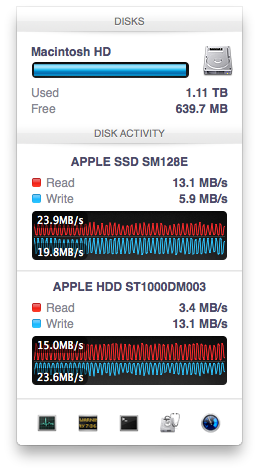
What’s very interesting is just how quickly the migration is triggered after a transfer occurs. As soon as file copy/creation, application launch or other IO activity completes, there’s immediate back and forth between the SSD and HDD. As you fill up the Fusion Drive, the amount of data moved between the SSD and HDD shrinks considerably. Over time I suspect this is what should happen. Infrequently accessed data should settle on the hard drive and what really matters will stay on the SSD. Apple being less aggressive about evicting data from the SSD as the Fusion Drive fills up makes sense.
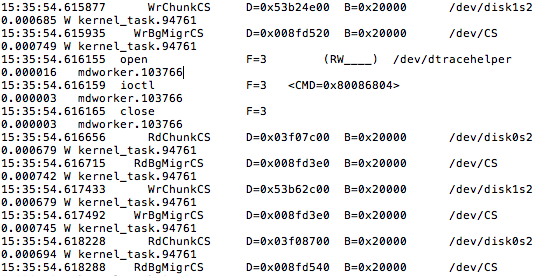
The migration process itself is pretty simple with data being marked for promotion/demotion, it being physically copied to the new storage device and only then is it moved. In the event of a power failure during migration there shouldn't be any data loss caused by the Fusion Drive, it looks like only after two copies of the 128KB block are in place is the source block removed. Apple told me as much last year, but it's good to see it for myself.
By moving data in 128KB blocks between the HDD and SSD, Apple enjoys the side benefit of partially defragmenting the SSD with all writes to it. Even though the Fusion Drive will prefer the SSD for all incoming writes (which can include smaller than 128KB, potentially random/pseudo-random writes), any migration from the HDD to the SSD happens as large block sequential writes, which will trigger a garbage collection/block recycling routine in cases of a heavily fragmented drive. Performance of the SSD can definitely degrade over time, but this helps keep it higher than it would otherwise given that the SSD is almost always running at full capacity and the recipient of all sorts of unrelated writes. As I mentioned earlier, I would’ve preferred a controller with more consistent IO latency or for Apple to set aside even more of the PM830’s NAND as spare area. I suspect cost was the deciding factor in sticking with the standard amount of overprovisioning.
Originally published at https://www.anandtech.com/show/6679/a-month-with-apples-fusion-drive (Wayback Machine).