
Gigabyte GA-7PESH1 Review: A Dual Processor Motherboard through a Scientist’s Eyes
- Posted in
- Motherboards
- Gigabyte
- C602
As part of this review, we also ran our normal motherboard benchmarks.
WinRAR x64 3.93 - link
With 64-bit WinRAR, we compress the set of files used in the USB speed tests. WinRAR x64 3.93 attempts to use multithreading when possible, and provides as a good test for when a system has variable threaded load. If a system has multiple speeds to invoke at different loading, the switching between those speeds will determine how well the system will do.
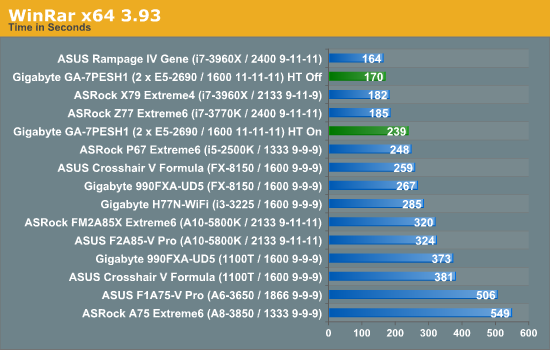
WinRAR is another example where enabling HyperThreading is actually hurting the throughput of the system. But even with all 32 threads in the system, the lack of memory speed hurts the benchmark.
FastStone Image Viewer 4.2 - link
FastStone Image Viewer is a free piece of software I have been using for quite a few years now. It allows quick viewing of flat images, as well as resizing, changing color depth, adding simple text or simple filters. It also has a bulk image conversion tool, which we use here. The software currently operates only in single-thread mode, which should change in later versions of the software. For this test, we convert a series of 170 files, of various resolutions, dimensions and types (of a total size of 163MB), all to the .gif format of 640x480 dimensions.
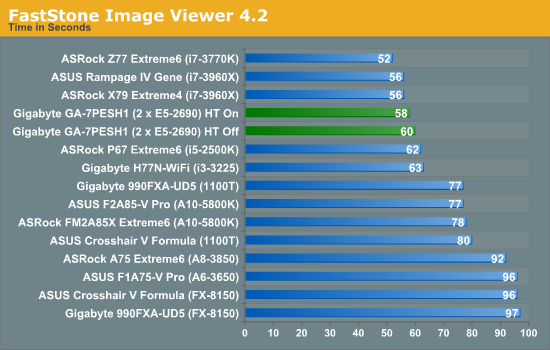
FastStone is relatively unaffected due to the single-threaded nature of the program.
Xilisoft Video Converter
With XVC, users can convert any type of normal video to any compatible format for smartphones, tablets and other devices. By default, it uses all available threads on the system, and in the presence of appropriate graphics cards, can utilize CUDA for NVIDIA GPUs as well as AMD APP for AMD GPUs. For this test, we use a set of 33 HD videos, each lasting 30 seconds, and convert them from 1080p to an iPod H.264 video format using just the CPU. The time taken to convert these videos gives us our result.
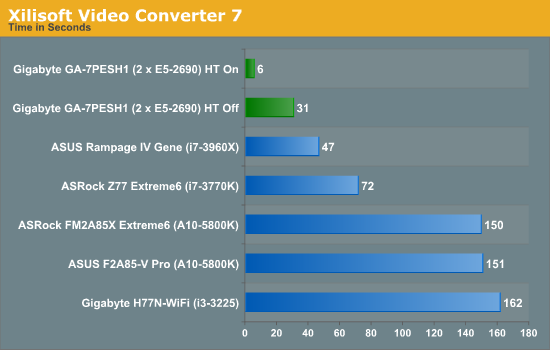
With XVC having many threads is what wins the day, and having HT enabled made the process very fast indeed. With HT on, we have 32 threads, meaning most of the videos were actually converted very quickly – the final 33rd video caused an extra delay at the end. This is yet another example of an algorithm that can be ported to GPUs, as XVC offers both an AMD and NVIDIA option for conversion.
x264 HD Benchmark
The x264 HD Benchmark uses a common HD encoding tool to process an HD MPEG2 source at 1280x720 at 3963 Kbps. This test represents a standardized result which can be compared across other reviews, and is dependant on both CPU power and memory speed. The benchmark performs a 2-pass encode, and the results shown are the average of each pass performed four times.
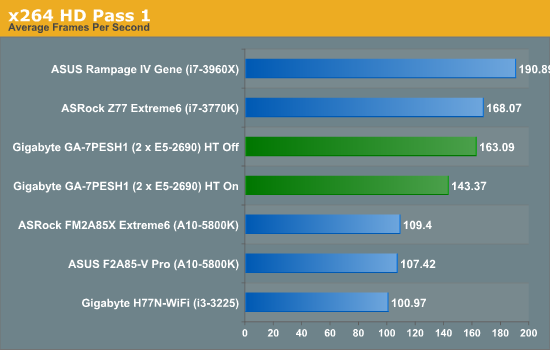
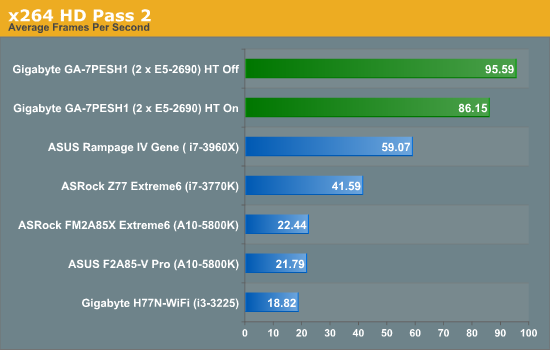
In contrast to XVC, which splits its threads across many files, the x264 HD benchmark splits threads across one file. As a result it seems that having HT off gives a subtle 13.7% boost in performance in the first pass and 11.0% boost in the second pass. The results of the first pass makes the second pass a lot more efficient across all the threads due to fewer memory accesses.
Originally published at https://www.anandtech.com/show/6533/gigabyte-ga7pesh1-review-a-dual-processor-motherboard-through-a-scientists-eyes (Wayback Machine).