
Arctic Cooling Accelero Hybrid VGA Cooler Review: Not For the Faint of Heart
- Posted in
- Arctic Cooling
- graphics
- cooling
Testing Methodology
Testing something like the Arctic Cooling Accelero Hybrid is kind of tricky. I'm not fond of using an open testbed for a product that is never going to see the outside of your case, so I appropriated the testbed used for the radiator roundup (and radiator fan roundup) with a couple of minor changes for my own edification.
| Fan and Radiator Testing Configuration | |
| CPU | Intel Core i7-2700K overclocked to 4.4GHz @ 1.4V |
| Motherboard | Zotac Z77-ITX WiFi |
| Graphics |
NVIDIA GeForce GTX 680 2GB GDDR5 at stock speed (1008MHz core/6GHz memory, 100% Power Target) at overclocked speed (1108MHz core/6.2GHz memory, 132% Power Target) |
| Memory | 2x4GB Corsair Value Select DDR3-1333 |
| Drives | Kingston SSDNow V+ 100 64GB SSD |
| CPU Cooler | Corsair H100i with dual 120mm Noctua fans |
| Power Supply | Corsair CX430 |
| Enclosure | BitFenix Shinobi XL Window |
The i7-2700K was left overclocked, but for the purposes of our testing that doesn't make too much difference as it won't be pushed very hard at any point. The H100i is undoubtedly going to be the source of some consternation, especially since I've customized it with Noctua fans. The Noctuas are more efficient and quieter than the stock fans included with the H100i, and I was also curious to see just how well the Accelero Hybrid would handle occupying similar space with the H100i. It handled it well, as you'll see.
I needed a case that could produce adequate airflow, handle all of the different cooling systems without much trouble, and did not include any sound dampening features. You might be surprised at just how difficult that was to find, but BitFenix came to the rescue and sent over a Shinobi XL. BitFenix's enclosure didn't get the best review when I tested it, but it's actually ideal for this testbed. I removed every case fan but the front intake, which I ran at 5V to prevent it from affecting acoustics while still providing adequate airflow.
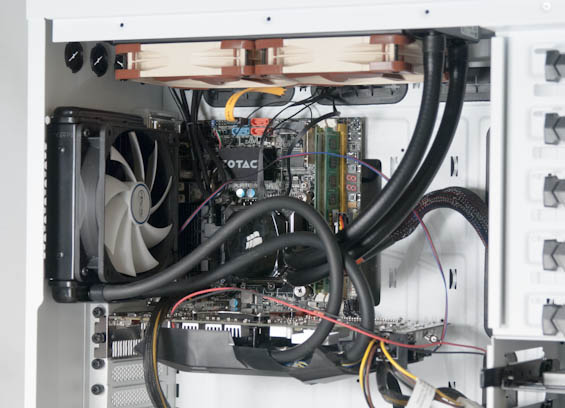
My experience with the GeForce GTX 680 has taught me that while at stock speeds the cooler is capable of running fairly quietly and effiiciently, once an overclock is applied it starts to buckle and can get a little obnoxious. I felt like a mild overclock would be the perfect test to see just how much better the Accelero Hybrid could perform.
Thermal and acoustic test cycles were done the same way as our case reviews. First, the system is left powered and idle for fifteen minutes. At this point the sound level is tested, room ambient temperature is recorded, and idle temperatures are recorded. Then I run EVGA's OC Scanner X (Furry Test) for 15 minutes.
Thank You!
Before moving on, we'd like to thank the following vendors for providing us with the hardware used in our roundup.
- Thank you to iBuyPower for providing us with the Intel Core i7-2700K.
- Thank you to Zotac for providing us with the Z77-ITX WiFi motherboard.
- Thank you to Kingston for providing us with the SSDNow V+ 100 SSD.
- Thank you to Corsair for providing us with the CX430 power supply and H100i.
- Thank you to BitFenix for providing us with the Shinobi XL Window enclosure.
Originally published at https://www.anandtech.com/show/6531/arctic-cooling-accelero-hybrid-vga-cooler-review-not-for-the-faint-of-heart (Wayback Machine).