
Z77 mITX Round-Up: Five of the Best – MSI, Zotac, ASRock, EVGA and ASUS
3D Movement Algorithm Test
The algorithms in 3DPM employ both uniform random number generation or normal distribution random number generation, and vary in various amounts of trigonometric operations, conditional statements, generation and rejection, fused operations, etc. The benchmark runs through six algorithms for a specified number of particles and steps, and calculates the speed of each algorithm, then sums them all for a final score. This is an example of a real world situation that a computational scientist may find themselves in, rather than a pure synthetic benchmark. The benchmark is also parallel between particles simulated, and we test the single thread performance as well as the multi-threaded performance.
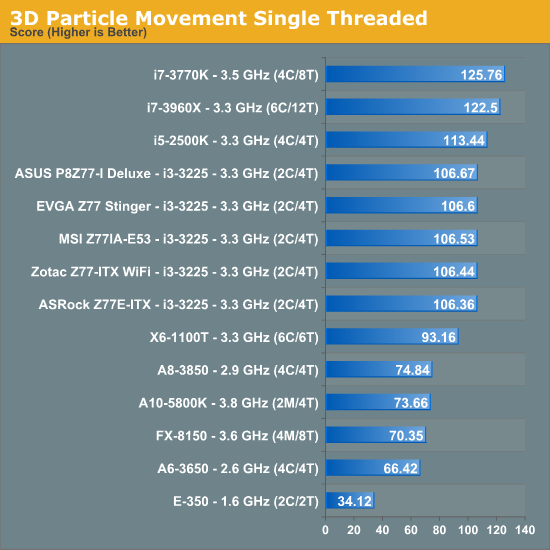
For single threaded performance, all the motherboards perform within sight of each other fairly easily.
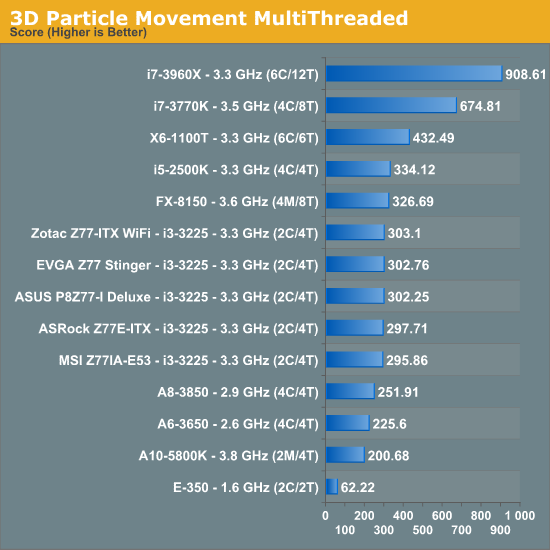
When it comes to the multithreaded though, the difference between top and bottom is as much as 2.4%.
WinRAR x64 3.93 - link
With 64-bit WinRAR, we compress the set of files used in the USB speed tests. WinRAR x64 3.93 attempts to use multithreading when possible, and provides as a good test for when a system has variable threaded load. If a system has multiple speeds to invoke at different loading, the switching between those speeds will determine how well the system will do.
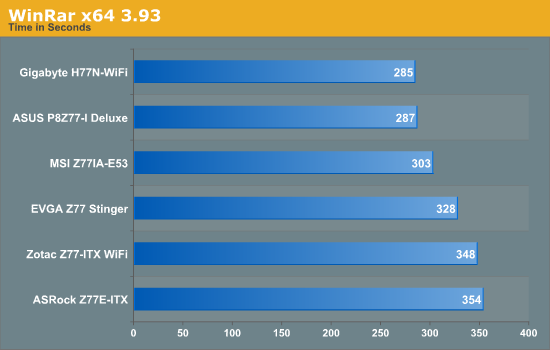
WinRAR is a test that is dictated by memory speed. The better the automatic sub-timings of the motherboard, the better the test result. When we apply XMP on a motherboard, the motherboard still has to interpolate some of the extra timings to best suit the kit – this is why verification of some kits on some motherboards might take longer than expected. It is also a measure of how aggressive a motherboard manufacturer is, and it is clear that top tier manufacturers have enough staff and time to be aggressive.
FastStone Image Viewer 4.2 - link
FastStone Image Viewer is a free piece of software I have been using for quite a few years now. It allows quick viewing of flat images, as well as resizing, changing color depth, adding simple text or simple filters. It also has a bulk image conversion tool, which we use here. The software currently operates only in single-thread mode, which should change in later versions of the software. For this test, we convert a series of 170 files, of various resolutions, dimensions and types (of a total size of 163MB), all to the .gif format of 640x480 dimensions.
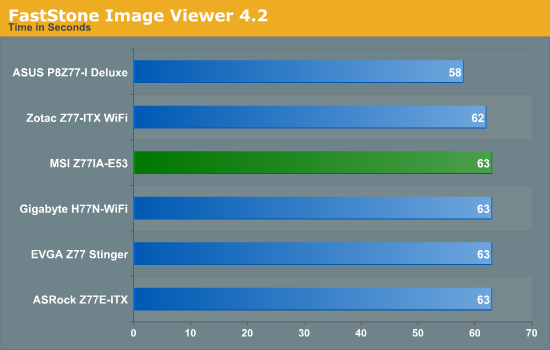
With all things being equal, the performance increase seen by the ASUS is confusing but welcomed. This test result was highly repeatable, suggesting that ASUS have gone to some lengths to optimize work flow.
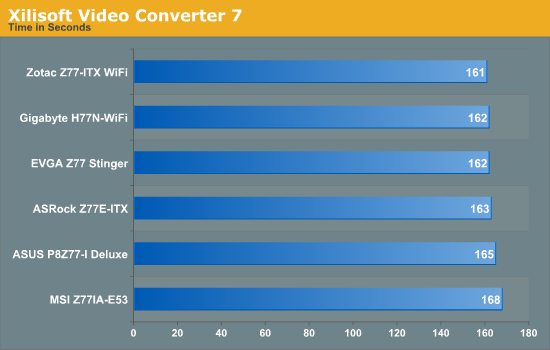
Xilisoft Video Converter
With XVC, users can convert any type of normal video to any compatible format for smartphones, tablets and other devices. By default, it uses all available threads on the system, and in the presence of appropriate graphics cards, can utilize CUDA for NVIDIA GPUs as well as AMD APP for AMD GPUs. For this test, we use a set of 32 HD videos, each lasting 30 seconds, and convert them from 1080p to an iPod H.264 video format using just the CPU. The time taken to convert these videos gives us our result.
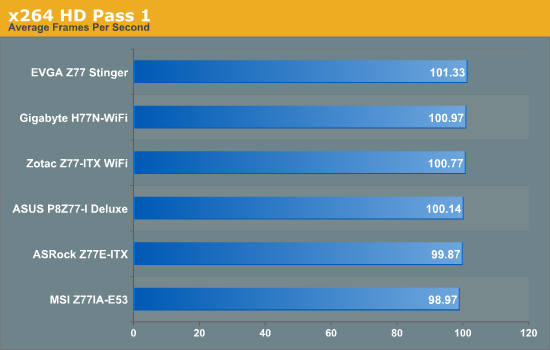
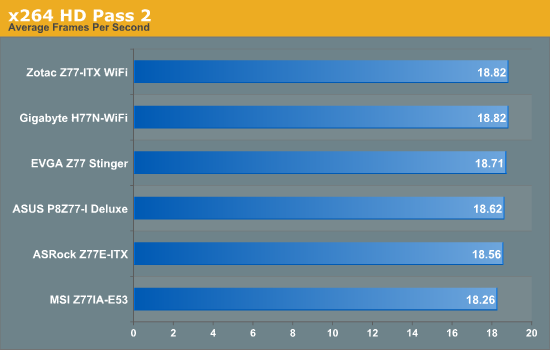
x264 HD Benchmark
The x264 HD Benchmark uses a common HD encoding tool to process an HD MPEG2 source at 1280x720 at 3963 Kbps. This test represents a standardized result which can be compared across other reviews, and is dependant on both CPU power and memory speed. The benchmark performs a 2-pass encode, and the results shown are the average of each pass performed four times.
Originally published at https://www.anandtech.com/show/6516/z77-mitx-roundup-five-of-the-best-msi-zotac-asrock-evga-and-asus (Wayback Machine).