
Corsair Carbide 200R Case Review: How Low Can You Go
- Posted in
- Cases/Cooling/PSUs
- Corsair
- mid-tower
In and Around the Corsair Carbide 200R
The Carbide 200R takes Corsair's design cues and refines them down to their most basic degree. In this market, oftentimes the best you can hope for is a black box with clean lines and fairly smart aesthetics, and that's what we have. It's been tough for me to really figure out exactly what sells and what doesn't since I mostly only have your reactions to cases to go by, and AnandTech readers are by default going to be a bit more well-informed than the garden variety consumer. I can't say if the gloss that's common from other manufacturers in this bracket sells well or not, but I'm never happy to see it. The clean matte plastic that Corsair uses for the fascia is appreciated and matches the black SECC steel used for the remainder of the enclosure well.
You can see the front of the case is fairly spare, but the flat surface is appreciated and should be good for deflecting some noise. Air intake is handled through the sides of the fascia, while Corsair includes a fairly standard three 5.25" drive bays. Note also that they've included USB 3.0 instead of 2.0, which is welcome in a $49-$59 case. The I/O, power, and reset switches are at the top of the front of the case, positioned for whether you plan to use it on or under your desk.
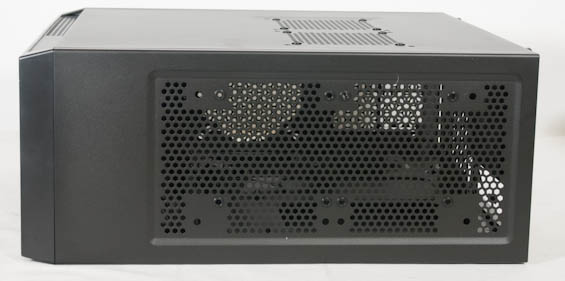
The rest of the 200R's exterior is pretty bog standard, though. The top features dual 120mm/140mm fan mounts with rubber grommets, and the 120mm mounts are oriented more towards the left side of the case to provide additional clearance for a 240mm radiator. Meanwhile the left side panel includes two more 120mm/140mm mounts in case the end user wants to add directed cooling over the video cards. Finally, the back sports a 120mm exhaust fan.
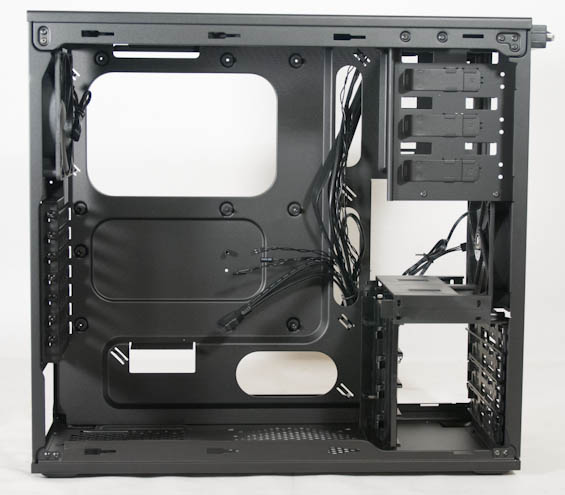
Opening up the Carbide 200R involves removing four thumbscrews and sliding off the notched side panels, and the interior is familiar for Corsair fans. They include a version of the recessed motherboard tray with dedicated cable routing channels that we saw in the Vengeance C70, as well as a mounting post and pre-installed standoffs for the motherboard itself. There's also a clear and open channel for air to travel from the intake fan through the case, but beneath it is one of Corsair's new designs, presumably a compromise between price and usability.


Integrated is a hard plastic drive "cage" that supports four 2.5" drives and four 3.5" drives, all toollessly. At the risk of spoiling the review, if the 200R has an achilles heel, it's this cage, which mostly seems like a good idea in theory but is an exercise in absolute frustration in practice.
All told, though, the design of the Carbide 200R feels mostly par for the course for Corsair and I appreciate the continued extra mile of convenience that's been a hallmark of their cases. Other manufacturers would do well to follow their example. It's not the kind of attitude that sells cases on its own, but it's worth continuing to mention and it's not a bad thing to build a reputation on.
Originally published at https://www.anandtech.com/show/6515/corsair-carbide-200r-case-review-how-low-can-you-go (Wayback Machine).