
Dell Precision M6700 Notebook Review: The Enterprise Split
In and Around the Dell Precision M6700
The internal hardware goes a long way, certainly, but the Dell Precision M6700 is unfortunately on the back foot when it comes to shell design. Take a look at our review of the HP EliteBook 8760w then come back here, and you'll see that Dell's aesthetic comes up short in more ways than one. You'll see it's not just about looks, either; HP's design is more functional.
Part of what kills is that the Precison M6700's shell may incorporate magnesium alloy and aluminum alloy, but it feels largely plastic. Dell's site lists the M6700 as having been subjected to Mil-spec 810G testing, but not if it meets that standard, while HP confirms that their current-generation 8770w does. They apparently use aluminum for trim and the back of the lid, but as a whole the notebook just doesn't feel as all around sturdy as its competitor is.


That said, when you do open it, the interior surfaces are flex-free, just uninspiring. The M6700 is two-toned, but the two tones aren't really complimentary. They use a gunmetal gray that's very dark, so that in soft light it's essentially indistinguishable from the black plastic used for the keyboard trim and bottom panel. As a whole, the two tones aren't unattractive, but there's a kind of cheap feeling to the materials, regardless of whether or not they actually are. HP's EliteBook looks and feels sturdy, with the aluminum trim and interior shell.
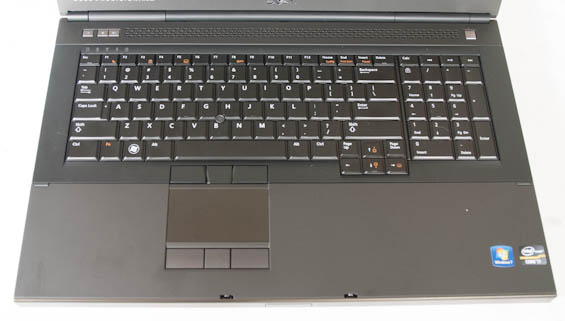
People who lament HP's shift to a chiclet keyboard may be happy at first with the M6700's traditional key style, but Dell's keyboard layout is confused both for them and for the end user. The "Page Up" and "Page Down" keys sandwich the up arrow, while the row normally reserved for document navigation above the number pad is instead a shortcut for the calculator and then media controls, which just plain don't belong on a notebook like this. Those could very easily and should very easily have been Fn+Function Key combinations. Overall the keyboard is plenty usable, but the layout is off-putting. On a less expensive notebook it's something that can be tolerated and adapted to; on a notebook that starts north of $1,600, it's unacceptable. As for the touchpad, it's mostly fine and easy to use, but it's actually on the small side and could stand to be wider. Again, though, Dell's design lacks the pleasant surface treatment of HP's.
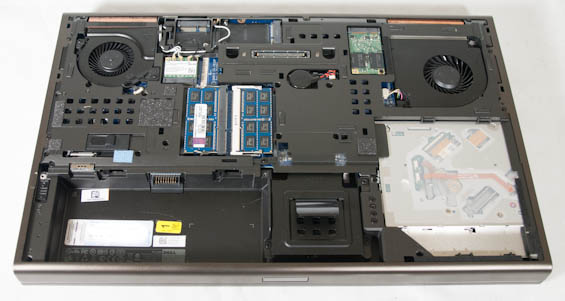
Finally, the M6700 could make up some ground by at least being easy to service, but that turns out not to really be the case. HP's design is as easy as pushing a latch and popping off the bottom panel, but the M6700 was actually a little confusing. There are two screws hidden inside the battery slot that must be removed, and then the panel slides up and off. The interior layout supports three 2.5" drives and an mSATA drive, but what's the point of having one drive caddy slide out of the side of the case if you have to remove an internal screw to unlock it? It's not a horrible interior design and definitely looks reinforced, but the M6700 just feels a little more cobbled together than I'd like.
Originally published at https://www.anandtech.com/show/6512/dell-precision-m6700-notebook-review-the-enterprise-split (Wayback Machine).