
Aleutia Relia Industrial PC Review: Ivy Bridge & Q77 in a Fanless Chassis
- Posted in
- Industrial PC
- HTPC
- Ivy Bridge
- Aleutia
Thermal Performance:
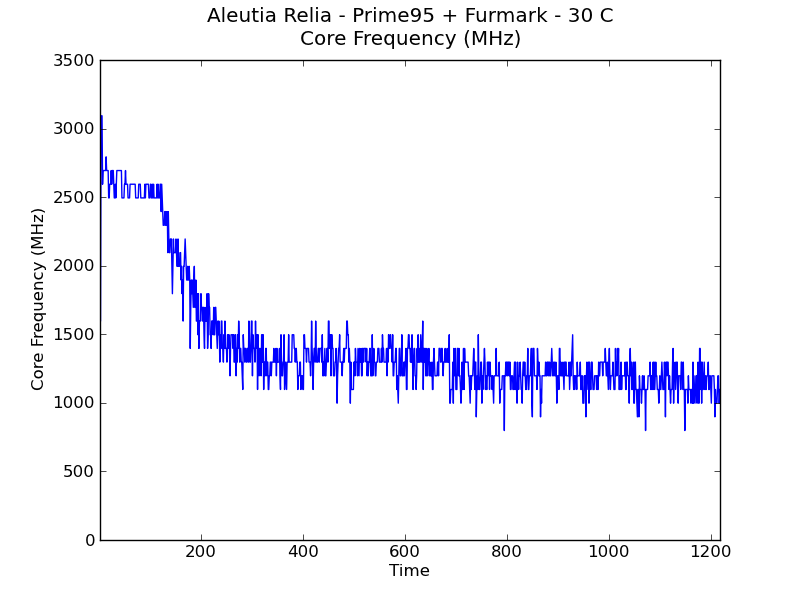
One of the drawbacks of completely passively cooled systems is that the CPUs reach their maximum temperature much faster than actively cooled systems. The CPU throttles down its performance as soon as the limits are reached. We proceeded to test out the thermal performance by loading up both the CPU and GPU with Prime 95 and Furmark. After hitting the thermal limits, the CPU speeds were throttled to 900 MHz.

One of the points to note in the above screenshot (taken with the unit at room temperature - 72 F) is that the chassis becomes hot enough for the HDDs to report a temperature of 59 C. This is even without any hard drive activity in the loading process. 55 - 60 C is considered the maximum permissible temperature for hard disks to ensure reliable operation. It doesn't seem advisable to use mechanical hard disks in the system if it is expected that the workloads for the system would end up throttling the CPU. We pinged Aleutia about this, and they indicated that the advisable ambient temperature for our test system was 30 C (for a pure SSD only solution, they upped it to 33 C). They also indicated that the i3-based system could go higher in terms of ambient temperature, but didn't mention specifics. For users with a requirement for operation at higher ambient temperatures, Aleutia indicated that they have custom solutions available too.
Our next plan of action was to determine the efficiency of the thermal solution under the above constraints. To test this out, we placed the unit in a temperature chamber and recorded the power consumption under full load. As soon as throttling hits, the power consumption of the unit starts to drop. We repeated the test with the temperatures at 0 C, 15 C and 30 C. After each run (i.e, subjecting the unit to full loading and letting the CPU cores reach the Tjmax of 94 C), we let it idle for 30 minutes. The core temperatures after the idling with the ambient at different temperatures are provided below.
| Aleutia Relia Cooling Efficiency | |
| Ambient Temperature | Core Temperature 30 min. after Tjmax |
| 0 C | 31 C |
| 15 C | 36 C |
| 22 C | 39 C |
| 30 C | 51 C |
The power consumption graphs are provided below for the unit's operation over a 20 minute duration after the start of the loading process.
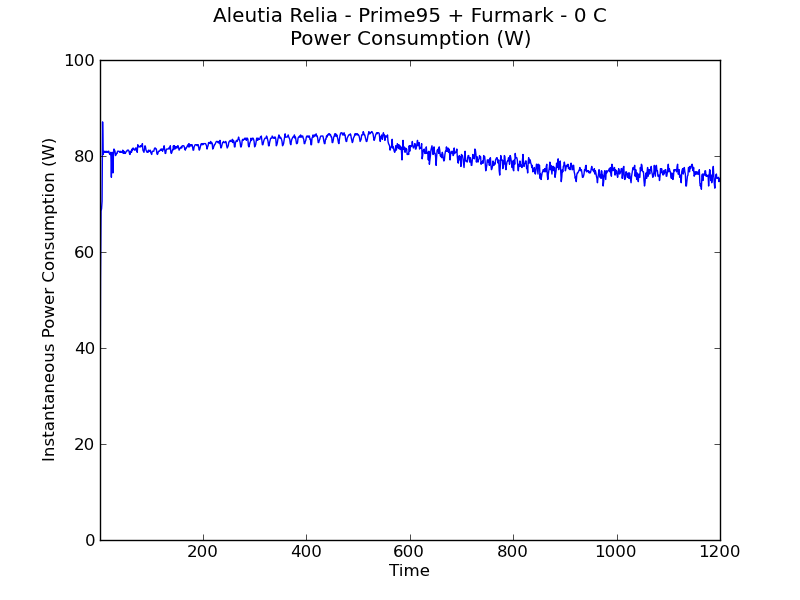
The thermal solution works very well at low temperatures, with throttling kicking in after 9 minutes or so. With rising ambient temperature, the throttling kicks in within 3 minutes (at 30 C). These graphs are with absolutely no air flow in the temperature chamber, and are hence, worst case scenarios.
At 30 C, we also have detailed graphs of the temperature, load and frequency for one of the cores. These were generated by CoreTemp 1.0 RC4.
Originally published at https://www.anandtech.com/show/6494/aleutia-relia-industrial-pc-review-ivy-bridge-q77-in-a-fanless-chassis (Wayback Machine).