
Holiday 2012 Small Form Factor Buyer's Guide
Small Size, Small Price Tag
While Intel has yet to release Ivy Bridge-based Celeron-class (i.e. cheap) CPUs, I briefly reviewed the Celeron G530's performance in a previous budget buyer's guide. Intel has, however, given its entry-level chips a modest speed bump in that the Celeron G540 and G550 models are often available for a dollar or two more than the G530. Because they are adequate for day-to-day tasks and are priced so low, they remain the kings of the budget CPUs.
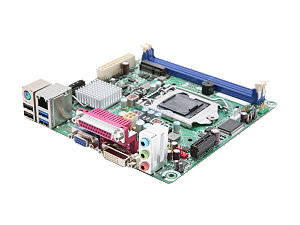
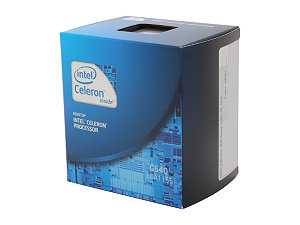 We've paired the Celeron G540 with one of the least expensive ITX Socket 1155 motherboards, Intel's BOXDH61DLB3. While there are less expensive boards, reliability issues prevent us from giving them the nod in this buyer's guide. Intel's entry-level ITX model offers basic features as well as USB 3.0 ports. Note that it does not have a PCIe x16 lane, instead offering a single PCIe x1 lane. This is likely not a concern for a budget, general office productivity box that will likely never need a video card installed but might need a wireless adapter card. Furthermore, its SATA ports are limited to SATA II speeds, so the newest SSDs that use SATA III will be crippled. Again, though, this is a budget system and something has to give. If you need a PCIe x16 lane and SATA III ports, you'll need to step up to a board like ASRock's B75M-ITX or ASUS' P8H77-I.
Housing the budget build is Apex's MI-008, a longtime favorite of mine for cheap ITX systems. It's reasonably well-constructed, and comes with a serviceable 250W power supply. Its thermals aren't particularly impressive, but for a system lacking a discrete graphics card and running a Sandy Bridge Celeron, it doesn't need to have the best airflow. The MI-008 can accommodate full size hard and optical drives, which helps keep costs down.
 As for the memory, a single 4GB stick of budget DDR3-1333MHz is sufficient for basic computing in Windows 7 64-bit (or Windows 8 if you want to go that route), and leaves an open slot so upgrading to 4GB in the future will be cheap and easy. Hard drive and solid state drive prices are especially dynamic this time of year, making recommendations difficult. While day to day hard drive prices remain elevated in the wake of the notorious Thailand floods, sale prices are beginning to get back to where they were before hard drive supplies were disrupted late last year. If you're patient and pay attention to prices, you will likely be able to snag a mainstream 7200RPM 1TB hard drive for $60 or less. If you don't need much local storage, a 64GB SSD will give you an enormous performance boost for about the same price.
While Windows 7 64-bit remains the de facto standard operating system for PCs, note that Windows 8 64-bit is now also available. Note that for this budget build, the $92 Windows license accounts for about 25% of the total cost. If you're on an extremely tight budget, or simply want to explore other operating systems, be sure to check out a free OS like Ubuntu.
| Component | Product | Price |
| Case | Apex MI-008 | $48 |
| Power supply | (included with case) | |
| CPU | Intel Celeron G540 2.5GHz dual-core | $45 |
| Motherboard | Intel BOXDH61DLB3 mITX | $72 |
| RAM | G.Skill Value 4GB DDR3-1333MHz | $18 |
| Hard drive | Seagate Barracuda 1TB ST1000DM003 | $70 |
| SSD alternate | Intel 330 Series 60GB | $70 |
| Optical drive | Samsung SH-224BB DVD burner | $16 |
| Operating system | Windows 7 64-bit Home Premium OEM | $92 |
| Total: | $361 |
Check the next page for our small form factor file server build.
Originally published at https://www.anandtech.com/show/6490/holiday-2012-small-form-factor-buyers-guide (Wayback Machine).