
ASRock FM2A85X Extreme6 Review
- Posted in
- Motherboards
- AMD
- ASRock
- Trinity
- FM2
ASRock FM2A85X Extreme6 In The Box
When competing at the lower end of the market, it can be hard to distinguish a motherboard with the extras in the box. The ASRock FM2A85X Extreme6 currently e-tails at $100, meaning that if any significant additional inclusion was in the box, the ASRock board could be highly competitive in terms of bang-for-buck. Alas, no such luck:
Driver CD
Manuals
Rear IO Shield
Four SATA Cables, Locking
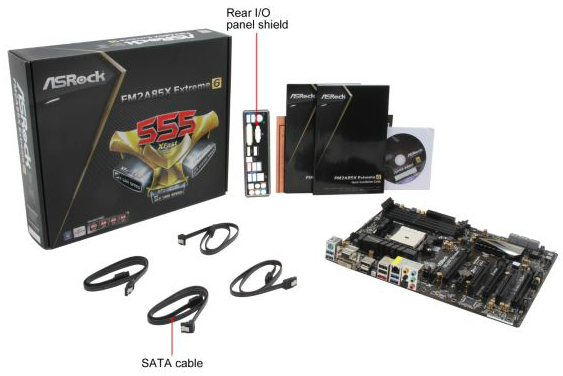
There is a small amount of differentiation – typically motherboards at this range have only two SATA cables, whereas we get four with the ASRock. Given the seven SATA ports on board, I would gladly take four rather than two.
ASRock FM2A85X Extreme6 Overclocking
Methodology:
Our standard overclocking methodology is as follows. We select the automatic overclock options and test for stability with PovRay and OCCT to simulate high-end workloads. These stability tests aim to catch any immediate causes for memory or CPU errors.
For manual overclocks, based on the information gathered from previous testing, starts off at a nominal voltage and CPU multiplier, and the multiplier is increased until the stability tests are failed. The CPU voltage is increased gradually until the stability tests are passed, and the process repeated until the motherboard reduces the multiplier automatically (due to safety protocol) or the CPU temperature reaches a stupidly high level (100ºC+). Our test bed is not in a case, which should push overclocks higher with fresher (cooler) air.
Automatic Overclock:
Using the X-Boost function at boot by pressing ‘X’, the system restarted and applied the top turbo clock of the processor for every level of load except idle. This meant the A10-5800K was adjusted to 4200 MHz under any load.
In the BIOS, we get the option for 4200 MHz to 4600 MHz in 100 MHz increments – each of these was tested:
At the 4200 MHz setting, the system applied 1.13875 volts on the CPU as well as a +0.060 volt offset. The NB was given a +0.120 volt offset, while the memory was set at DDR3-1333. This setting was stable in the OS.
At the 4300 MHz setting, the system applied the same settings as per the 4200 MHz situation but with a single increase in the CPU multiplier. This setting was also stable.
At the 4400 MHz setting, the system adjusted up the offset on the CPU to +0.120 volts while still keeping the fixed voltage selection the same as previous settings. This setting was stable in the OS.
At the 4500 MHz setting, the system upped the CPU voltage offset further to +0.180 volts. This was stable in the OS.
At the 4600 MHz setting, the system adjusted the CPU in terms of both fixed and offset values, placing 1.4000 volts on the CPU and a +0.200 volt offset. This setting failed stability during OCCT which produced an error on one of the CPU cores.
Manual Overclock:
For the first time in a long time, I am thoroughly stumped by manually overclocking a motherboard. Unlike the previous FM2 boards we have tested, the ASRock FM2A85X Extreme6 failed to enjoy many manual settings above 4.3 GHz. When using the automatic settings above, everything was simple – but if I used the exact settings in a manual mode, the system would happily agree to boot at those speeds but fail to ramp up to full speed under load. This was a very confusing scenario, meaning that while I could boot at 4.8 GHz, and CPU-Z briefly acknowledging the speed, when I loaded up PovRay or OCCT, the system would reduce to idle speeds and never come back up to full speed. I thought that this was perhaps related to the AMD CPU Overdrive functionality in the AMD Control Center, but no combination of settings worked.
Originally published at https://www.anandtech.com/show/6478/asrock-fm2a85x-extreme6-review (Wayback Machine).