
Samsung Chromebook (XE303) Review: Testing ARM's Cortex A15
Display Quality
The new Chromebook's display is still a fairly mediocre TN panel, but for anyone used to the majority of low cost PC notebooks over the past few years it's really not any different. The 16:9 display measures 11.6 inches along the diagonal with a 1366 x 768 resolution.

Viewing angles are pretty bad. Max brightness tops out at 233 nits, although contrast ratio is better than a lot of low cost notebooks. The low max brightness means that outdoor use will be an issue, generally speaking for really bright sunlight you'll need something closer to 500 nits to be usable.
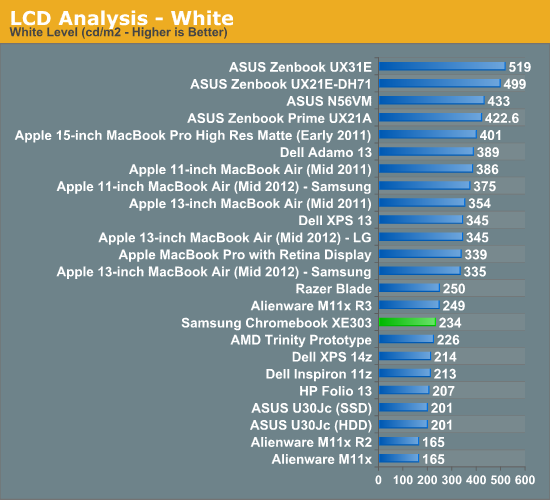
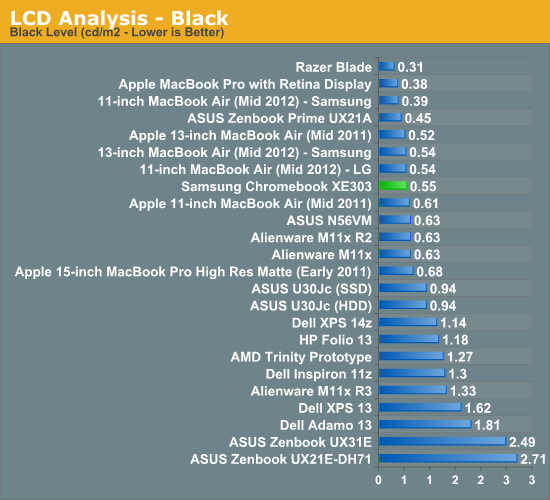
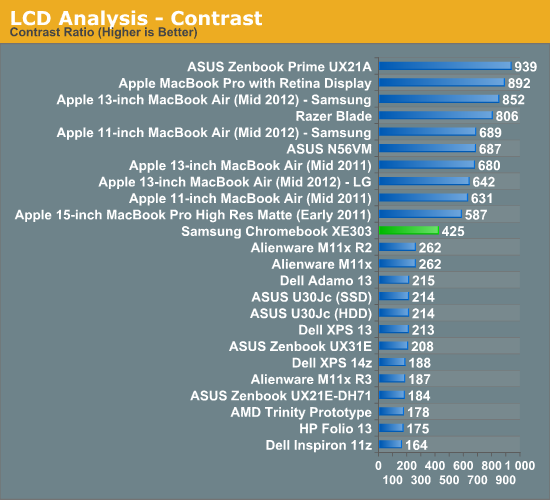
Given the price tag however, the Chromebook's display is passable. What's more bothersome is that PC makers were fine shipping this quality of a display in systems that were 2x the price of the new Chromebook.
Keyboard & Trackpad
The new Chromebook retains the chicklet keyboard that its predecessors introduced. Key feel is a little mushier than I would like but overall the keyboard is pretty good. There's obviously no backlight, which again is a concession Samsung had to make to hit the Chromebook's aggressive price point.
As this is a Chrome OS device there's no Windows/Apple key alternative, just oversized control/alt keys which I really do appreciate.

Chrome OS' keyboard shortcuts do mimic those of OS X. Ctrl + W will close a Chrome tab/window, and more universally ctrl + L will shift focus to the omnibar. There's a row of shortcut keys at the top of the keyboard. Shortcuts include brightness and volume controls, page forward/back and refresh keys, as well as dedicated keys for maximizing the current window and switching between windows (although alt+tab still works for that as well). There's no capslock key, but a dedicated search key in its place. Perhaps Google doesn't want Chromebook users to contribute to overly capitalized YouTube comments.
None of these aspects of the keyboard are new, they've been around since the first Chromebook. There are no dedicated page up/down, home or end keys unfortunately (although alt + up/down will work as a page up/down replacement).
The trackpad is the weaker of the two input devices on the new Chromebook, and even it isn't all that bad. Tracking accuracy is good, and I never had any unintentional taps. The trackpad is actually a clickpad with no discrete buttons. Two fingers on the clickpad will trigger a right click (a two finger tap and click both work). Two finger scrolling is also supported, although there aren't any other gestures. My biggest problem with the trackpad is its click + drag performance isn't all that good. Compared to some of the garbage that has shipped in much more expensive PC notebooks (and Ultrabooks for that matter), Samsung did a good job with the Chromebook.
Originally published at https://www.anandtech.com/show/6422/samsung-chromebook-xe303-review-testing-arms-cortex-a15 (Wayback Machine).