
GeIL Evo Veloce Review: 2x8GB at DDR3-2400 C11-12-12 1.65 V
- Posted in
- Memory
- Ivy Bridge
- DDR3
- GeIL
USB 3.0 Backup
Our backup testing takes a typical set of user files – specifically just under 8000 files across 7.5 GB, some large files but mostly small. For USB 3.0 testing, these files are copied from our SSD onto an OCZ Vertex3 which is connected via a SATA 6 Gbps to USB 3.0 device using the UASP protocol that the ASMedia controller on our test bed affords as well as the chipset driven Intel USB 3.0 under ASUS' Turbo mode. The copy test is conducted using DiskBench, a copying tool with accurate copy timing.
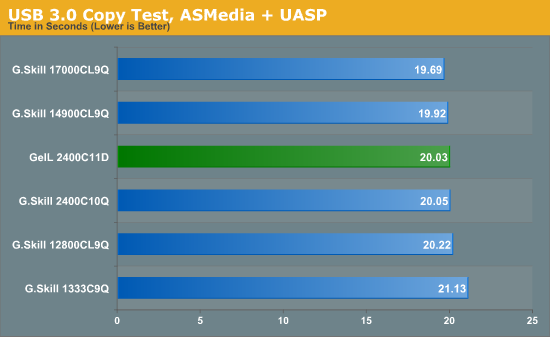
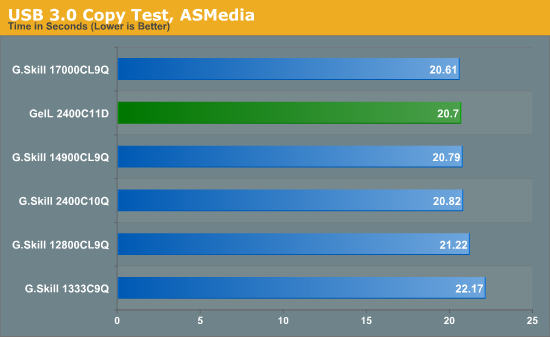
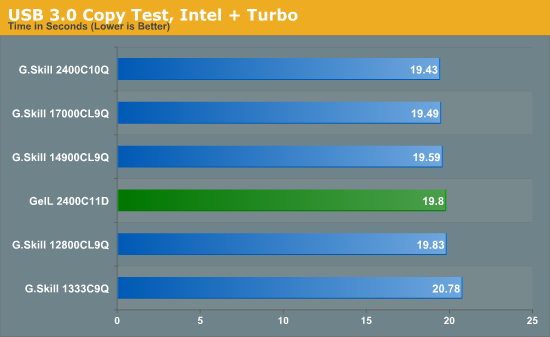
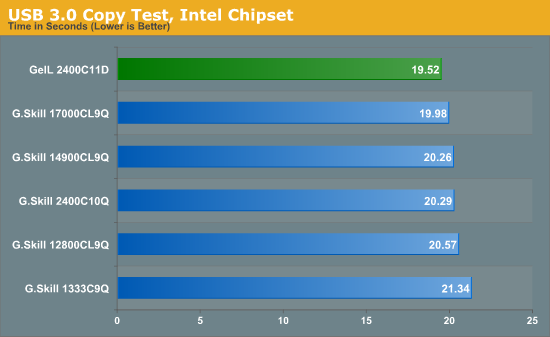
In the USB 3.0 testing, we find some interesting results:
USB 3.0 ASMedia + UASP: 2400 C11 is between 1600 C9 and 1866 C9
USB 3.0 ASMedia: 2400 C11 is between 1866 C9 and 2133 C9
USB 3.0 Intel + Turbo: 2400 C11 performs similar to 1600 C9
USB 3.0 Intel: 2x8 GB 2400 C11 is better than 4x4 GB 2400 C10
In most motherboards, the USB 3.0 Intel result will be the main point of the test (ASMedia and UASP are limited to ASUS at the minute), and it seems the Intel chipset likes denser modules for USB 3.0 testing.
Thunderbolt Backup
Similar to our USB 3.0 Backup test, Thunderbolt testing carries the same files directly through to our LittleBig Disk which contains two 120 GB Intel SSDs in RAID-0. The copy test is conducted using DiskBench, a copying tool with accurate copy timing.
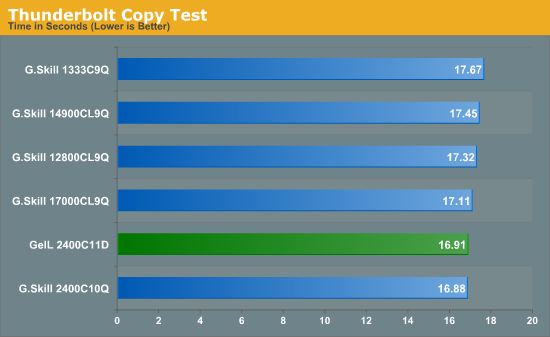
Our 2400 C11 kit performs similar to the 2400 C10 and better than the 2133 C9, meaning that Thunderbolt is a big fan of memory MHz.
Originally published at https://www.anandtech.com/show/6374/geil-evo-veloce-review-2x8gb-at-ddr32400-c111212-165-v (Wayback Machine).