
Memory Performance: 16GB DDR3-1333 to DDR3-2400 on Ivy Bridge IGP with G.Skill
- Posted in
- Memory
- G.Skill
- Ivy Bridge
- DDR3
Conversion – Xilisoft 7
Another classic example of memory bandwidth and speed is during video conversion. Data is passed between the memory and the CPU for processing – ideally faster memory here helps as well as memory that can deal with consecutive reads. Multiple threads on the CPU will also provide an additional stress, as each will ask for different data from the system. Our test uses two sets of conversions: first, a series of 160 videos have the first three minutes of each converted from various formats (480p to 1080p mkv) to AAC audio; and second is the motherboard testing, converting 32 1080p videos to iPod format. Each test is measured by the time taken to complete.
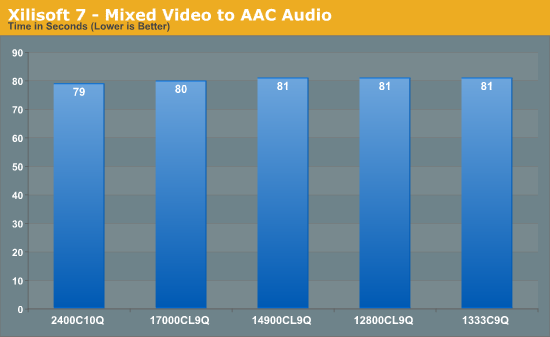
Converting to AAC seems to depend not on the memory – the movement of data from storage to memory to CPU is faster than the CPU can compute.
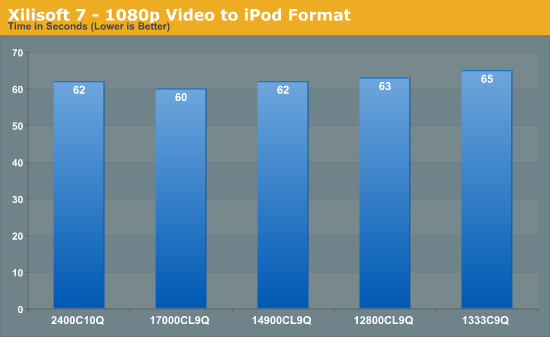
Video conversion is often one area quoted as being beneficial for memory speed, however these does not seem strictly true. As data is moved from storage to memory to the CPU, only if that memory transfer is the limiting factor does having faster memory help. In conversion to an iPod video format, that seems true moving from DDR3-1333 to DDR3-2133 just about, however it seems the limiting factor is still the CPU speed or the algorithm doing the conversion.
Folding on GPU
Memory usage is all algorithm dependent – if the calculation has a lot of small loops that do not require additional reads memory, then memory is unimportant. If the calculation requires data from other sources in those calculations, then memory can either be stressed randomly or sequentially. Using Ryan’s Folding benchmark as a platform, we are testing how much memory affects the serial calculation part of a standard F@H work unit.
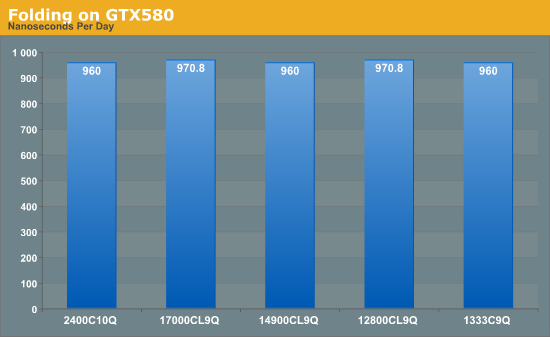
Unfortunately this test is only available to the nearest second, thus the benchmark finishes in either 89 or 90 seconds, giving appropriate ns/day. From the results, folding on GPUs is not affected by memory speed.
WinRAR x64 4.20
When compressing or converting files from one format to another, the file itself is often held in memory then passed through the CPU to be processed, then written back. If the file is larger than the available memory, then there is also loading time between the storage and the memory to consider. WinRAR is a variable multi-threaded benchmark, whereby the files it converts and compresses determines how much multi-threading takes place. When in multithreaded mode, the rate of cache misses can increase, leading to a less-than optimal scaling. Having fast memory can help with this.
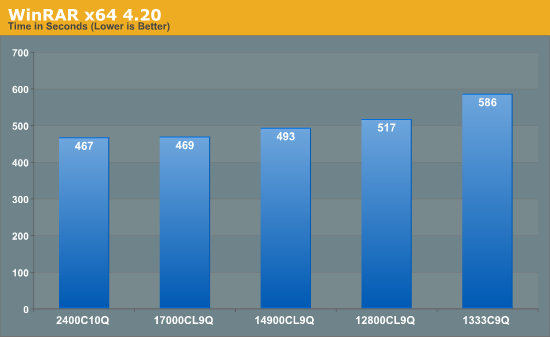
WinRAR is one of the benchmarks in our testing suite that benefits immensely from having faster memory. Moving from DDR3-1333 to DDR3-2400 speeds the process up by 20%, with the biggest gain moving from 1333 to 1600, and noticeable gains all the way up to 2133 C9.
Greysky's x264 HD 5.0.1
The x264 HD test, now version 5.0.1, tests the time to encode a 1080p video file into a high quality x264 video file. This test is standard across a range of reviews from AnandTech and other websites allowing for easy comparison. The benchmark is capable of running all cores to the maximum. Results here are reported as the average across four attempts for both the first and second passes.
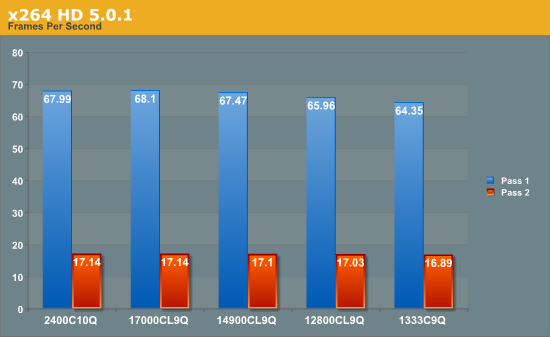
In another conversion test, we see that this benchmark gets a ~5% boost with faster memory, although Pass 1 sees a bigger boost than Pass 2. If conversion into x264 is the main purpose of the system, then the price premium of the faster memory could easily be justifiable.
Originally published at https://www.anandtech.com/show/6372/memory-performance-16gb-ddr31333-to-ddr32400-on-ivy-bridge-igp-with-gskill (Wayback Machine).