
The New Razer Blade: Thoroughly Reviewed
Razer Blade (late 2012) - Performance
To gauge how the new Blade stacks up versus its predecessor and other gaming-class notebooks, we picked a decent selection of systems with the entire range of modern GPUs, from the GT 650M GDDR5 in Samsung's Series 7 to the pair of Alienware systems with GTX 680M and 680M SLI graphics configurations. There's a decent range of storage technologies on display here as well, with a number of different SSDs and hybrid storage solutions, along with one conventional 7200RPM hard drive.
| Notebook Configuration Overview | ||||
| CPU | Graphics | Storage | Battery | |
| Alienware M17x R4 | i7-3720QM | GTX 680M | Hybrid (Intel SRT) | 90Wh |
| Alienware M18x R2 | i7-3820QM | GTX 680M SLI | 2x SSD 830 (RAID) | 97Wh |
| ASUS G74SX-A2 | i7-2630QM | GTX 560M | Intel 320 SSD | 90Wh |
| AVADirect Clevo P170EM | i7-3720QM | HD 7970M | Crucial M4 SSD | 77Wh |
| Clevo W110ER | i7-3720QM | GT 650M | Hybrid (Momentus XT) | 62Wh |
| iBUYPOWER MSI GT70 | i7-3610QM | GTX 675M | 7200RPM HDD | 60Wh |
| Razer Blade | i7-2640M | GT 555M | Lite-On M2S SSD | 60Wh |
| Samsung Series 7 | i7-3615QM | GT 650M | Hybrid (ExpressCache) | 77Wh |
| Razer Blade (late 2012) | i7-3632QM | GTX 660M | Hybrid (DataPlex) | 60Wh |
The Blade is the first 35W quad that I’ve dealt with, and it’s the only 35W quad to go through our labs since Dell’s XPS 15 a few months ago. The Blade uses a new OEM-specific i7-3632QM that is essentially the same as the i7-3612QM in the Dell, except with 100MHz faster clocks. Performance-wise, it falls in roughly where you’d expect a 2.2GHz Ivy Bridge quad, a bit faster than the SNB quads and the 2.1GHz i7-3612QM but a bit slower than the various IVB quads that are clocked faster, starting with the 2.3GHz i7-3610 and 3615QM. I'm going to skip straight to the CPU testing this time, as I find PCMark 7 to be far too heavily skewed by other factors (SSD, Quick Sync, etc.)
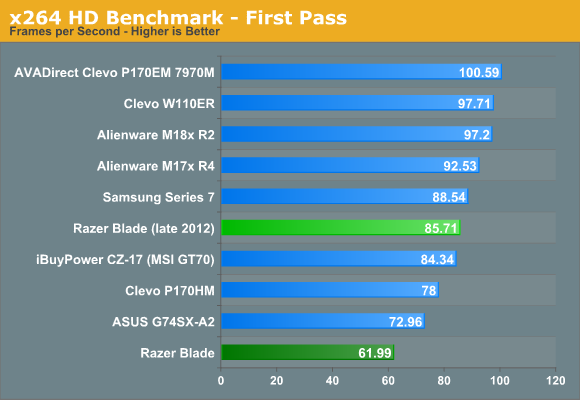
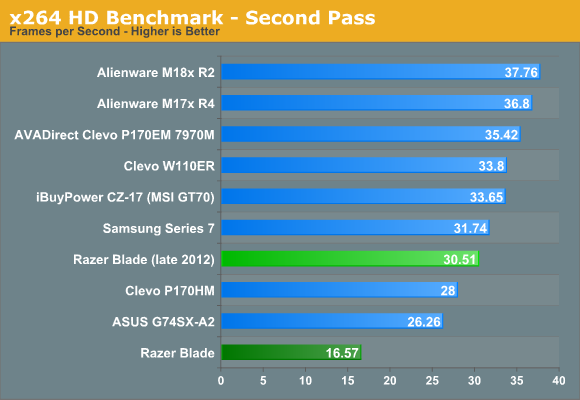
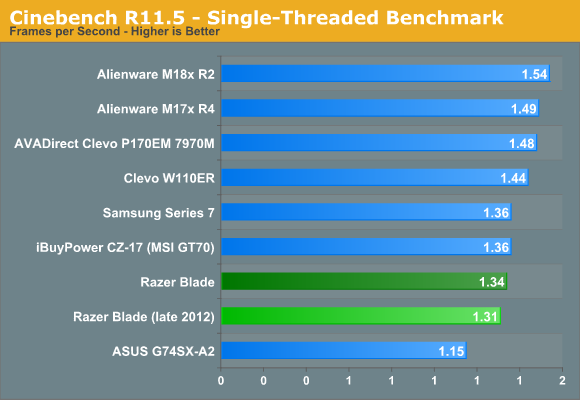
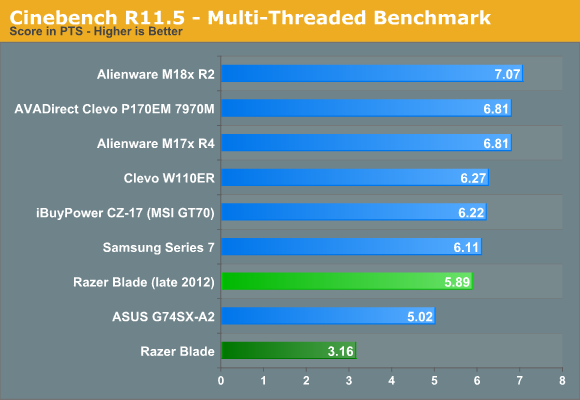
There’s not too much else to say about Ivy Bridge here; it’s just a really solid CPU that’s done well for Intel. The only complaint that really can be leveled against it is that even though the tick+ update focused heavily on a new on-die graphics architecture, Intel is still playing catch up to AMD’s far more advanced integrated graphics solutions. Intel’s HD 4000 is solid enough for anything not involving gaming though, and in these applications at least, it does its job well.
Traditionally, I try to avoid all Futuremark tests, but I decided to break my rule here with the PCMark 7 storage benchmark. I wanted to see how effective NVELO’s DataPlex caching solution was with respect to Intel’s Smart Response Technology as well as the SSD in the previous Blade. The PCMark Storage score is pretty impressive, beating the SRT-enabled Dell XPS 15 (which had a 32GB cache drive) and interestingly, the old Blade as well. Admittedly, the original Blade’s SSD wasn’t the fastest in the world, even though it used the same Marvell controller as the caching SSD in the new Blade (and the Intel SSD 510, amongst other notable SSDs). We saw better Storage benchmark scores out of faster SSDs in the ASUS N56VM, which was tested using a SandForce-based drive, and Alienware M18x R2 (two Samsung SSD 830s in RAID).
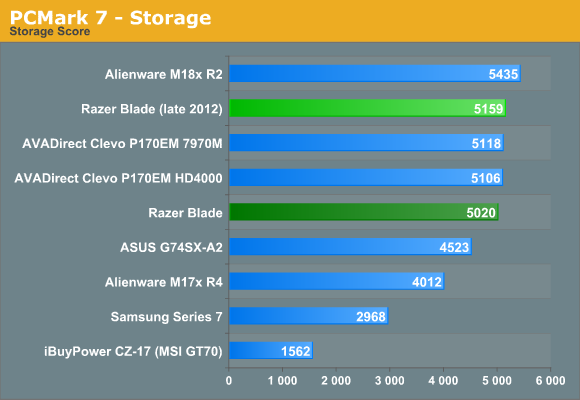
It was a pretty impressive showing, and I actually wasn’t put off by the hard drive too much in day to day usage. The one place where I missed the SSD? Shut down/restart and sleep/wake cycles. I timed a cold boot at 20.8 seconds, a solid 5 seconds off the pace of the old SSDified Blade, and it was definitely something you were reminded of every time the system was rebooted or woken from sleep. As much as the new caching solutions help, nothing can touch the outright responsiveness of a real SSD.
Originally published at https://www.anandtech.com/show/6351/the-new-razer-blade-thoroughly-reviewed (Wayback Machine).