
Lenovo IdeaCentre A7 All-in-One Review: Starting to Get The Balance Right
Screen Quality
I really, really want to give Lenovo a gold star on the IdeaCentre A7 for opting to include an IPS panel. Even if it's 1080p instead of the more fashionable 2560x1440 resolution, it's still high resolution and a big step up from just using a TN panel instead. That it has ten-finger touch is just an added bonus; I'm mostly just happy to see a halfway decent display being used for once.
Unfortunately the IdeaCentre's default monitor calibration is absolutely awful. There are three different settings for the display, but you're really just choosing what color cast the display is going to have on it. The default ("Web") makes everything blue, while the "Movie" one makes everything just a bit less blue, and the "Document" one makes everything green. That's before getting into how frustrating the touch-based controls at the bottom of the display can be. I've never liked touch controls on displays; they've always complicated the job that a few regular buttons were able to do just fine.
Calibration takes most of the edge off, but out of the box the blue hue on everything is distracting and just feels cheap.
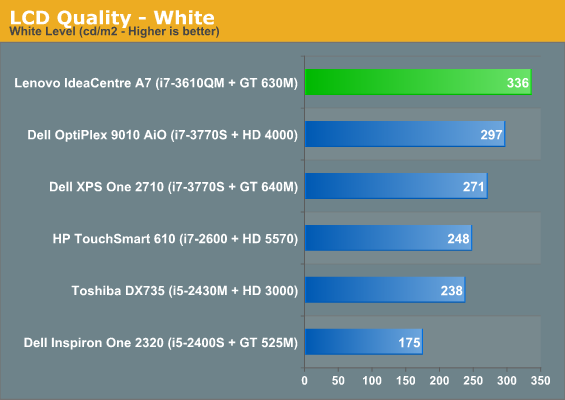
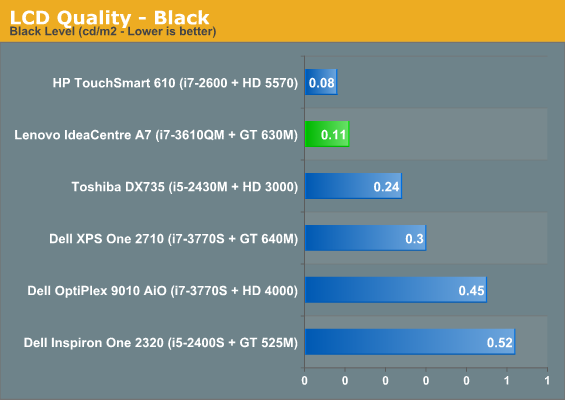
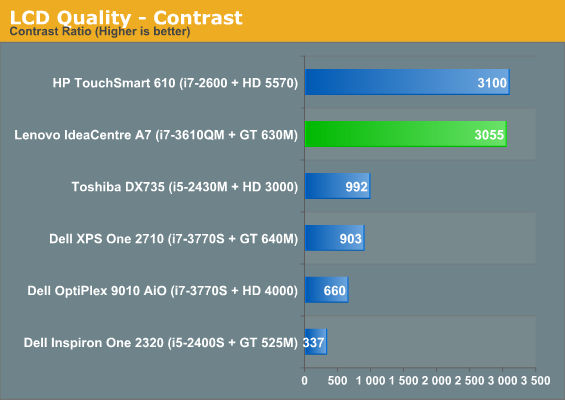
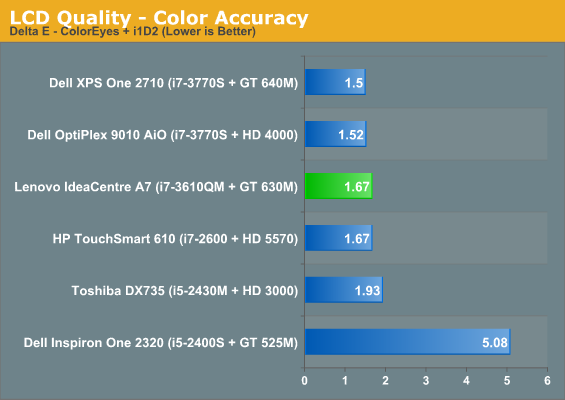
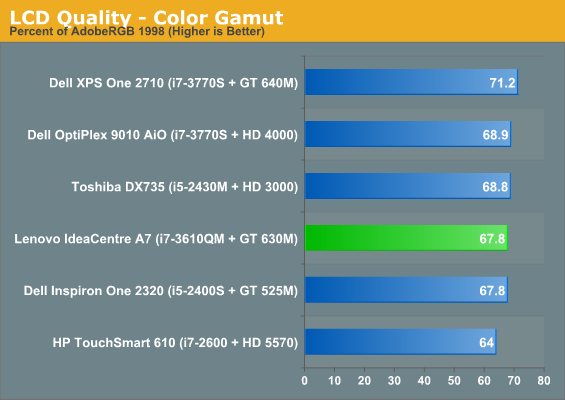

You can see just how well the display can perform after calibration. It's very bright and offers excellent contrast; only the HP TouchSmart 610 is able to produce a contrast ratio as impressive. Gamut isn't great, but accuracy is fine.
It's just a shame that the default calibration of the display is as poor as it is. Worse still, while doing game testing I noticed what appeared to be some fairly serious ghosting. It's not awful and it's not quite an overdrive smear, but response time of the display seems to be on the slow side. So while I can appreciate that Lenovo included an IPS panel, I'm disheartened that they weren't more responsible with it.
Originally published at https://www.anandtech.com/show/6331/lenovo-ideacentre-a7-allinone-review-starting-to-get-the-balance-right (Wayback Machine).