
Samsung SSD 840 Pro (256GB) Review
- Posted in
- Storage
- SSDs
- Samsung
- Samsung SSD 840
PCMark 7
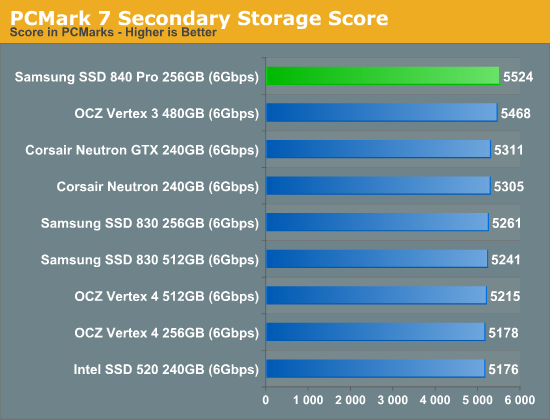
PCMark 7's secondary storage benchmark does little to show us differences between modern, high-performance SSDs as everything here scores within 5% of one another - but that's the point. For most mainstream client uses you'd be hard pressed to tell the difference between two good 6Gbps SSDs. Worry more about cost and reliability than outright performance if you're considering an SSD for a normal machine. Anything you see here will be much faster than a mechanical drive.
Performance Over Time & TRIM
Over time SSDs can get into a fairly fragmented state, with pages distributed randomly all over the LBA range. TRIM and the naturally sequential nature of much client IO can help clean this up by forcing blocks to be recycled and as a result become less fragmented. Leaving as much free space as possible on your drive helps keep performance high (20% is a good number to shoot for), but it's always good to see how bad things can get before the GC/TRIM routines have a chance to operate. As always I filled all user addressible LBAs with data, wrote enough random data to the drive to fill the spare area and then some, then ran a single HD Tach pass to visualize how slow things got:

The 840 Pro is really no different than the 830 when it comes to how low performance can get in the worst case scenario. Client users will want to keep some free space on the drive to avoid getting backed into this type of a performance corner. TRIM will obviously help and looks to be fully functional on the 840 Pro:

Originally published at https://www.anandtech.com/show/6328/samsung-ssd-840-pro-256gb-review (Wayback Machine).