
Gigabyte Z77X-UP4 TH Review: Thunderbolt Times Two
- Posted in
- Motherboards
- Gigabyte
- Z77
- thunder
USB Speed
For this benchmark, we run CrystalDiskMark to determine the ideal sequential read and write speeds for the USB port using our 240 GB OCZ Vertex3 SSD with a SATA 6 Gbps to USB 3.0 converter. Then we transfer a set size of files from the SSD to the USB drive using DiskBench, which monitors the time taken to transfer. The files transferred are a 1.52 GB set of 2867 files across 320 folders – 95% of these files are small typical website files, and the rest (90% of the size) are the videos used in the Sorenson Squeeze test.
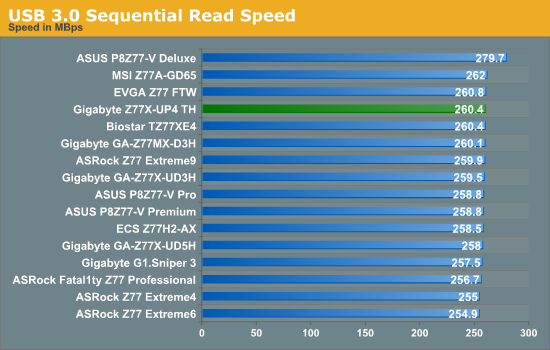
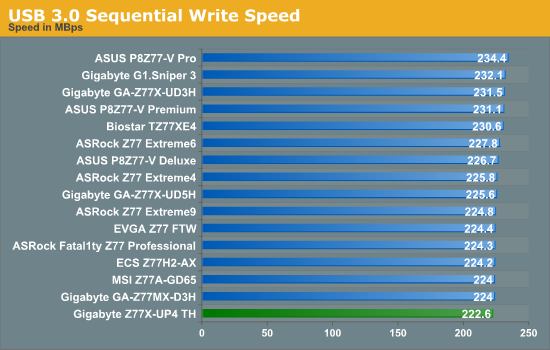
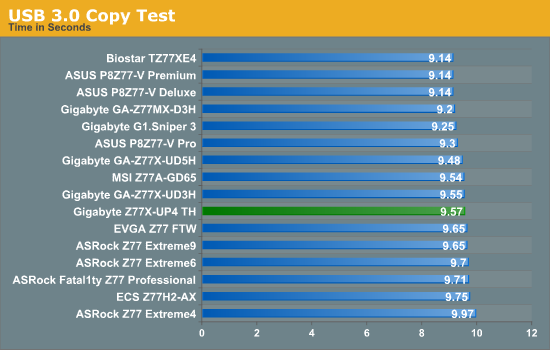
Nothing obscenely wrong comes from the Gigabyte in terms of USB 3.0 speed – even through the write speed was lower than the rest, it came mid-pack in terms of our copy test (the CPU speed may have helped here). Though out USB 3.0 copy test is starting to separate out in terms of vendor – first comes ASUS, then Gigabyte and finally ASRock.
SATA Testing
We also use CrystalDiskMark for SATA port testing on a C300 drive. The sequential test (incompressible data) is run at the 5 x 1000 MB level. This test probes the efficiency of the data delivery system between the chipset and the drive, or in the case of additional SATA ports provided by a third party controller, the efficiency between the controller, the chipset and the drive.
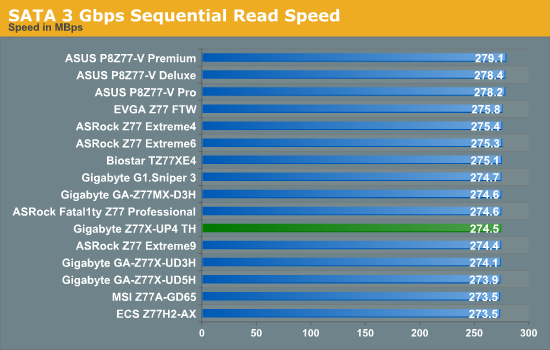
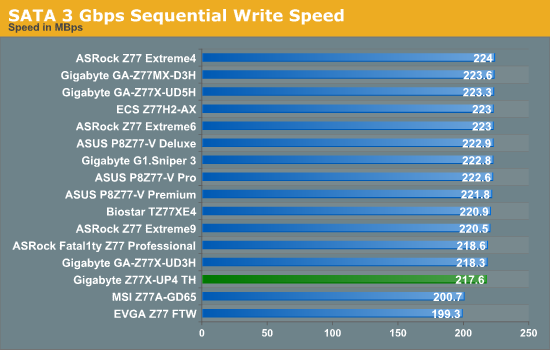
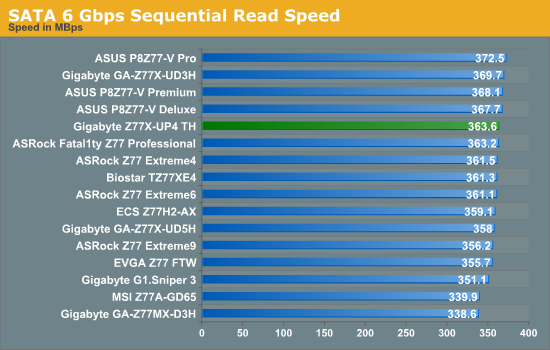
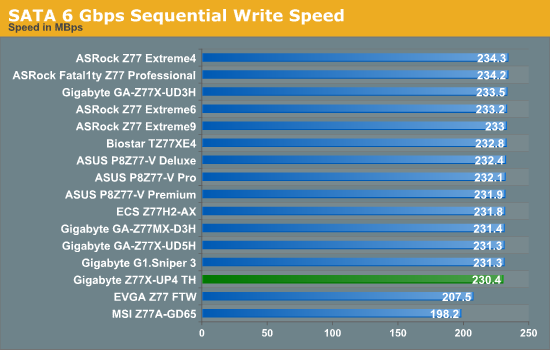
The odd blips we see from some other motherboards in terms of SATA speed are not seen here on the Z77X-UP4 TH, although the writing speed seems a little slow.
DPC Latency
Deferred Procedure Call latency is a way in which Windows handles interrupt servicing. In order to wait for a processor to acknowledge the request, the system will queue all interrupt requests by priority. Critical interrupts will be handled as soon as possible, whereas lesser priority requests, such as audio, will be further down the line. So if the audio device requires data, it will have to wait until the request is processed before the buffer is filled. If the device drivers of higher priority components in a system are poorly implemented, this can cause delays in request scheduling and process time, resulting in an empty audio buffer – this leads to characteristic audible pauses, pops and clicks. Having a bigger buffer and correctly implemented system drivers obviously helps in this regard. The DPC latency checker measures how much time is processing DPCs from driver invocation – the lower the value will result in better audio transfer at smaller buffer sizes. Results are measured in microseconds and taken as the peak latency while cycling through a series of short HD videos - under 500 microseconds usually gets the green light, but the lower the better.
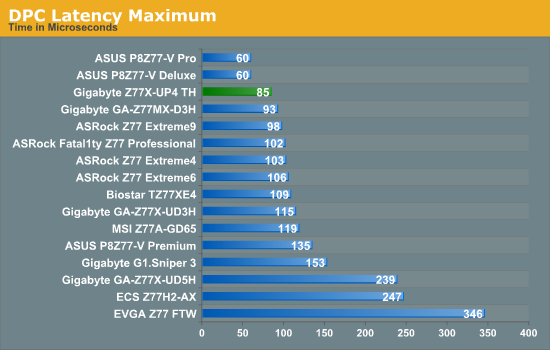
Despite the Z77X-UP4 TH falling victim to the H/W Monitor bug in terms of DPC testing (raising the value to 800+), when turned off the peak DPC Latency was 85 microseconds which is an excellent result.
Originally published at https://www.anandtech.com/show/6296/gigabyte-z77xup4-th-review-thunderbolt-times-two (Wayback Machine).