
AMD’s Enduro Switchable Graphics Levels Up
Other Technical Details and Performance Expectations
So far we’ve discussed the past and near future of AMD’s Enduro/Switchable Graphics, but we haven’t gone into the technical aspects much. We’ve covered most of this previously (and neither AMD nor NVIDIA provide a ton of detail as to how precisely they’re doing the work), but there are a couple other tidbits we wanted to briefly discuss before wrapping up.
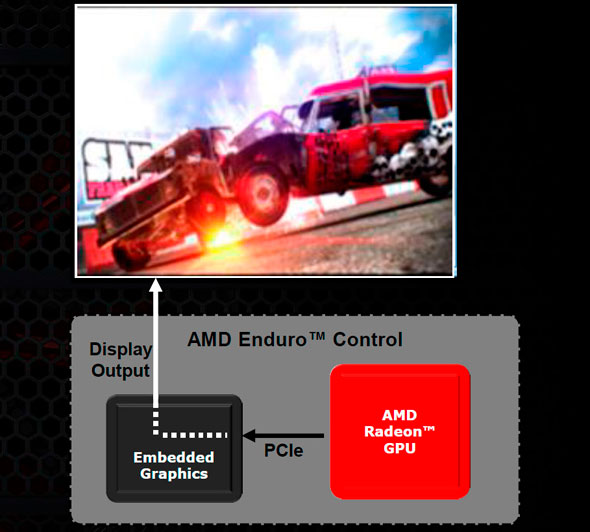
At a high level, all of the display outputs on a laptop now connect to the Intel iGPU, and AMD is able to route their content through the PCIe bus to the embedded graphics and out to the display. Nothing has really changed there; content is copied from the dGPU to the iGPU output in some fashion and you get the ability to switch seamlessly between the two GPUs. We also mentioned earlier that AMD has now removed the need for the active PCIe bus when the GPU is powered down, which drops power use of the dGPU from less than 100mW or so down to 0W.
One thing that hasn’t changed is AMD’s use of Link Adapter Mode (LDA) where NVIDIA uses Multi Adapter Mode, but we now have an explanation of why this difference exists. As far as we could tell, there’s not really an inherent superiority of either mode for general use. The primary reason AMD uses LDA is that they also have a chipset business, where NVIDIA has bowed out of making chipsets. Why this matters is that LDA is what facilitates AMD’s Dual Graphics (formerly Hybrid CrossFire)—the dGPU and the iGPU working together to render a scene. This is less important on Intel platforms, as AMD isn’t trying to do any cooperative rendering with Intel iGPUs; they potentially could in the future if desired, but that seems unlikely given the difficulty of getting even similar GPUs to work together. AMD also indicates that the use of LDA provides full support for Windows 8 Metro applications; I would assume NVIDIA also supports Metro apps, so unless that proves to not be the case (and we should know soon enough), other than Dual Graphics it appears that Enduro and Optimus are essentially at parity in terms of how they function, with software/drivers being the key differentiator.
Something else we’re still waiting to see is the packaging of the new Mobility Catalyst drivers. AMD didn’t provide us with the actual installation files—they installed them for us as they were still in a rather early state. That being the case, we aren’t sure if the Mobility Catalyst drivers for Enduro systems will feature totally independent drivers as far as Intel iGPUs are concerned, but that appears to be the case. If all goes as planned, you will be able to update your AMD dGPU drivers separately from your Intel iGPU drivers without any trouble once the Enduro Catalyst drivers start coming out.
Performance Expectations
AMD let us borrow a Sager notebook for a short time after the preview to test out the new “Enduro 5.5” drivers, and they also helped us install the drivers on a Clevo P170EM system from AVADirect. We’ll be providing a full review with performance data for the P170EM in the near future, but in the meantime we wanted to show off the Sager notebook as well as discuss performance expectations. Here's a rundown of the system specs for the Sager NP9150 along with some photos.
| Sager NP9150 / Clevo P150EM Specifications | |
| Processor |
Intel i7-3720QM (Quad-core 2.60-3.60GHz, 6MB L3, 22nm, 45W) |
| Chipset | HM77 |
| Memory | 8GB (2x4GB) DDR3-1600 |
| Graphics |
Intel HD 4000 (16 EUs, up to 1250MHz) AMD Radeon HD 7970M 2GB GDDR5 (1280 cores @ 850MHz, 256-bit 4800MHz RAM) |
| Display | 15.6" WLED Glossy 16:9 1080p (1920x1080) |
| Storage | 180GB Intel 520 SSD |
| Operating System | Windows 7 Home Premium 64-bit |
| Price | $1919 as configured (9/05/2012) |


The Sager unit is their rebranded Clevo P150EM, and it has many of the same design issues that we’ve seen with Clevo in the past. The backlit keyboard with zoned lighting is a new addition, and they’ve tweaked the keyboard layout as well. Interestingly (and frustratingly), while they’ve mostly fixed my complaints with the 10-key layout, they went ahead and screwed up the main keyboard layout. The Windows key is now to the right of the spacebar, and there’s a second backslash key just right of the spacebar. I’m also not a fan of the tactile feedback from the keys, though it’s not terrible. Outside of the keyboard quirks and overly abundant use of plastic for the chassis, though, the performance is certainly there.
We ran through our current suite of games at the native 1080p on the P150EM with settings maxed out in most titles. Total War: Shogun 2 wouldn’t allow us to select Very High settings (a problem we’ve encountered on other systems in the past where the game incorrectly detects the amount of video memory and/or iGPU feature set rather than looking at the dGPU), but otherwise we get very respectable frame rates. Civilization V continues to be a bit sluggish at max settings (around 26FPS), but the brutal Battlefield 3 manages 36FPS and could very easily reach 40+ FPS if you disable 4xMSAA and just use FXAA. Those are the three lowest performing games we tested, with everything else running smoothly in the 45+ FPS range. A quick look at the last GTX 580M system we tested shows performance is better in over half of the games, and slightly lower in the other three titles. We’ll have a second look at the P170EM with a GTX 680M from AVADirect shortly after our full HD 7970M review, though, so stay tuned.
Finally, AMD did inform us that the current drivers aren’t fully optimized for performance (particularly with the 7970M), so we should hopefully see some gains with the final driver release—or if not then, the next release. Performance with GCN architecture desktop cards has been a little erratic since the launch, up until the latest Catalyst 12.7 drivers. I believe that the current beta drivers I’m using also predate 12.7 in some aspects (though they're version 9.0.0.0), so if that’s the case then the official release should clean things up quite a bit.
Originally published at https://www.anandtech.com/show/6243/amds-enduro-switchable-graphics-levels-up (Wayback Machine).