
Midrange System Buyer's Guide
Midrange Workstation
If you are considering building a midrange workstation, one important question you need to ask is whether your workloads will benefit from Hyper-Threading. This is the most important difference between the Core i5-3570 and Core i7-3770 CPUs. Anand previewed and reviewed the Core i7-3770 at length, and given that the cost differential between the two aforementioned chips is about $100, they're worth reading. Succinctly, workloads heavy on compression, encryption, multi-threaded audio and video transcoding, and multi-threaded software compilation are among the more common tasks that benefit greatly from the addition of the i7's Hyper-Threading. Many functions in Adobe Creative Suite 6 benefit from Hyper-Threading.
In my experience, Hyper-Threading increases productivity in certain SAS and Excel functions but not others. While we don't have the i5-3570 in Bench yet, comparing the previous generation i5-2500 (non Hyper-Threading) to the i7-2600 (Hyper-Threading) will give you a sample of applications that benefit from Hyper-Threading. Because so many productivity titles benefit from Hyper-Threading, we're recommending the Core i7-3770 here. Note that if you are interested in overclocking, you'll need to spend a few more dollars on the multiplier unlocked i7-3770K. While overclocking modern CPUs is often unproblematic (especially with modest overclocks that don't entail overvolting), a workstation needs to be as stable as possible, so we are not recommending an overclocked CPU for this build.
A second important question is whether your workloads will benefit from GPU acceleration. Many popular productivity titles like Sony's Vegas Pro 11, Adobe CS 6, and MATLAB, as well as more specialized software titles like those that model electrochemistry and align DNA sequences, can complete certain tasks much faster when accelerated by a GPU than when the work is done solely by the CPU. A more thorough discussion of GPGPU is outside the scope of this article; suffice it to say that if you are not already familiar with GPU acceleration, it is worth researching whether your workloads will benefit from it. If you are already familiar with GPU acceleration, you likely know which GPU models best fit your needs. Less expensive GPGPU-purposed video cards are typically within reach of a midrange workstation builder's budget, but for the sake of simplicity, one is not included in this build.
No workstation should be without an SSD—nothing improves overall system responsiveness like an SSD—so we include the Samsung 128GB here. Windows 7, Office 2010, and Adobe CS 6 will all comfortably fit on a 128GB SSD but you'll likely need more storage. If you're a heavy Photoshop user, you might want to consider adding another SSD to use as a scratch disk. You can certainly upgrade to higher-performance 7200RPM drives or add more storage drives as necessary, but 2TB will give you plenty of storage space to start.
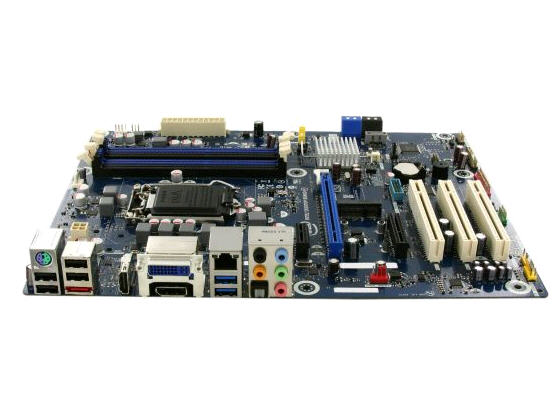
The Intel BOXDH77KC is, in my experience, a reliable motherboard with plenty of expansion slots; it includes a slot for an mSATA SSD if you prefer to use that either in place of or in addition to the Samsung 830 128GB SSD. The 16GB (2 x 8GB) kit of Kingston DDR3-1600 RAM will likely be sufficient for most workstation users; if not, another 16GB kit can be added for 32GB total (note that you'll need Windows 7 Pro/Ultimate to benefit from more than 16GB). Powering everything, we're recommending the SeaSonic S12II 430B. This is an extremely well-built unit that will provide your components with stable, clean power. It's also very quiet.
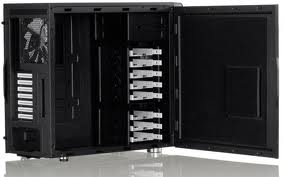
Workstations come in legion configurations, and most people want them to be quiet and look clean. Fractal Design's Define R4 was reviewed by Dustin recently, and I agree with his pertinent conclusions: it is flexible, quiet, has great thermals, and is a very good value at just over $100. It can accommodate multiple, larger GPUs for GPGPU computing, many hard drives for lots of local storage, and is very easy to keep clean because of its many fan filters. It's also available with a windowed side panel if you want to impress people with your computer building skills.
Finally, this build includes a copy of Windows 7 Professional 64-bit. You can get an overview of the differences between Windows versions at Microsoft and Wikipedia. Some of the more relevant and important differences between Professional and Home Premium are the former's support for more than 16GB of RAM, Windows XP mode, domain join, and integrated backup and restore features. Here's our final baseline workstation--many higher end users will want to add an appropriate GPU, which is easy to do.
| Component | Product | Price |
| Case | Fractal Design Define R4 | $110 |
| Power Supply | SeaSonic S12II 430B | $60 |
| CPU | Intel Core i7-3770 | $309 |
| Motherboard | Intel BOXDH77KC | $110 |
| RAM | Kingston 16GB (2 x 8GB) DDR3-1600 | $75 |
| SSD | Samsung 830 128GB | $100 |
| HDD | Western Digital 2TB Green | $110 |
| Optical Drive | Lite-On IHAS324 | $20 |
| Operating System | Windows 7 Professional 64-bit | $117 |
| Cost: | $1,011 | |
That takes care of our primary builds for this guid, but read on for some additional concluding remarks.
Originally published at https://www.anandtech.com/show/6229/midrange-system-buyers-guide (Wayback Machine).