
ASUS UX31A: Putting the Ultra in Ultrabooks
ASUS UX31A: General Performance
Next up is our overview of general performance, and honestly outside of the laptop overview and LCD characteristics this is probably the most pertinent aspect of how the UX31A behaves in everyday use. You typically don’t buy an Ultrabook because you want the fastest laptop on the planet or for serious gaming. Those duties are for larger laptops that can house discrete GPUs and quad-core processors. Ultrabooks are about portability and everyday tasks like running Office, surfing the Internet, checking email, etc.—only they’re hopefully more responsive than regular laptops thanks to their SSDs. Here’s how the UX31A compares to other recently reviewed Ultrabooks, including the prototype Ivy Bridge Ultrabook from Intel.
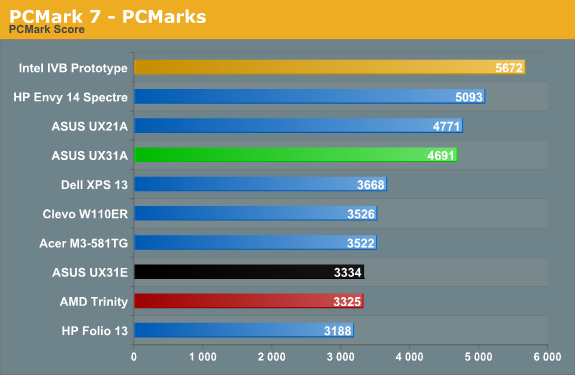
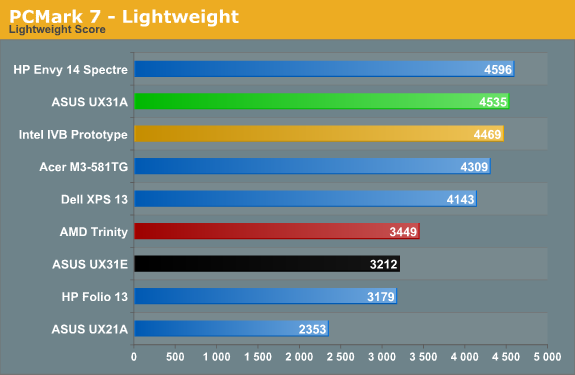
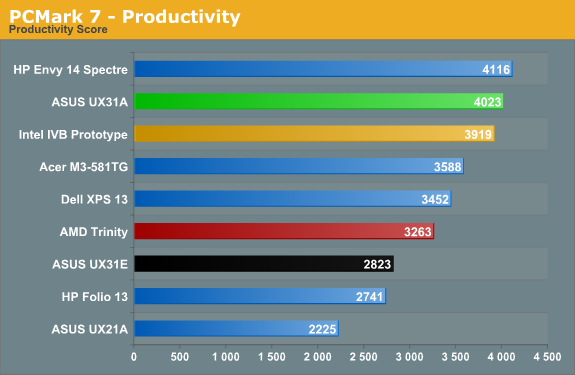
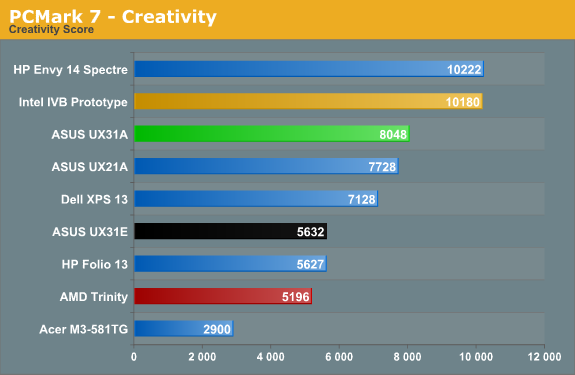
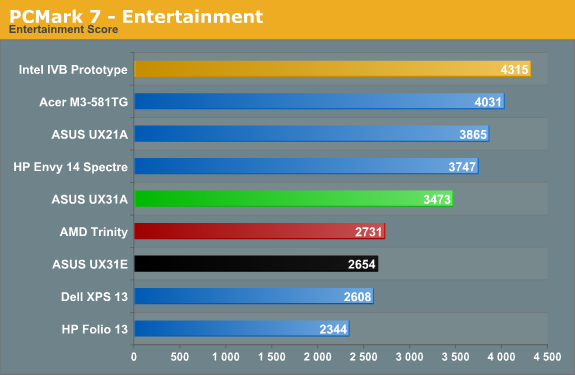
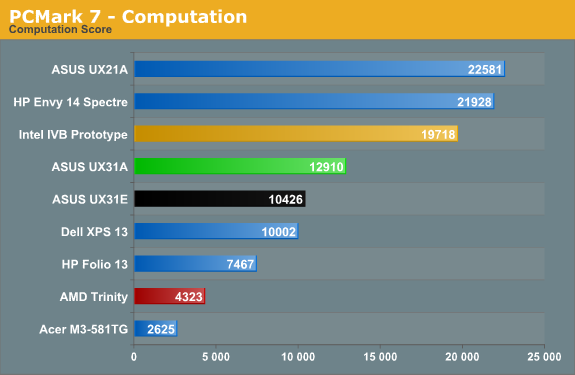
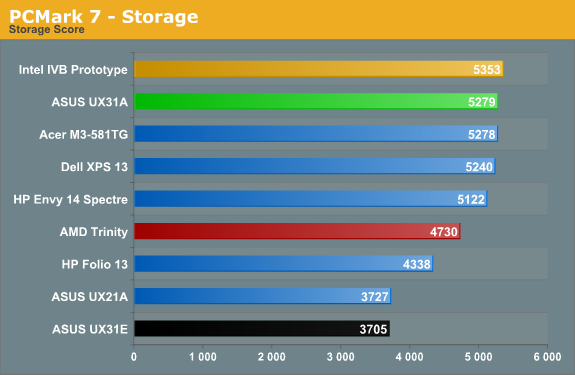
We’re looking at a faster i7-3517U processor compared to the i5-3427U in the last IVB Ultrabook, so naturally some of the scores are higher. PCMark 7 is extremely sensitive to storage performance for most of the tests, and the SF-2281 based SSDs are among the fastest out there (SandForce firmware issues notwithstanding, though I haven’t personally experienced any issues). But if the UX31A sports the fastest ULV processor we’ve tested so far and one of the fastest SSDs, why doesn’t it dominate all of the charts? The problem appears to be with the Intel GPU drivers; other IVB Ultrabooks and laptops have scored in the 20,000+ range in the Computation suite, thanks to Quick Sync, but the UX31A only manages just under 13K. ASUS shipped the UX31A with Intel’s latest 2761 driver set, and while I’ve seen good scores with those drivers I’ve also seen sub-par scores; this appears to be a case of the latter, and it brings down the Computation, Creativity, and Entertainment scores, which in turn affects the overall score as well. Don’t let those minor differences concern you, though: this is right up there with the fastest Ultrabooks.
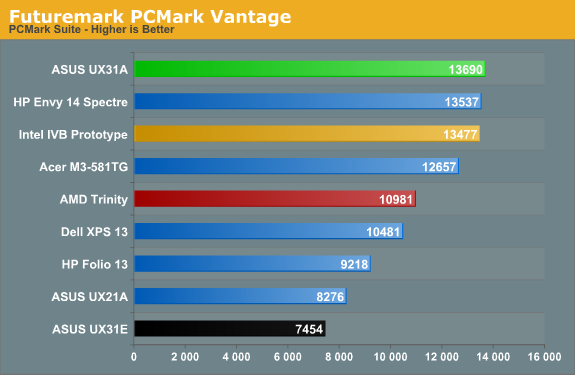
PCMark Vantage doesn’t utilize Quick Sync, leveling the playing field quite a bit, and you can see that the UX31A tops that chart. Obviously, the difference isn’t all that great, but we wouldn’t expect it to be. The i7-3517U comes with a base clock just 100MHz higher and a max Turbo clock that’s 200MHz higher than the i5-3427U, and as a system benchmark we don’t expect to see that much of a spread in PCMark. Now let’s see what happens with the other benchmarks.
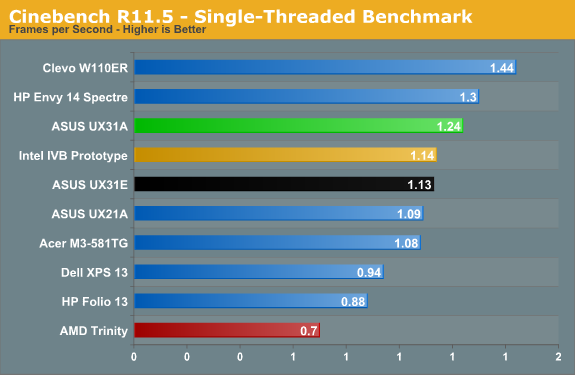
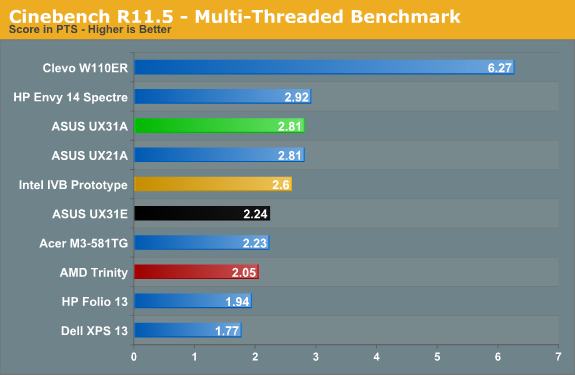
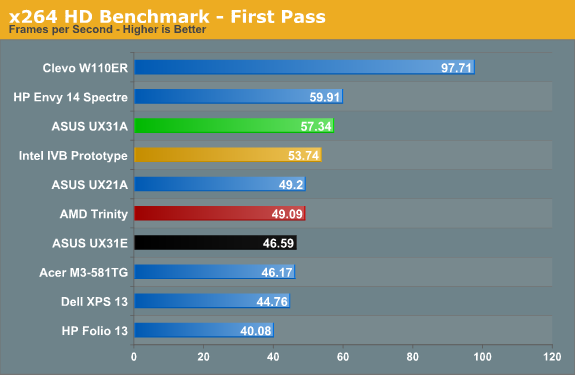
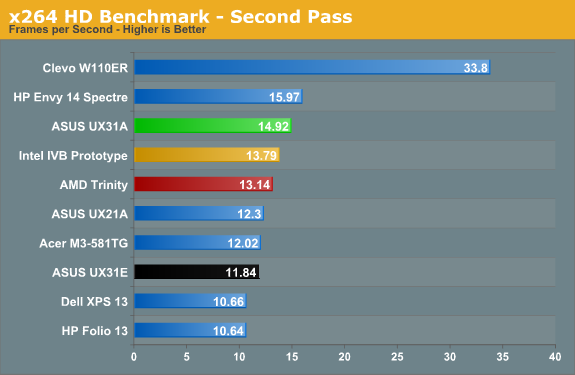
Moving on to the CPU testing side of things, the i7-3517U performs right where you’d expect. A dual-core ULV processor will never match the likes of 45W quad-core Ivy Bridge CPU for raw computational power, but if you’re only doing typical office and Internet related tasks, along with consumption of multimedia, it’s not really a problem. There are definitely applications that will benefit from more CPU performance, but things like 3D rendering (Cinebench) and video editing are only used by a relatively small percentage of users; if you have a desktop in addition to a laptop, that’s likely where you’re going to be doing such tasks. The i7-3517U ends up just slightly faster than the i5-3427U, and there’s really not much of a benefit to the upgrade. Either you can live with ULV performance and the i5 chips, or you’ll need more than the i7 ULV parts can provide.
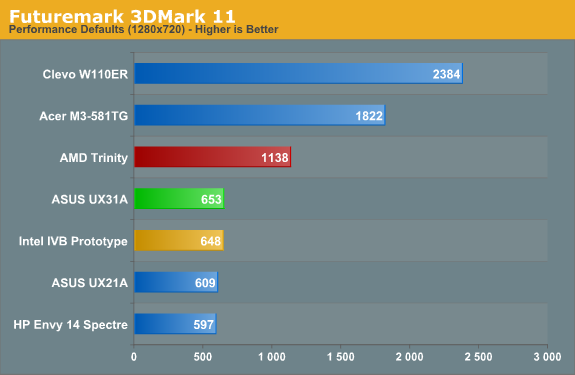
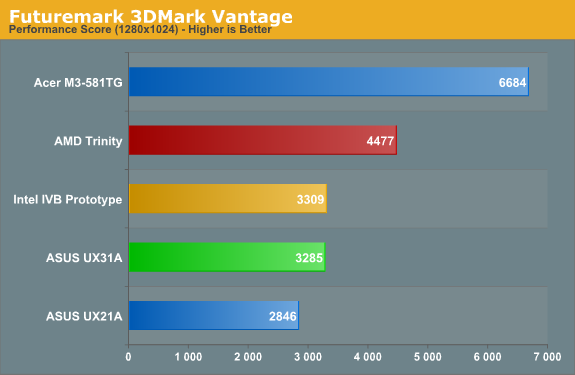
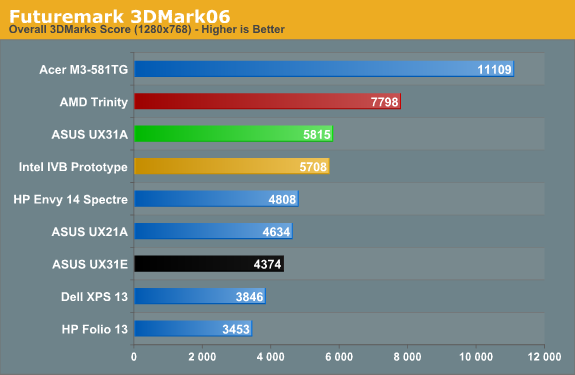
Wrapping up with a quick look at graphics performance, while HD 4000 is certainly a big step up from HD 3000—which in turn was an even bigger step up from Arrandale’s HD Graphics—it’s still nowhere near matching even midrange GPUs like the GT 640M. Ultrabooks are okay for most casual games, but demanding titles will prove too much for the HD 4000, especially when it has to operate within a 17W TDP. If you want an Ultrabook that has a bit more gaming potential, we’d suggest looking at ASUS’ UX32VD (it includes a switchable GT 620M dGPU) or Acer’s updated M5 Ultrabook (with a faster GT 640M LE dGPU). But let’s not base that off of just 3DMark results….
Originally published at https://www.anandtech.com/show/6194/asus-ux31a-putting-the-ultra-in-ultrabooks (Wayback Machine).