
Four Multi-GPU Z77 Boards from $280-$350 - PLX PEX 8747 featuring Gigabyte, ASRock, ECS and EVGA
Gigabyte G1.Sniper 3 In The Box
Gigabyte gives the user a very dichotomous relationship depending on the motherboard you buy. At the low end of the spectrum, the cheaper boards come with little else apart from a pair of SATA cables, an IO shield and a driver CD. At the higher end, such as the UD5/UD5H models and above, Gigabyte lays it on a little thicker with more cables, SLI rigid connectors, and possibly much more. So with the G1.Sniper 3 being above the UD5H, we expect a good deal in the box!
Rear IO Shield
Driver CD
User Manual
3-way SLI Rigid Connector
4-way SLI Rigid Connector
Eight SATA Cables
x1 PCIe Dual Band WiFi Card
Two WiFi Antenna
eSATA + Power Bracket
SATA Power Cables
Internal USB Cable
USB 3.0 Front Bracket
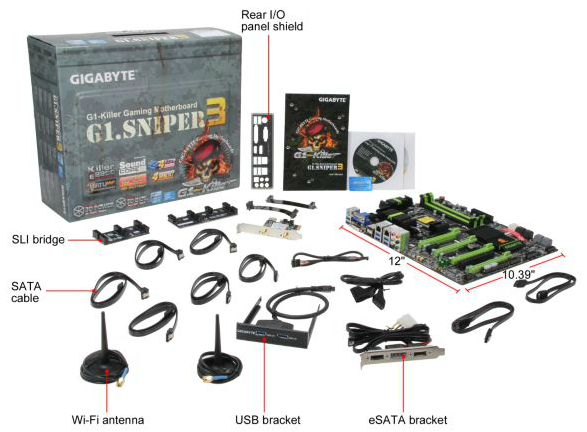
Gigabyte clearly does lay it on very think with the G1.Sniper 3, much to the joy of users everywhere. The usefulness of the WiFi card could perhaps be questionable as this is a board aimed at 4-way GPU users, though 3-way GPU users can take advantage of the spare space with that WiFi card and the eSATA bracket. So many SATA cables in the box are nice, as well as that USB 3.0 bracket and the SLI connectors.
Voltage Readings
After my first publication of OCCT voltage readings, a few readers responded with a more in-depth reasoning behind some of the results we were seeing. With this in mind, I would like to re-describe what we are doing with this test, and how it comes about.
Much of what an enthusiast overclocker does is monitor CPU temperature and voltage. Whatever settings a user places in the BIOS or OS is at the mercy of the motherboard - in terms of actually setting the values and reporting the values back. As an enthusiast, we have to rely on what readings we get back, and hope that motherboard manufacturers are being honest with their readings.
Take CPU voltage. What we as a user see in CPU-Z or OCCT is a time-averaged value that hides voltage ripple (if any) for power delivery. It is very easy for a motherboard manufacturer to hide this value, or to disregard slight deviations and report a constant value to the user. The CPU voltage reading can be taken at a variety of places on the power plane, which can vary between motherboards and manufacturers, meaning that each reading is essentially not comparable with the other. Nevertheless, as an enthusiast, we will constantly compare value A with value B.
Whether or not I can achieve 4.7 GHz with 1.175 volts on a particular board is inconsequential - your motherboard may perhaps produce the same result with a reading at 1.200 volts. The only way to test the actual value is with consistent methodology is via an oscilloscope connected to similar points on each board. This may sound like taking an OCCT reading is therefore redundant.
However, motherboards have settings relating to load line calibration. As load is applied to the CPU, the voltage across the processor decreases (VDroop). Load Line calibration essentially attempts to control this level of droop, by increasing voltage when voltage drops are detected away from a fixed value. Manufacturers have different ideas on how to modify LLC with respect to load, or whether the level of modification should be controlled by the user. Some manufacturers offer the option at a variety of levels, such that overclockers can be sure of the applied setting (even if it increases peak voltage, as explained by AnandTech in 2007).
By doing a full load OCCT test, we are essentially determining both how aggressive the motherboard is reporting the CPU voltage under load and how aggressive load line calibration is performing (from the point of view of the user without an oscilloscope or DVM). If someone has one of the motherboards we have tested and you have a different one, variations in load voltage should describe the offset you may require for overclock comparisons.
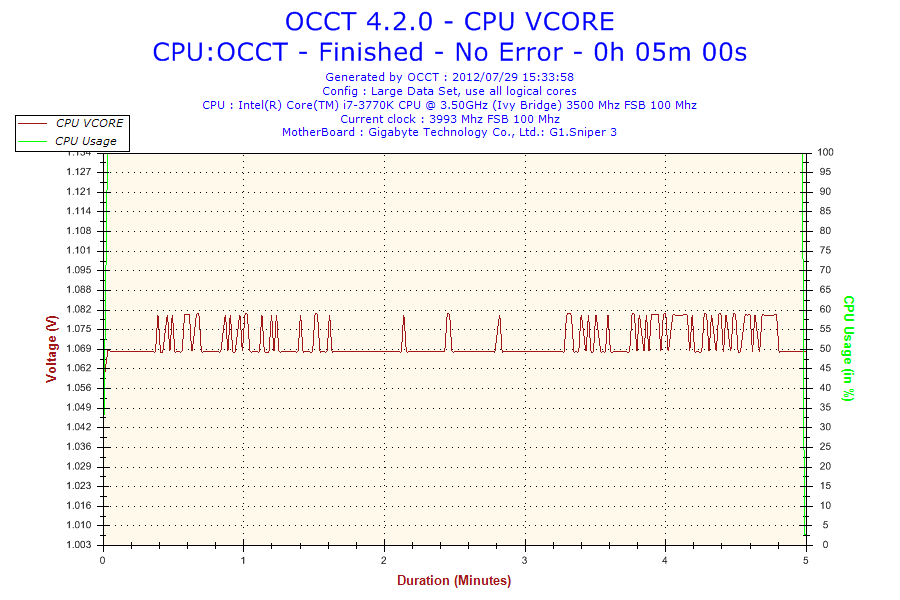
At stock, the G1.Sniper 3 showed that the voltage recorded by OCCT jumps around with a very large granularity – 0.10 volts or so. This is rather surprising – going back to the previous Gigabyte boards we have tested, we all got straight lines under the assumption that the values were being manipulated from the sensor to the operating system. If the case is that the granularity of that reporting is this large (rather than 0.02 volts on most other boards), then we have to wonder why this is the case.
We also looked at the OCCT readings when overclocked:
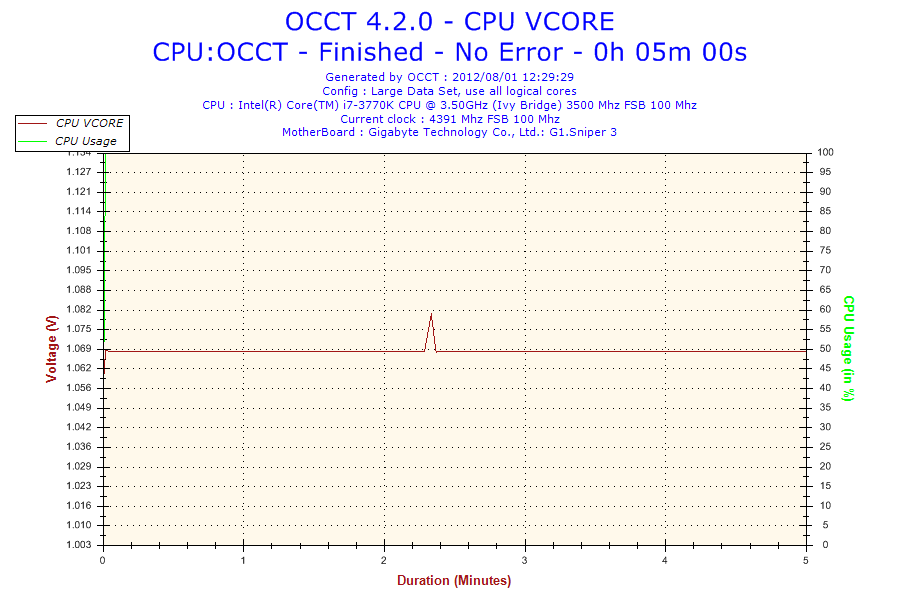
With our overclocked results (1.100 volts set in BIOS, also showing 1.068 volts in CPU-Z) we do indeed get a straight line. This could suggest that when the voltage is fixed in the BIOS by the user, the CPU load line configuration has more of a fixed gradient, compared to when it is set to Automatic (as shown above).
| Reported Load Voltage / V | |
| ASRock Fatal1ty Z77 Professional | 0.956 |
| ASRock Z77 Extreme4 | 1.050-1.058 |
| ASRock Z77 Extreme6 | 1.040-1.048 |
| ASRock Z77 Extreme9 | 1.016-1.024 |
| ASUS P8Z77-V Deluxe | 1.085 |
| ASUS P8Z77-V Pro | 1.090 |
| ASUS P8Z77-V Premium | 1.088 |
| Biostar TZ77XE4 | 1.036 |
| ECS Z77H2-AX | 1.048 |
| EVGA Z77 FTW | 0.698-0.706 |
| Gigabyte Z77X-UD5H | 1.067 |
| Gigabyte Z77X-UD3H | 1.067 |
| Gigabyte G1.Sniper 3 | 1.068-1.078 |
| MSI Z77A-GD65 | 1.020 |
Originally published at https://www.anandtech.com/show/6170/four-multigpu-z77-boards-from-280350-plx-pex-8747-featuring-gigabyte-asrock-ecs-and-evga (Wayback Machine).