
Four Multi-GPU Z77 Boards from $280-$350 - PLX PEX 8747 featuring Gigabyte, ASRock, ECS and EVGA
ECS Z77H2-AX Overclocking
Note: Ivy Bridge does not overclock like Sandy Bridge. For a detailed report on the effect of voltage on Ivy Bridge (and thus temperatures and power draw), please read Undervolting and Overclocking on Ivy Bridge.
Experience with ECS Z77H2-AX
Previous overclocking attempts on ECS motherboards have not entirely been successful – the name ECS does not exactly scream with an overclocking heritage. If your company background is based in OEM and B2B sales, overclocking expertise is probably not at the front of the mind when a motherboard is made. Despite this, ECS recently paired up with overclocking league website HWBOT as a sponsor and has run competitions for users using ECS motherboards as well as users to win ECS motherboards. Results in these competitions were a little mixed, with the winners having to modify the motherboards physically to reach the best scores. No doubt ECS learned a lot from the competition, as well as invested in the winners via consultancy regarding overclocking.
To put this into perspective, the ECS Z77H2-AX I had in for review overclocked very easily on the CPU, hitting 4.7 GHz at 1.200 volts (OS at full CPU loading) similar to most of the other boards in our testing. With regards memory, we had issues running our very aggressive DDR3-2400 9-11-11 kit at XMP – no matter our timings or voltages, the kit would not run at these settings. In the end, we settled for DDR3-2133 10-12-12, which could limit the motherboard in some of our benchmark suite.
Unfortunately, ECS has not decided to put in any automatic overclocking settings – no way of selecting a predefined set of options for your processor. The only way to overclock properly is through the BIOS, where all the options are in a trio of menus that are easy to navigate between. There is some overclocking software as part of the package, but it only allows BCLK adjustment.
One note I should point out – similar to the testing with the ASUS P8Z77-V Premium, during the testing of this motherboard we had an uncommonly bright and warm day, causing ambient temperatures to raise from 15°C to 25°C, and humidity to also rise. As a result, overclocking on this system hit its peak earlier than in other environments. Unfortunately it is not common for residential properties in the UK to have air conditioning either, so we had to make do with an additional pair of powerful fans to aid cooling.
Methodology:
Our standard overclocking methodology is as follows. We select the automatic overclock options and test for stability with PovRay and OCCT to simulate high-end workloads. These stability tests aim to catch any immediate causes for memory or CPU errors.
For manual overclocks, based on the information gathered from previous testing, starts off at a nominal voltage and CPU multiplier, and the multiplier is increased until the stability tests are failed. The CPU voltage is increased gradually until the stability tests are passed, and the process repeated until the motherboard reduces the multiplier automatically (due to safety protocol) or the CPU temperature reaches a stupidly high level (100ºC+).
Our test bed is not in a case, which should push overclocks higher with fresher (cooler) air. We also are using Intel's All-in-one Liquid Cooler with its stock fan. This is a 120mm radiator liquid cooler, designed to mimic a medium-to-high end air cooler.
Manual Overclock:
To start with, we adjust the CPU multiplier to 44x and the CPU voltage in the BIOS to 1.100 volts as we have done in our other Z77 testing. With the ECS Z77H2-AX, we also adjusted the VDroop to disabled. In order to apply a fixed value for the voltage, the voltage mode was set to ‘Ignore SVID’.
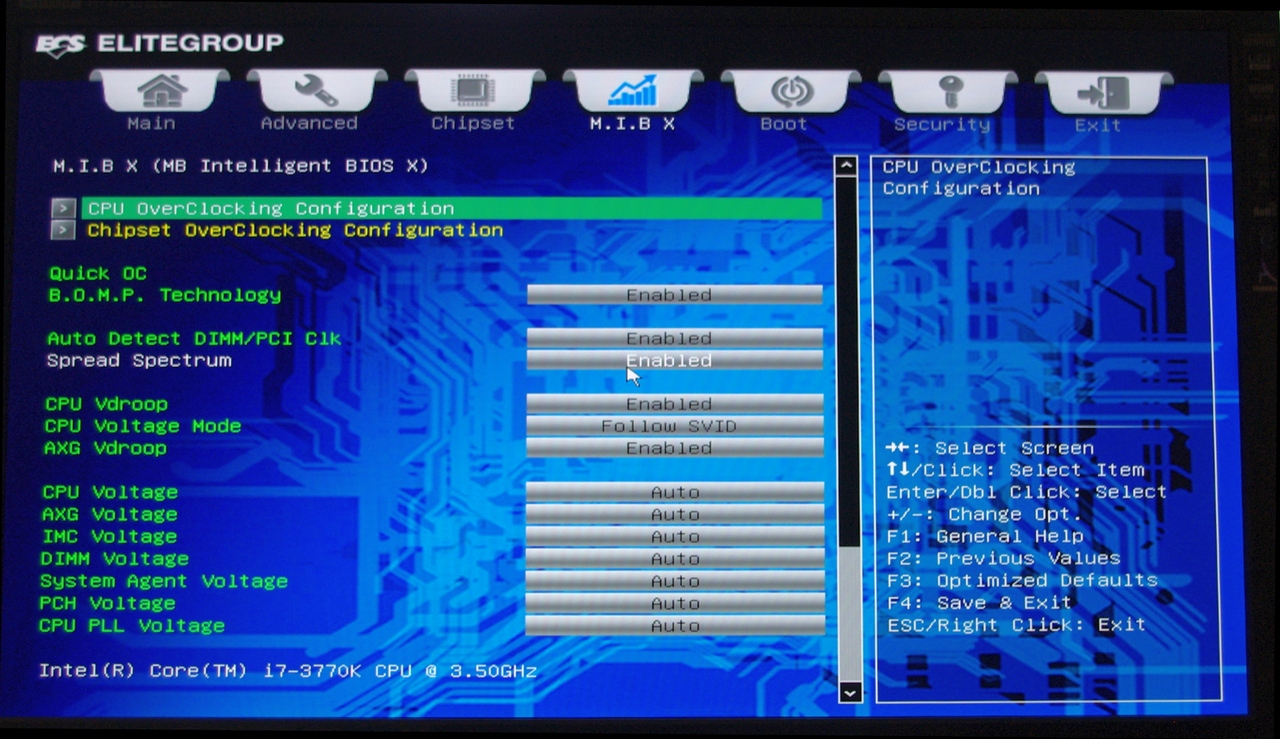
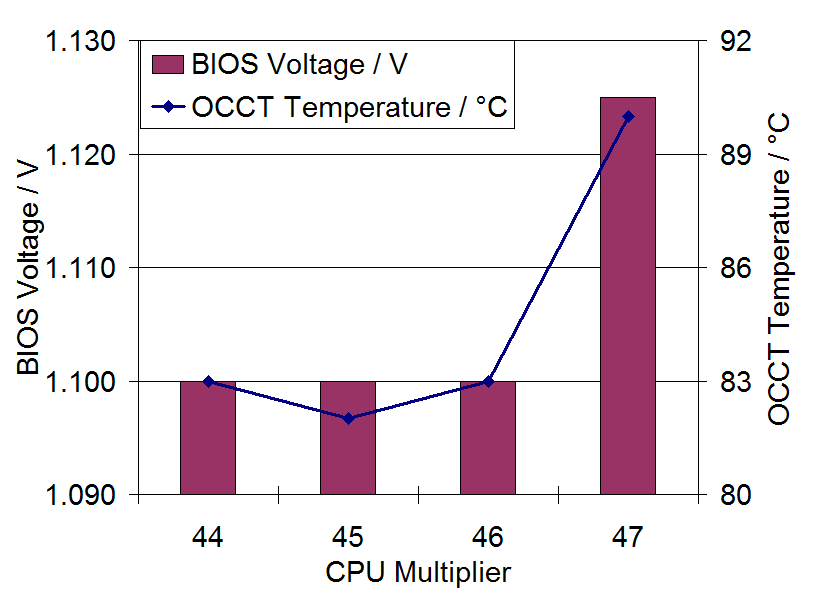
At the 44x CPU multiplier, the system was stable at 1.100 volts showing 1.164 volts at load when VDroop was disabled. Peak temperatures observed were 82°C during PovRay and 83°C during OCCT.
At the 45x CPU multiplier, the system was stable at 1.100 volts showing 1.164 volts at load when VDroop was disabled. Peak temperatures observed were 81°C during PovRay and 82°C during OCCT.
At the 46x CPU multiplier, the system was stable at a minimum of 1.100 volts set in the BIOS, showing 1.164 volts at load when VDroop was disabled. Peak temperatures observed were 82°C during PovRay and 83°C during OCCT.
At the 47x CPU multiplier, the system was stable at a minimum of 1.125 volts set in the BIOS, showing 1.200 volts at load when VDroop was disabled. Peak temperatures observed were 87°C during PovRay and 90°C during OCCT.
Unfortunately we were not able to get the 48x multiplier stable, and at a BIOS voltage of 1.200 volts, we saw 1.272 volts on the CPU at load and 97°C during PovRay before the system reported a memory error.
Originally published at https://www.anandtech.com/show/6170/four-multigpu-z77-boards-from-280350-plx-pex-8747-featuring-gigabyte-asrock-ecs-and-evga (Wayback Machine).