
Four Multi-GPU Z77 Boards from $280-$350 - PLX PEX 8747 featuring Gigabyte, ASRock, ECS and EVGA
ASRock Z77 Extreme9 Overclocking
Note: Ivy Bridge does not overclock like Sandy Bridge. For a detailed report on the effect of voltage on Ivy Bridge (and thus temperatures and power draw), please read Undervolting and Overclocking on Ivy Bridge.
Experience with ASRock Z77 Extreme9
Overclocking with the ASRock Z77 series of motherboards is actually quite easy compared to some of the others. ASRock offer a good selection of automatic overclocking controls, from the ‘Advanced Turbo 30’ to the ‘Optimized CPU OC Setting’ options, and for manual selections we have direct access to CPU multipliers, BCLKs, voltages and LLC all in a single screen. Failed CPU overclocks are easily caught, but the downside to the ASRock OC functionality is their operating system software, which does not amount to much.
*It should be noted that during the overclock testing of this motherboard, the localized temperature was higher than usual due to the weather. We experienced similar issues with the ASUS P8Z77-V Premium, and as a result our overclock limits were hit earlier than expected. As explained in the ASUS review, it is hard to keep temperatures constant under these circumstances in the UK where air conditioning is not a standard feature in properties. In this case, I added a pair of fans to aid in cooling.
Methodology:
Our standard overclocking methodology is as follows. We select the automatic overclock options and test for stability with PovRay and OCCT to simulate high-end workloads. These stability tests aim to catch any immediate causes for memory or CPU errors.
For manual overclocks, based on the information gathered from previous testing, starts off at a nominal voltage and CPU multiplier, and the multiplier is increased until the stability tests are failed. The CPU voltage is increased gradually until the stability tests are passed, and the process repeated until the motherboard reduces the multiplier automatically (due to safety protocol) or the CPU temperature reaches a stupidly high level (100ºC+).
Our test bed is not in a case, which should push overclocks higher with fresher (cooler) air. We also are using Intel's All-in-one Liquid Cooler with its stock fan. This is a 120mm radiator liquid cooler, designed to mimic a medium-to-high end air cooler.
Automatic Overclock:
The automatic overclock options are in the BIOS, found directly at the top of the OC Tweaker menu. The main two options are ‘Advanced Turbo 30’, which implements a 4.7 GHz overclock with aggressive voltage timings, or ‘Optimized CPU OC Setting’, which applies presets from 4.0 GHz to 4.8 GHz with a less aggressive strategy.
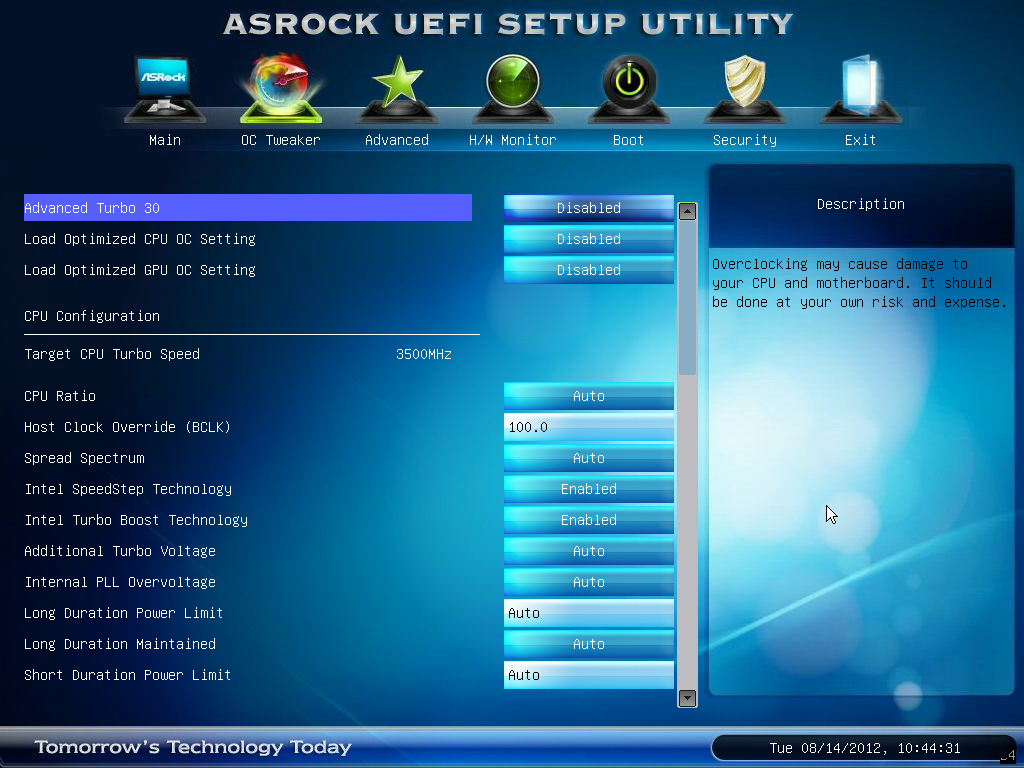
Here are our results:
For the Advanced Turbo 30 setting, the system applied an all-core overclock to the 47x multiplier along with a +0.085 volt offset on the CPU under LLC Level 1. The system also applied a +0.120 volt offset to the iGPU, along with iGPU LLC Level 2. At these settings, the system showed 1.280 volts at load in the OS, with peak temperatures during PovRay reaching 102°C and during OCCT of 103°C. In both cases, the system declocked down to 46x to reduce temperatures.
With the ‘Advanced CPU OC Settings’, we have options from 4.0 GHz to 4.8 GHz in 200 MHz intervals. The following results were obtained.
At the 4.0 GHz setting, the system remained at automatic CPU voltages and LLC settings. In the OS, a load voltage of 1.168 volts was reported, and peak temperatures observed were 79°C for PovRay and 84°C for OCCT.
At the 4.2 GHz setting, the system remained at automatic CPU voltages and LLC settings. In the OS, a load voltage of 1.176 volts was reported, and peak temperatures observed were 83°C for PovRay and 87°C for OCCT.
At the 4.4 GHz setting, the system remained at automatic CPU voltages and LLC settings. In the OS, a load voltage of 1.176 volts was reported, and peak temperatures observed were 86°C for PovRay and 87°C for OCCT.
At the 4.6 GHz setting, the system remained at automatic CPU voltages but adjusted the LLC to Level 1. In the OS, a load voltage of 1.192 volts was reported, and peak temperatures observed were 87°C for PovRay and 91°C for OCCT.
At the 4.8 GHz setting, the system gave a fixed CPU voltage of 1.240 volts and adjusted the LLC to Level 1. In the OS, a load voltage of 1.224 volts was reported, but the system was unstable, giving errors in both PovRay and OCCT.
Manual Overclock:
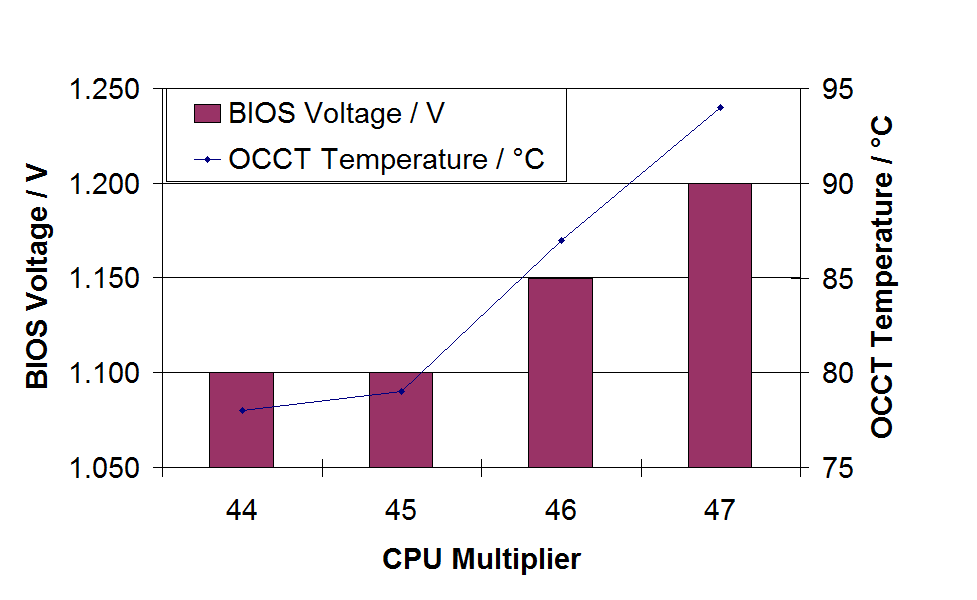
In the manual overclocking, the system was adjusted to LLC Level 1 from the beginning, to allow for greater stability at high CPU loading. As usual for Z77 overclocks, we start at the 44x multiplier and 1.100 volts in the BIOS with our i7-3770K CPU.
At the 44x multiplier, the system was stable at a minimum BIOS voltage of 1.100 volts. This showed a load voltage of 1.096 volts in the OS, and peak temperatures of 76°C during PovRay and 78°C during OCCT.
At the 45x multiplier, the system was stable at a minimum BIOS voltage of 1.100 volts. This showed a load voltage of 1.104 volts in the OS, and peak temperatures of 77°C during PovRay and 79°C during OCCT.
At the 46x multiplier, the system was stable at a minimum BIOS voltage of 1.150 volts. This showed a load voltage of 1.152 volts in the OS, and peak temperatures of 84°C during PovRay and 87°C during OCCT.
At the 47x multiplier, the system was stable at a minimum BIOS voltage of 1.200 volts. This showed a load voltage of 1.208 volts in the OS, and peak temperatures of 92°C during PovRay and 94°C during OCCT.
At the 48x multiplier, the system was not stable even at 1.275 volts in the OS. At this voltage, the system would rise to above 100°C in PovRay and give memory errors.
Originally published at https://www.anandtech.com/show/6170/four-multigpu-z77-boards-from-280350-plx-pex-8747-featuring-gigabyte-asrock-ecs-and-evga (Wayback Machine).