
SilverStone Sugo SG05: The Mini-ITX Standard Bearer
Assembling the SilverStone Sugo SG05
For how smitten I was with Cooler Master's inexpensive Elite 120 Advanced, it had a couple of kinks that made it less enjoyable to assemble than SilverStone's Sugo SG05 is. Having to provide space for an ATX power supply and a full 5.25" optical drive bay meant cutting into some of the case's internal space, and the drive cage wound up actually being detrimental to the design in some ways. The SG05 is a remarkably clean design and was very easy to assemble, especially for a case of its diminutive size.


Installing the motherboard was for the most part very easy; standoffs come built into the tray, although it's nigh impossible to screw the board in on one corner without removing the power supply. You'll have to remove the bracing bar from the PSU along with the drive caddies, but you would've needed to remove at least the caddies anyways. Call me lazy, but I actually just left the corner of the board floating and still found it plenty secure. More responsible users may be inclined to remove the PSU to completely mount the board. There's a healthy amount of space around the board to connect power cables and headers, as well.
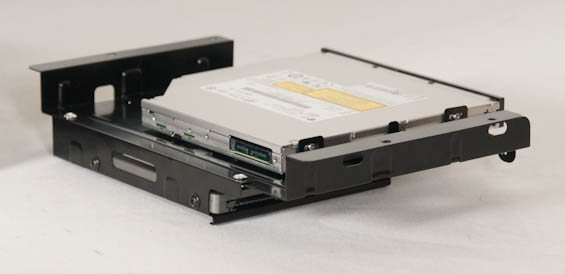
Honestly, the worst part of assembling our system in the SG05 was the optical drive and 2.5" drive caddy. Getting the screws into the 2.5" drive required a bit of dexterity, while the slimline optical drive's tiny, tiny screws made installing it a nightmare. I'm not a particularly steady person in the first place, and these are the kinds of screws a housecat will swallow without a second thought. Part of that is just the nature of the screws used to mount slimline drives and I'm not sure how much SilverStone could've done to make this process easier. As for the 3.5" drive bay, I actually eschewed that entirely. That cage is removable, and I found that when assembling the SG05 the copious amount of cabling stemming from the PSU made it exceedingly difficult to install.
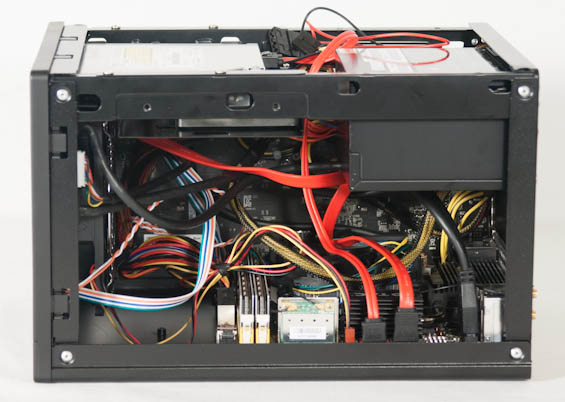
The drive bays seem to be where SilverStone decided to make their sacrifices in the name of getting the SG05 as small as it is. If you're determined enough you can jimmy the 3.5" drive cage in, but as you can see in the image above, the cable spaghetti nature of building in a small enclosure makes it pretty difficult. You'll also have to remove the front fascia (there are six plastic snaps you can bend up) to pop out the bay shield.
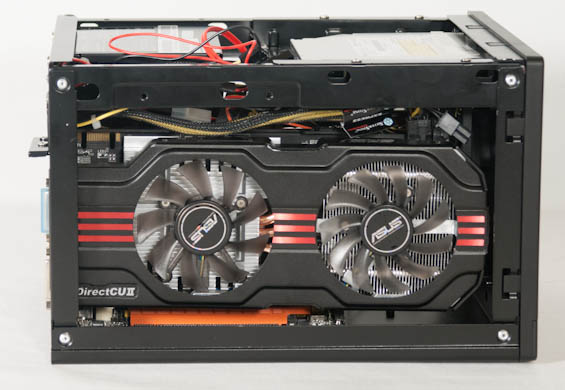
When you install an expansion card in the SG05, you're also going to be deciding just how far you're willing to push the limits of the enclosure. The ASUS GeForce GTX 560 Ti we use for testing our bigger cases did indeed fit in the SG05 (and we had to test with it, naturally), but that card is 10.2" long and it was really as big as you can get away with; I had to angle and tilt to fit it inside. Keep in mind that certain shorter card designs may have the PCIe power leads facing the back of the card instead of the top, too, so you'll want to account for that when calculating clearance.
Mushing all the cabling down and getting the shell back on the SG05 wasn't too difficult, but the tremendous amount of ventilation means that any lights inside the case are probably going to be visible. The memory kit we use for testing has LEDs on it and those LEDs are very easy to see while the system is running, along with the LEDs on the motherboard itself. Enterprising builders will have no trouble making the SG05 glow.
Originally published at https://www.anandtech.com/show/6167/silverstone-sugo-sg05-the-miniitx-standard-bearer (Wayback Machine).