
HP 2311xi IPS Monitor
HP 2311xi - Color Quality and Color Gamut
Straight out of the box, I set the color mode on the 2311xi to sRGB mode and then set the brightness level to 200 nits. I didn’t do any other adjustments, and I also didn’t use the HP .icc profile, as HP only allows this to be downloaded from their website as a Windows .exe file and I do the monitor testing on a Mac. Since this is a file that can be used on all OS platforms without an issue, I see no reason to only have the download as an .exe file, so I just decided it was appropriate to not use it.
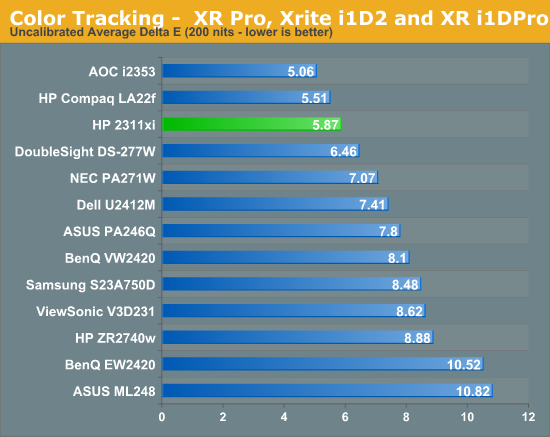
Despite this, the performance of the 2311xi in sRGB mode was very good. The average dE on our Gretag Macbeth test was 5.87, which is the second best monitor out of the box that I have tested so far. The grayscale performance was pretty good, and color performance was even better. Since most users that purchase a $200 display are not going to be calibrating it I imagine, being this good out of the box is a big benefit for users. You’ll get better color than almost any other display without any adjustments, and that’s a really nice thing to see.

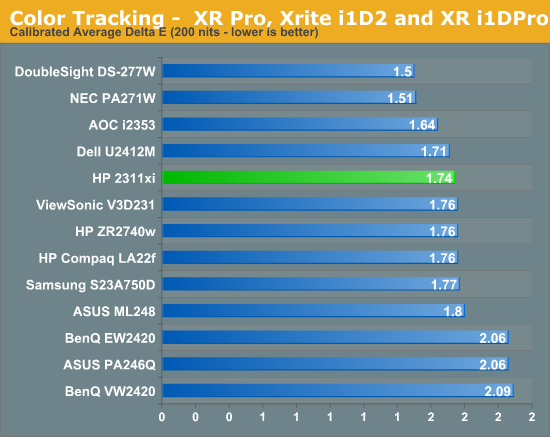
Since the HP was so good out of the box, I expected it to perform really well once it was properly calibrated. After using ColorEyes Pro, with a target of D65, 2.2 gamma, and 200 nits, we see that the average dE drops down to 1.74. This is good but not exceptional. The most noticeable difference is that the grayscale goes from being one of the best to one of the worst. It’s still at 1.0 or below, so the differences are incredibly small, but other monitors do wind up being better after calibration.

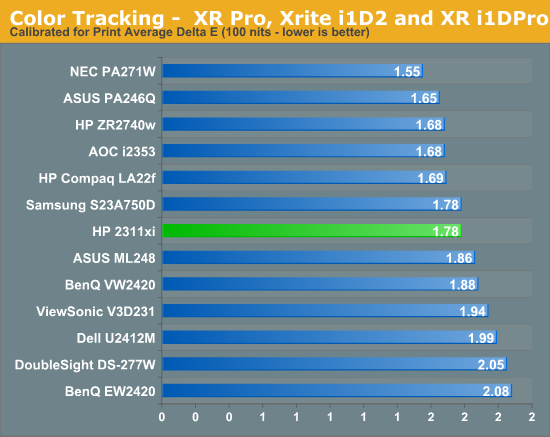
Targeting 100 nits instead of 200 nits for calibration, the results were almost identical. Grayscale errors were about the same, and so were the numbers for the colors. With how consistent the contrast ratio numbers were for different light output levels, I would expect the color results to be the same at different levels of light, and it proved to be that way. The HP was fantastic out of the box, but only decent once calibrated. I place more importance on the out of the box numbers here because of the target audience for the display, so I’d say it’s a very good performer in that regard.

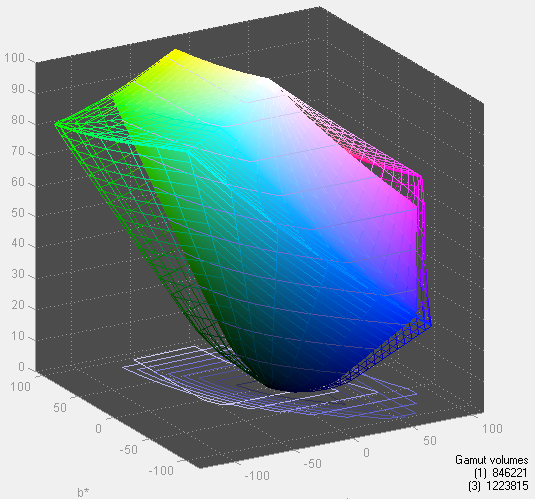
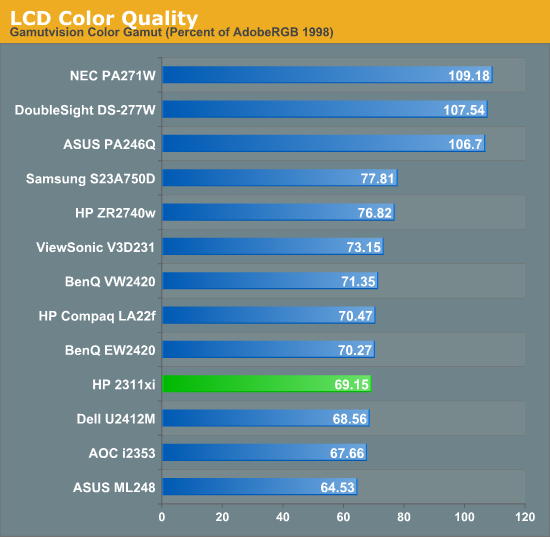
The color gamut of the HP 2311xi can only be sRGB, as white LEDs can’t do greater than sRGB; you need to move up to RGB LEDs for an AdobeRGB or larger gamut. Right around what we would expect, we see the 2311xi can manage 69% of the AdobeRGB gamut, very close to what it is specified for. This explains the issues with certain blue tones that fall at the edge of the sRGB space on the Gretag Macbeth chart as well, since it can’t produce those at all and can only try to come close.
Originally published at https://www.anandtech.com/show/6115/hp-2311xi-ips-monitor (Wayback Machine).