
Cooler Master Elite 120 Advanced Case Review: Little in Almost Every Way
Noise and Thermal Testing
Now we get to see just how well the Cooler Master Elite 120 Advanced's modest cooling system really holds up. It should be a foregone conclusion this isn't an enclosure for any kind of serious overclocking, but hopefully it should be able to hold up reasonably well with a 65-watt dual core Sandy Bridge processor.
Summer is beginning to pick up in California, and with it, ambient temperatures go up. Ambient hovered between 24C and 25C during testing with the Elite 120.
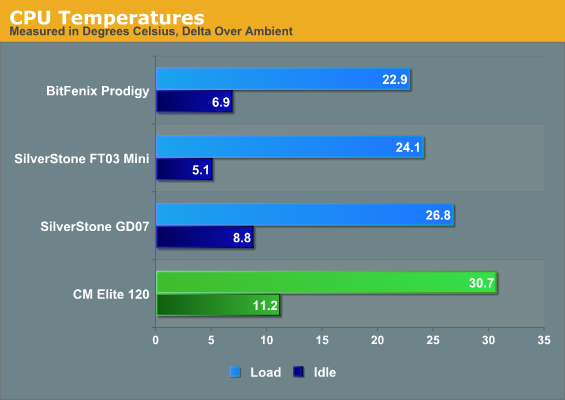
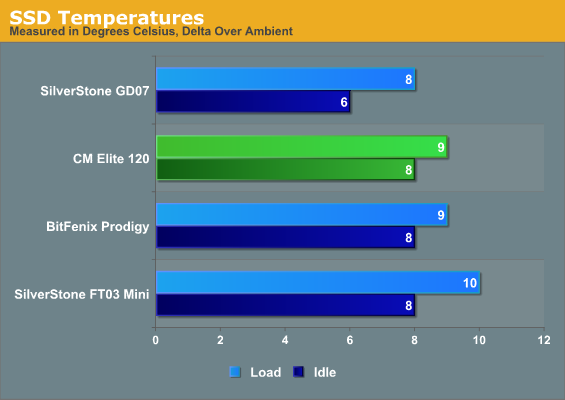
Thermals aren't stellar, but they aren't awful either. Remember that this case is smaller than the other cases save the SilverStone FT03 Mini, which is both more than twice as expensive and more particular about the components it supports (SFX power supply, slot-loading slimline optical drive). SilverStone's design does boast a vastly superior cooling system, but you'll pay for the privilege.
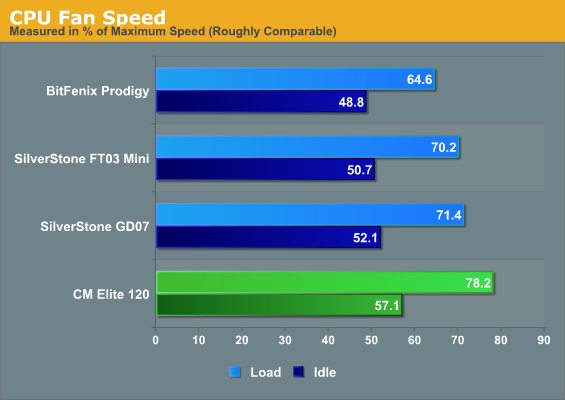
The CPU fan has to work a lot harder to get those temperatures down, too. Our testbed fan, the SilverStone NT07-1156, actually has a switch that allows you to limit how fast it spins. Given that the CPU is peaking at only 56C or so, there's probably enough headroom to relax the CPU fan speed a little to reduce system noise.
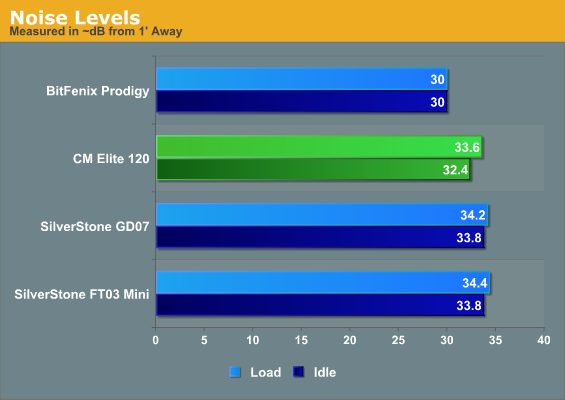
Unfortunately the stock fans, however silent Cooler Master wants to advertise them as, make a decent racket. This is really the achilles heel of cases this small; while a better quality fan could probably take some of the edge off, the copious ventilation does nothing to minimize system noise. The only way you're going to get the Elite 120 to run quiet is to substantially limit the fans and possibly outright replace the front intake.
Originally published at https://www.anandtech.com/show/6110/cooler-master-elite-120-advanced-case-review-little-in-almost-every-way (Wayback Machine).