
Cooler Master Elite 120 Advanced Case Review: Little in Almost Every Way
Assembling the Cooler Master Elite 120 Advanced
Putting together a system in any Mini-ITX enclosure is going to be more difficult than in larger cases, that's a given. Yet with the Cooler Master Elite 120 Advanced, I often found my fingers didn't need to be as spidery as they were to get the job done, and an end user who takes proper care to plan out the assembly isn't going to have much trouble getting everything together. The worst part of just about any Mini-ITX build is getting the power supply in, but if you use a modular PSU, you can ameliorate a lot of that difficulty by connecting all of your leads to the components first and then connecting and installing the PSU last.


Truthfully I was a little disappointed Cooler Master didn't include the motherboard standoffs pre-installed or at least extrude the bottom of the case enough that standoffs wouldn't be necessary (as Corsair did in the 300R). There's only one form factor of motherboard that fits into the Elite 120, and the screws are only ever going to go in the same four places. Given how cramped our testbed motherboard is, though, I opted to connect all of the case headers prior to installing the board and thankfully those cables were long enough to make this relatively easy. The side intake fan, however, does cramp things a bit and no one would fault you for removing it.
Installing 5.25", 3.5", and 2.5" drives was incredibly simple. For the 5.25" bay, you need to remove the front fascia (which snaps off easily, if maybe a little too easily), then remove the bay shield; it's impossible to remove without damaging something otherwise. The toolless locking mechanism for the 5.25" bay is excellent, though, and easy to use. There's a single lever in the center and "Open" and "Lock" etched into the plastic on either side of it. It's a small touch but appreciated.
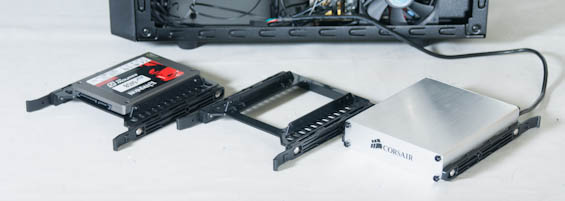
The adaptor for the 2.5" drives is made of firm plastic and the two come preinstalled with the rails snapped into the sides; a third set of rails for a separate 3.5" drive is included with the screws. The rails snap into the adaptor and 3.5" drives with ease and they feel remarkably secure. I don't think they'll be stellar for absorbing vibration, but certainly they'll do in a pinch and they're a nice convenience.
Where things get hinky is the same place they always do and the same place I mentioned before: cabling the power supply. Installing an expansion card has more to do with delicately moving and cramming cables into whatever nooks and crannies you can find for them rather than any kind of real clearance issue. There's definitely enough height and width for all but the biggest of video cards, but cramming cables can be a nuisance. Thankfully, the power supply bracket is easy to remove, with four standard screws holding it in place. Provided your PSU is short enough you could theoretically even install it without actually removing the bracket, but removing the bracket will make your life easier.
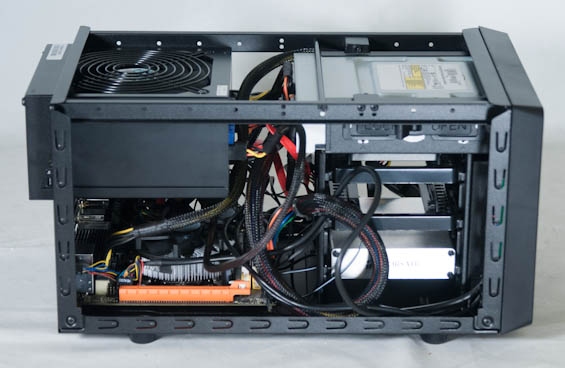
All told the Elite 120 is remarkably easy to assemble given the circumstances and I didn't have any major complaints with how it came together. Even gently tucking the cables and getting the shroud back on the sides and top of the case was fairly simple. As I mentioned before, my primary concerns lie more with actual performance than with aesthetics or ease of assembly. I don't see a Mini-ITX case, especially one that supports full size ATX components, getting a whole lot easier to assemble while staying this small.
Originally published at https://www.anandtech.com/show/6110/cooler-master-elite-120-advanced-case-review-little-in-almost-every-way (Wayback Machine).