
Gigabyte GA-Z77X-UD5H Review: Functionality meets Competitive Pricing
- Posted in
- Motherboards
- Gigabyte
- Z77
Gigabyte GA-Z77X-UD5H Overclocking
Note: Ivy Bridge does not overclock like Sandy Bridge. For a detailed report on the effect of voltage on Ivy Bridge (and thus temperatures and power draw), please read Undervolting and Overclocking on Ivy Bridge.
Experience with Gigabyte GA-Z77X-UD5H
Overclocking on the UD5H was a mixed back of results. The automatic overclocks worked, but only if the system liked the memory you were using - the automatic overclocks apply some changes to memory that caused our system to fail using our default G.Skill DDR3-2400 9-11-11 kit. However, when we used a Patriot DDR3-2133 kit, all was well.
Manual overclocking was clear-cut, as the system applies the overclock at the start of POST rather than the end. This meant that during the OS loading, if the system was very unstable, a BSOD would show and we entered the BIOS to change the voltages.
Overall results were a little disappointing, given the other good performances we had with the motherboard.
Methodology:
Our standard overclocking methodology is as follows. We select the automatic overclock options and test for stability with PovRay and OCCT to simulate high-end workloads. These stability tests aim to catch any immediate causes for memory or CPU errors.
For manual overclocks, based on the information gathered from previous testing, starts off at a nominal voltage and CPU multiplier, and the multiplier is increased until the stability tests are failed. The CPU voltage is increased gradually until the stability tests are passed, and the process repeated until the motherboard reduces the multiplier automatically (due to safety protocol) or the CPU temperature reaches a stupidly high level (100ºC+).
Our test bed is not in a case, which should push overclocks higher with fresher (cooler) air. We also are using Intel's All-in-one Liquid Cooler with its stock fan. This is a 120mm radiator liquid cooler, designed to mimic a medium-to-high end air cooler.
Automatic Overclock:
For our automatic overclocking, we had to utilize a Patriot DDR3-2133 2x2GB memory kit as the system failed to boot with our G.Skill DDR3-2400 4x4 GB kit when the automatic overclock settings were selected.
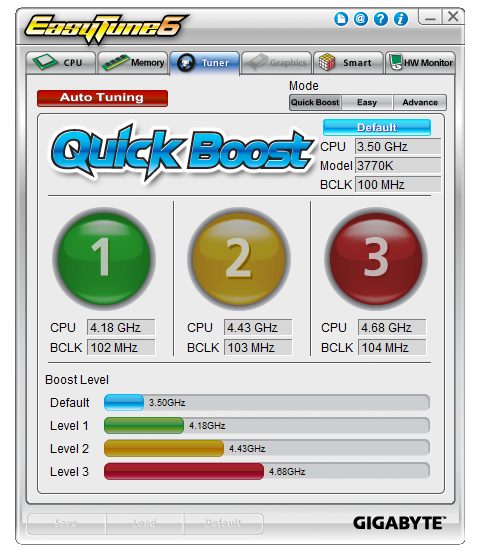
EasyTune6 offers three levels of automatic overclocking, along with an Auto Tuning option that stresses the system while raising speeds and voltages. Here are our results.
At ET Level 1, the system applied a 102.3 MHz BCLK and 41x multiplier, giving a final CPU speed of 4198 MHz. This gave a +0.150 volt offset to the CPU core, and set the memory to XMP but reduced the speed back one strap due to the enhanced BCLK. Maximum temperatures for this setting were 78ºC during PovRay and 80ºC during OCCT.
At ET Level 2, the system applied a 103.4 MHz BCLK and 43x multiplier, giving a final CPU speed of 4446.2 MHz. In the OS, a load voltage of 1.248 volts was reported, and stress testing gave maximum temperatures of 84ºC during PovRay and 88ºC during OCCT. Memory was also adjusted to one strap below XMP.
At ET Level 4, the system applied a 104.3 MHz BCLK and 45x multiplier, giving a final CPU speed of 4693.9 MHz. In the OS, a load voltage of 1.284 volts was reported, and stress testing gave maximum temperatures of 96ºC during PovRay and 98ºC during OCCT. Memory was also adjusted to one strap below XMP.
The Auto Tuning option gave the following experience:
- The system rebooted, and loads a stress-testing program.
- This program gradually raised the multiplier and BCLK.
- The stress testing part of the program crashed at 47x103.5, but tests continued.
- System hard reset at 49x103.5.
- System booted into OS at 48x104 and loaded program again, which crashed and shut down.
- System rebooted at 46x103.3 for full load and 48x103.3 for single core loads.
This overclock showed 1.296 volts at full load, giving 93ºC during PovRay and 95ºC during OCCT. However, performing the single core benchmark on PovRay caused a memory error.
Manual Overclock:
Manual overclocking was performed in the BIOS, where the CPU voltage was fixed at 1.100 volts and the multiplier started at 44x. Here are the results:
At 44x, the system was stable with a BIOS voltage set at 1.100 volts, which led to a load voltage of 1.068 volts in the OS. Peak temperatures during stability testing were 68ºC during PovRay and 71ºC during OCCT.
At 45x, the system was stable with a BIOS voltage set at 1.125 volts, which led to a load voltage of 1.096 volts in the OS. Peak temperatures during stability testing were 71ºC during PovRay and 72ºC during OCCT.
At 46x, the system was stable with a BIOS voltage set at 1.175 volts and Load Line Calibration set to Extreme, which led to a load voltage of 1.176 volts in the OS. Peak temperatures during stability testing were 80ºC during PovRay and 81ºC during OCCT.
At 47x, the system was stable with a BIOS voltage set at 1.225 volts and Load Line Calibration set to Extreme, which led to a load voltage of 1.224 volts in the OS. Peak temperatures during stability testing were 88ºC during PovRay and OCCT.
At 48x, the system was stable with a BIOS voltage set at 1.275 volts and Load Line Calibration set to Extreme, which led to a load voltage of 1.284 volts in the OS. Peak temperatures during stability testing were 97ºC during PovRay and 96ºC during OCCT.
Originally published at https://www.anandtech.com/show/6108/gigabyte-gaz77xud5h-review-functionality-meets-competitive-pricing (Wayback Machine).