
Dell XPS 15 L521X: A Detailed First Look
Dell XPS 15 General Performance
We start as usual with our general performance application benchmarks. We’re reaching the point where we now have quite a few notebooks in our updated Mobile Benchmark suite, and we’ve tried to select some reasonable comparison points. Given the preliminary nature of our benchmark results (i.e. potential for CPU and/or GPU throttling), we have not yet added the XPS 15 to Mobile Bench, but we will do so when we have a final release BIOS that addresses our throttling concerns. Here’s the list of laptops we’ll be using for our charts, along with a brief overview of their specs. The full specs for each laptop can be found in their respective reviews, which we’ve linked in the table below.
| Laptop Configuration Overview | ||||
| Laptop | CPU | Graphics | Storage | Battery |
| Acer Aspire V3-571G | Intel i7-3610QM | GT640M/HD4000 | HDD | 48Wh |
| Acer Aspire S5 | Intel i7-3517U | HD4000 | SSD | 35Wh |
| Acer TimelineU M3 | Intel i7-2637M | GT640M/HD3000 | SSD | 55Wh |
| AMD Trinity Prototype | AMD A10-4600M | HD7660G | SSD | 56Wh |
| ASUS N56VM (Prerelease) | Intel i7-3720QM | GT630M/HD4000 | HDD/SSD | 56Wh |
| ASUS G74SX-A2 | Intel i7-2630QM | GTX560M/HD3000 | SSD | 90Wh |
| Clevo W110ER | Intel i7-3720QM | GT650M/HD4000 | Hybrid (Seagate) | 62Wh |
| Dell XPS 15 (L521x) | Intel i7-3612QM | GT640M/HD4000 | Hybrid (SRT) | 65Wh |
| Razer Blade | Intel i7-2640M | GT555M/HD3000 | SSD | 60Wh |
| Sony VAIO SE | Intel i7-2640M | HD6630M/HD3000 | HDD | 49Wh |
| Toshiba P755D | AMD A8-3520M | HD6620G | HDD | 47Wh |
We have quite a few SSD-equipped laptops in our list, which will mostly influence PCMark results. The Dell XPS 15 we’re reviewing marks the first time—and certainly won’t be the last!—we’ve had a laptop arrive with support for Intel’s Smart Response Technology. Previously SRT was only available with the desktop Z68 chipset, but with the new Ivy Bridge Panther Point chipsets (see the chipset table at the bottom of our IVB Ultrabook review) laptops with 7-series chipsets (excluding the HM76) all support SRT. Dell uses a Samsung P830 32GB mSATA SSD for SRT caching, and we enabled the higher performing “Maximized” mode with write-back caching as opposed to the lower performing “Enhanced” mode with write-through caching. There is an increased risk of data loss in the event of hardware removal or failure, but HDD removal is highly unlikely to occur on the XPS 15 and in the case of hardware failure there’s already a high chance of data loss. (We always recommend users back up, and back up often!) Note that a system crash doesn’t cause data loss—the Intel BIOS hooks detect an improper shutdown with “unsaved” data in the SSD cache, and that data is then committed to the hard drive on the next boot—it’s actually quite slick.
The other hybrid storage solution that we’ve seen more often is Seagate’s Momentus XT, which has an 8GB cache that AFAIK only functions in write-through caching mode. Going forward, we’ll also see some laptops using alternative caching schemes like Diskeeper/Condusiv Technologies’ ExpressCache software. I do have a laptop undergoing testing right now with an 8GB ExpressCache implementation, and it appears to be less performant than a 32GB SRT cache, but given the discrepancy in SSD size it’s difficult to come to any firm conclusion at this point.
Now let’s get to the benchmark results, starting with PCMark. We ran the XPS 15 in both IGP and dGPU modes, as the presence/lack of Intel’s Quick Sync technology can have a sizeable impact on overall performance according to this metric. We’ve used the best score for each chart on previously testing laptops (e.g. IGP for the Computation results). The XPS 15 results are in green, with the similarly equipped Acer V3-571G results in yellow. We also have results for the ASUS N56VM/N56VZ prototype with both HDD and SSD (light blue) storage, so you can get a feel for the range of performance that the storage solution creates. Note that while the overall design is highly reminiscent of Apple’s current MacBook Pro 15, we do not have current MBP15 Boot Camp results—and anecdotally it appears there is very little cross shopping; people either want an MBP with OS X, or something else with Windows. If/when Anand or Vivek gets around to testing the latest MacBooks with Windows, we’ll add the results to Mobile Bench.
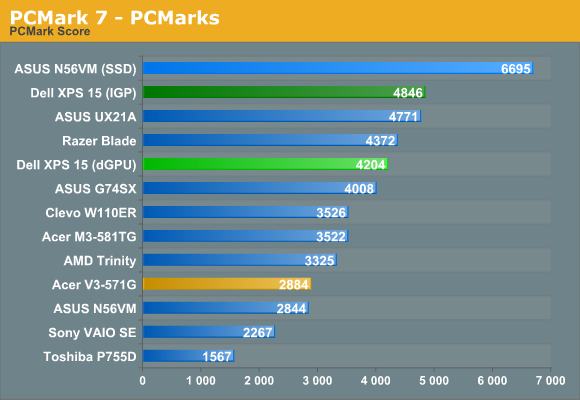
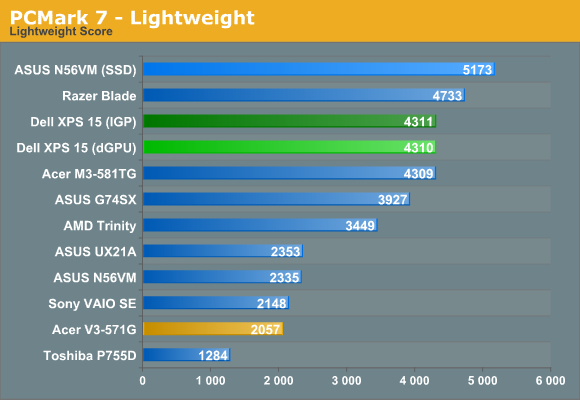
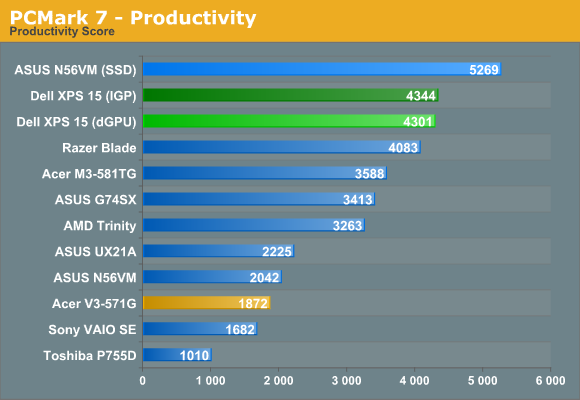
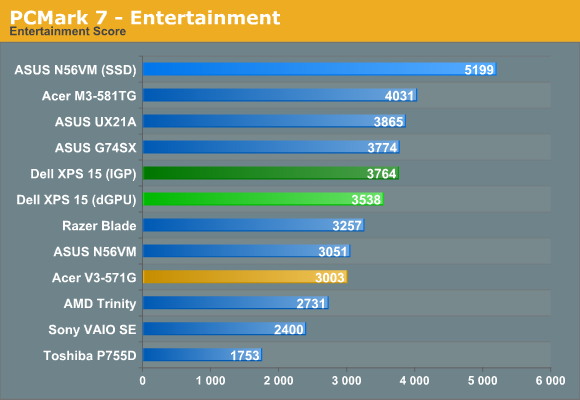
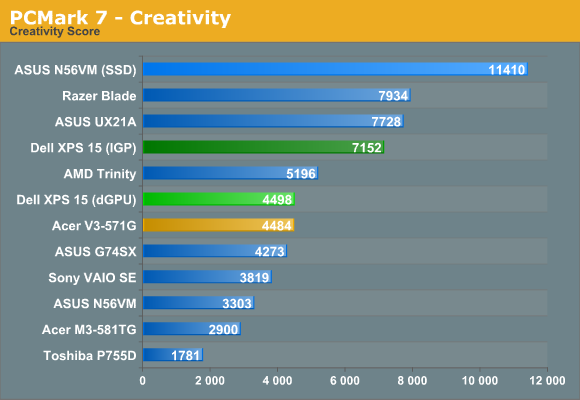
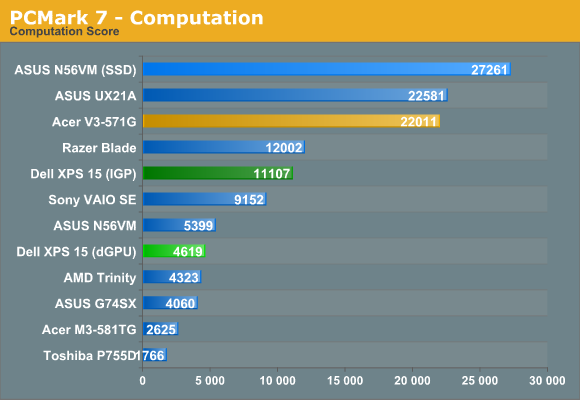
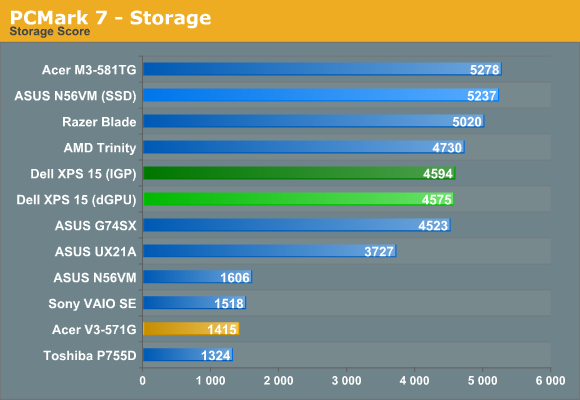
Starting with PCMark 7, our results are actually somewhat surprising. The hybrid Seagate Momentus XT storage in the Clevo W110ER doesn’t improve scores all that much over a typical hard drive (if you can call 25% “not that much”), whereas the 32GB SRT solution in the XPS 15 looks to improve performance by around 75% over an HDD. Of course, if you make the switch to a pure SSD solution (e.g. look at the N56VM scores), PCMark 7’s overall score improves by 135%. That pretty much establishes the expected storage hierarchy: SSD > HDD + SSD Cache > Hybrid HDD > HDD.
There are a few other oddities in the PCMark 7 results worth noting. Both the Creativity and Computation suites benefit tremendously from Intel’s Quick Sync technology. For whatever reason (we tried both the 2696 and 2761 Intel drivers, with similar scores in both cases), the XPS 15 results don’t seem to be in line with other Ivy Bridge laptops. In particular, note how the other three IVB laptops (N56VM, UX21A, and V3-571G) all post Computation scores in excess of 20000, while the XPS 15 has to “make do” with a score of only 11000. This may be yet another instance where throttling is affecting the results, so we’ll wait for updated firmware before trying to draw any final conclusions.
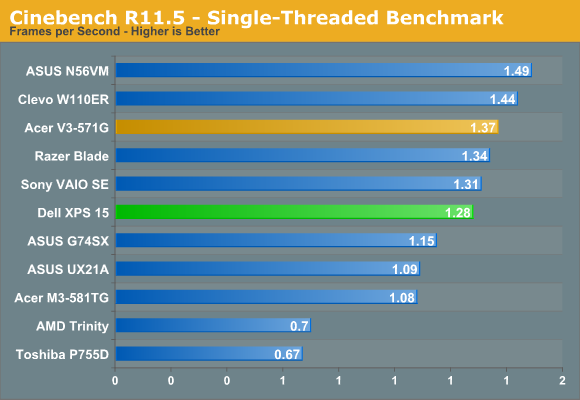
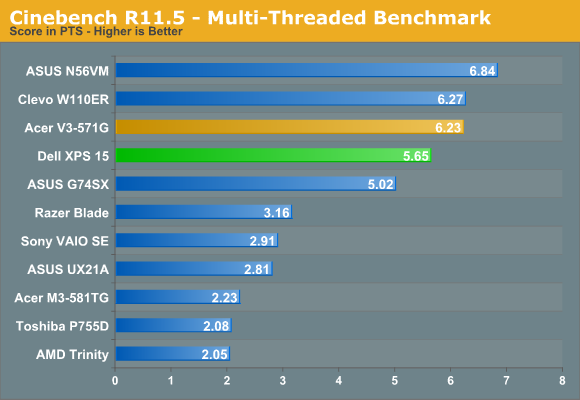
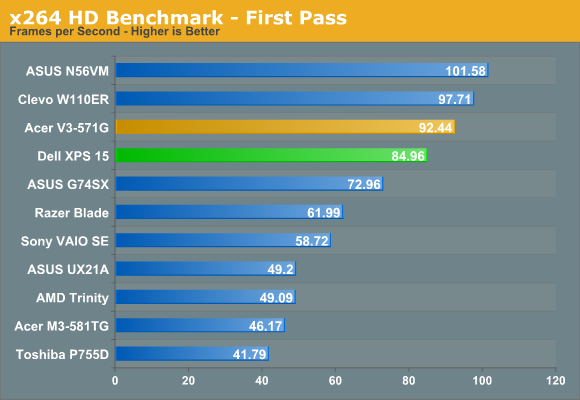
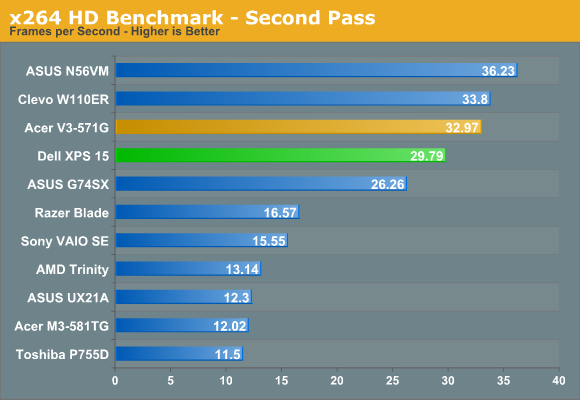
Our CPU-centric tests put the XPS 15 and its 35W i7-3612QM right about where you’d expect. It’s faster than any dual-core processor and outperforms the quad-core Sandy Bridge chips, but it’s a slight step down from the standard voltage 45W IVB quad-cores. Throttling of CPU clocks did not occur during these tests, so it’s only when the CPU and GPU are carrying a significant load the throttling is triggered. As far as we can tell, with the current A04 BIOS, the Dell XPS 15 can pretty much loop a workload like the Cinebench SMP test indefinitely and remain at the maximum Turbo Boost clock (though that may change with updated firmware).
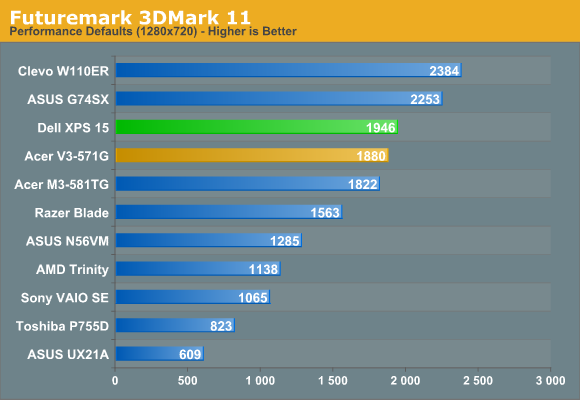
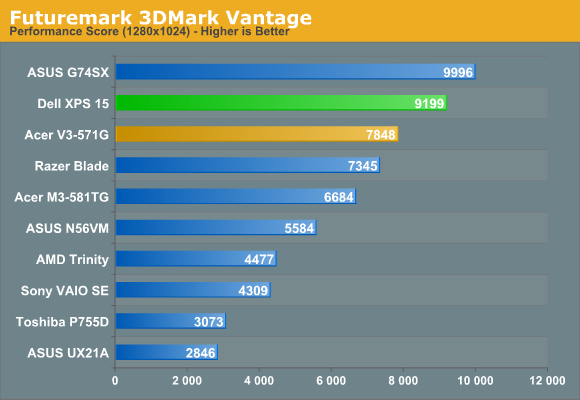
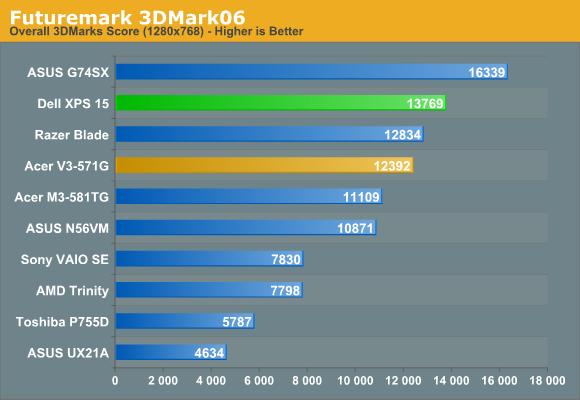
3DMark results also put the XPS 15 and its GDDR5-equipped GT 640M right where you’d expect. It’s a step up in performance over the DDR3-equipped GT 640M in the Acer V3-571G, and it also beats the previous generation GT 555M in the Razer Blade. Meanwhile, the GTX 560M can still win in our synthetic graphics tests, and the GT 650M with GDDR5 also outperforms the XPS 15. There are no real surprises here, but as noted several times already, throttling may be affecting these results—and it’s definitely a factor in the gaming results, which we’ll get to next.
Originally published at https://www.anandtech.com/show/6103/dell-xps-15-l521x-detailed-first-look (Wayback Machine).