
The Google Nexus 7 Review
The Display
In this new age of high resolution panels with small dimensions, the goal seems to be to just get the display out of the way. You shouldn't notice the display, it should just quietly do its job and make you believe that what you're looking at is real. When viewed with this critical eye, very few displays do their job well.

The Nexus 7's display is somewhere between good and perfection. It's not on the latter end of the spectrum, but it's great for $199. Black levels are good, and max brightness is more than enough for indoor use, although you'll have problems outdoors if it's too sunny.
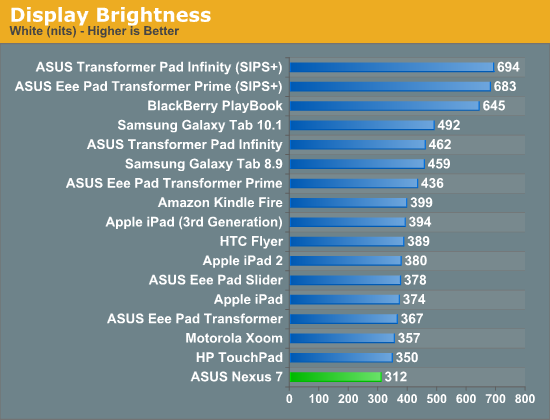
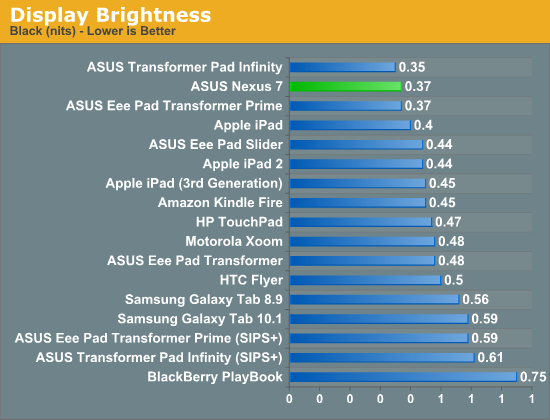
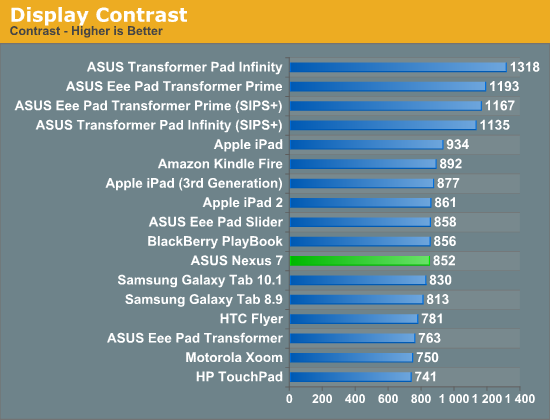
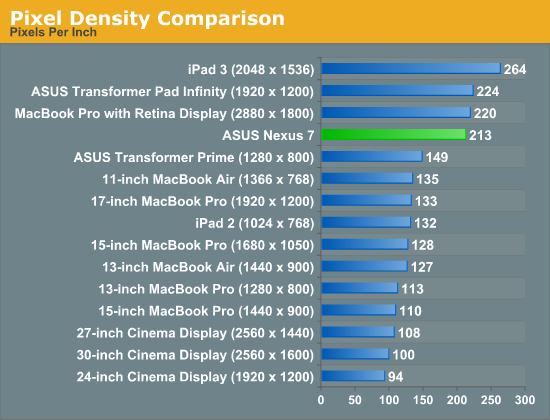
The resolution is high enough that neither Brian nor I were able to identify individual pixels at our normal viewing distances. Images do look better on the new iPad however (not a resolution but rather a panel advantage).
The other interesting aspect of the Nexus 7 is that it is a relatively new and somewhat interesting display form factor. 213 pixels per inch in a 7 inch display is unique for an Android tablet, and puts the Nexus 7 in the "tvdpi" screen density category for Android, 600 x 961 dp (that's dp - density independent pixels, relative to 160 ppi).
The end result is that some applications get a scaled down version of the 10" form factor Android 4.x UI, others don't. Some pages use the phone layout (for example the settings page, play store, and the notifications shade), others use the tablet two pane layout (for example Gmail) due to the 600dp width of the Nexus 7. That is to say it isn't totally correct to say that the UI on the Nexus 7 is a larger, scaled version of the phone UI, but something of an intermediary between the traditional 10" tablet version, and the phone version depending on what the break point is (in dps) for the particular app.
The other interesting note is that because 'tvdpi' isn't a primary display density for Android developers to build assets against, most often bitmaps get scaled down from the hdpi asset. In most places there isn't much of a noticeable softening of the edges, but I'll admit there are a few places where it's obvious bitmaps have been decimated and look a bit soft. Luckily, the pixel density of the display itself is high enough to mask most of this, but it isn't always perfect.
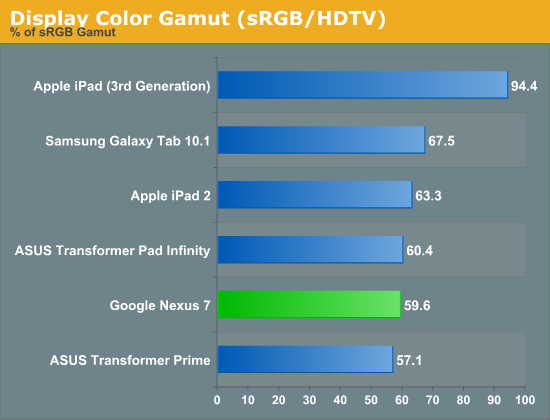
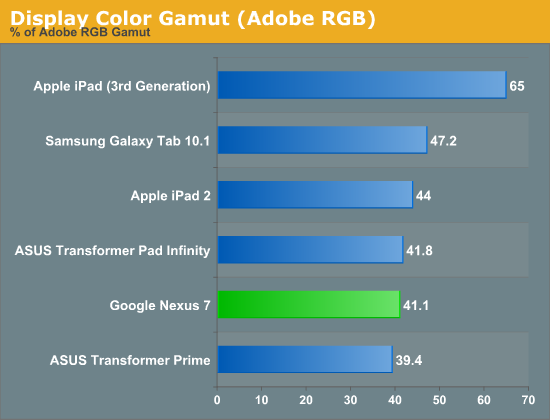
The Nexus 7's IPS panel offers great viewing angles, something that's simply a requirement for any device whose primary interface revolves around the display. Color accuracy is simply middle of the road, but I don't expect many users to do a lot of professional photo editing on the Nexus 7 so I'm not sure how much this actually matters.
Originally published at https://www.anandtech.com/show/6073/the-google-nexus-7-review (Wayback Machine).