
BitFenix Shinobi XL Case Review: Something is Lost in the Process
- Posted in
- bitfenix
- Cases/Cooling/PSUs
Assembling the BitFenix Shinobi XL
While it's easy to complain about BitFenix utilizing a very common design language for the interior of the Shinobi XL, it must be said that this design language also makes assembly a relatively painless process. BitFenix ships the Shinobi XL with the motherboard standoffs already installed in the tray, and the toolless design is largely flawless.
Where I did run into problems is that the motherboard tray itself is missing a hole for a standoff for the Micro-ATX motherboard we use for our testbed. It's not catastrophic, but it does result in a little bit of flex when connecting the case headers to the motherboard. Worth mentioning is that the Shinobi XL doesn't need separate USB 3.0-to-2.0 header adaptors; each USB 3.0 header cable comes with a built-in USB 2.0 header. Since boards with two onboard USB 3.0 headers are pretty rarefied, this is appreciated, though on the flipside it may be difficult at first to figure out which of your USB 3.0 ports are running at 3.0 and which are stuck at 2.0. Note also that the yellow USB port on the top of the case has no data header; instead it just has a SATA power lead (and I appreciate their use of SATA instead of molex).
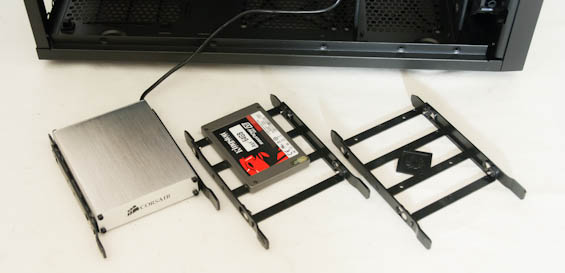
Installing any kind of drive in the Shinobi XL is a largely painless process, too. The drive trays feature pins on the sides that bend and snap into 3.5" drives while also featuring holes in the bottom for mounting 2.5" drives. The toolless clamps for the 5.25" bays are a little more confusing and require consulting the manual, but you can eschew them entirely and just use screws to secure the drives as well. Expansion cards are just as easy, using the familiar thumbscrews.


Getting the power supply in was easy as well, although one of the screw holes on the PSU didn't quite line up. BitFenix actually has four rubber standoffs the power supply sits on as well as indentations in the motherboard tray that help line up the PSU, making it easy to fit in any standard sized unit.
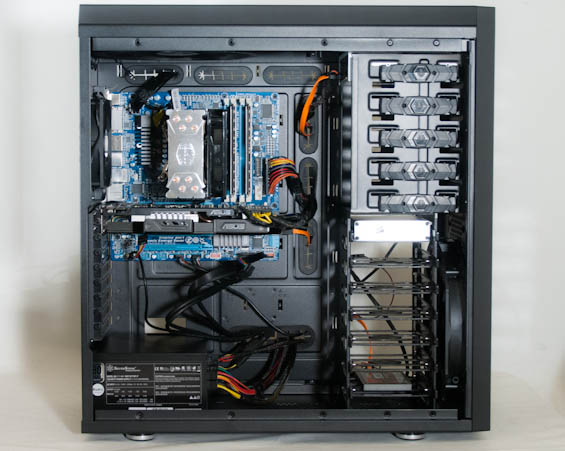
That's why it's unfortunate that when it comes time to cable the Shinobi XL, everything goes to pot. It's not absolutely awful, but the routing holes in the motherboard tray are frankly just too small and the spacing feels off. There's plenty of space behind the tray, but getting cables back there is another matter entirely, as each of the holes is a fairly tight fit. It doesn't seem so bad at first glance and you can definitely make it work, but the instant you start putting together a fairly busy system (e.g. multiple drives, multiple video cards), I can see things getting very complicated in a hurry.
The interior of the Shinobi XL just isn't that exciting, but outside of the cabling issues it comes together fairly well. Unfortunately, there are other cases in the Shinobi XL's price range (and cheaper) that are easier to put together. I get the distinct feeling this enclosure just isn't going to shine unless it's supporting a proper custom water-cooling rig.
Originally published at https://www.anandtech.com/show/6021/bitfenix-shinobi-xl-review-something-is-lost-in-the-process (Wayback Machine).