
ASRock Fatal1ty Z77 Professional Review - IDE and Floppy on Z77
- Posted in
- Motherboards
- ASRock
- Fatal1ty
- Z77
Test Setup
| Processor |
Intel Core i7-3770K ES 4 Cores, 8 Threads, 3.5 GHz (3.9 GHz Turbo) |
| Motherboards |
ASRock Z77 Extreme4 ASUS P8Z77-V Pro Gigabyte GA-Z77X-UD3H MSI Z77A-GD65 ASUS P8Z77-V Deluxe ASRock Fatal1ty Z77 Professional |
| Cooling | Intel All-in-One Liquid Cooler |
| Power Supply | OCZ 1250W Gold ZX Series |
| Memory |
GSkill RipjawsZ 4x4 GB DDR3-2400 9-11-11 Kit GSkill TridentX 2x4 GB DDR3-2666 11-13-13 Kit |
| Memory Settings | XMP (2400 9-11-11) |
| Video Cards |
ASUS HD7970 3GB ECS GTX 580 1536MB |
| Video Drivers |
Catalyst 12.3 NVIDIA Drivers 296.10 WHQL |
| Hard Drive | Micron RealSSD C300 256GB |
| Optical Drive | LG GH22NS50 |
| Case | Open Test Bed - CoolerMaster Lab V1.0 |
| Operating System | Windows 7 64-bit |
| SATA Testing | Micron RealSSD C300 256GB |
| USB 2/3 Testing | OCZ Vertex 3 240GB with SATA->USB Adaptor |
Power Consumption
Power consumption was tested on the system as a whole with a wall meter connected to the OCZ 1250W power supply, while in a dual 7970 GPU configuration. This power supply is Gold rated, and as I am in the UK on a 230-240 V supply, leads to ~75% efficiency > 50W, and 90%+ efficiency at 250W, which is suitable for both idle and multi-GPU loading. This method of power reading allows us to compare the power management of the UEFI and the board to supply components with power under load, and includes typical PSU losses due to efficiency. These are the real world values that consumers may expect from a typical system (minus the monitor) using this motherboard.
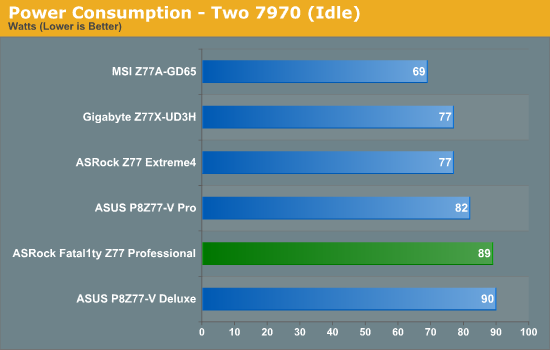
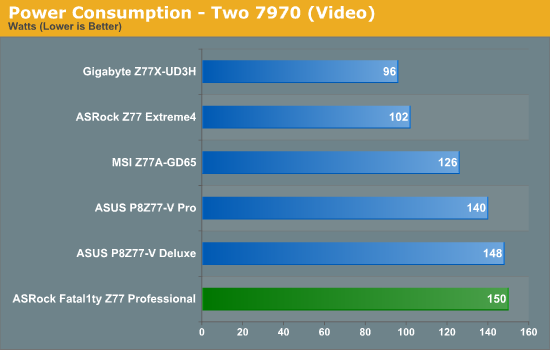
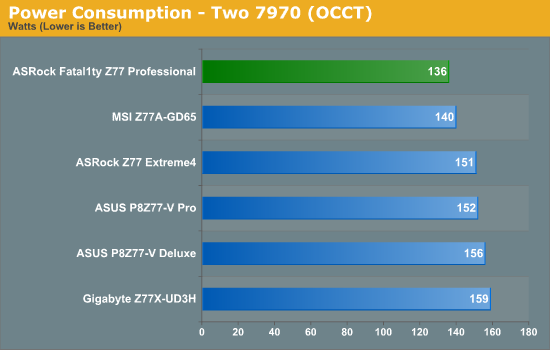
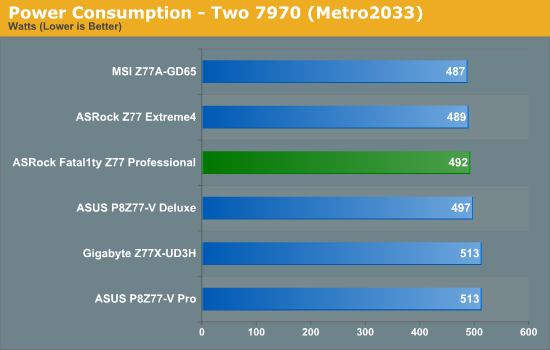
A trend I have noticed over the course of Ivy Bridge testing is that the more power phases there are on a board, the more of the phases are ‘loaded’ during moderate CPU usage, such as playing video. As these phases are at low loading individually, they are relatively inefficient than compared to high loading – this leads to a lot of power draw. As the ASRock Fatal1ty Z77 Professional has a 16+8 phase power delivery, we see this explicitly with 150W system power draw at load – 48W more than the ASRock Z77 Extreme4. There could also be other reasons for this difference, such as different signals to the GPUs regarding power required and how they power gate certain features.
POST Time
Different motherboards have different POST sequences before an operating system is initialized. A lot of this is dependent on the board itself, and POST boot time is determined by the controllers on board (and the sequence of how those extras are organized). As part of our testing, we are now going to look at the POST Boot Time - this is the time from pressing the ON button on the computer to when Windows starts loading. (We discount Windows loading as it is highly variable given Windows specific features.) These results are subject to human error, so please allow +/- 1 second in these results. As requested in my initial Z77 review, we will also be showcasing normal and ‘stripped’ POST times, whereby controllers are turned off in an attempt to get the minimum POST time.
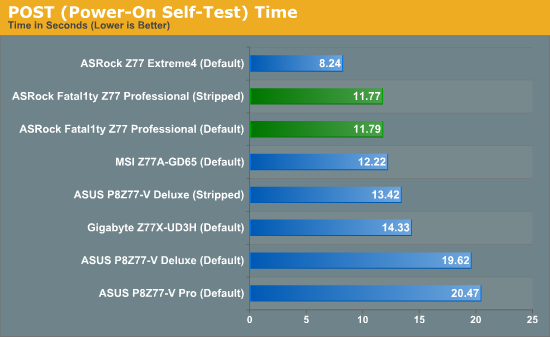
Overall, ASRock are posting some rather reasonable POST times, coming in at almost half the time of the slowest boards. It seems that the controllers on board have little effect on the POST time itself, as the stripped time comes in almost exactly the same as the default time.
Overclocks
Here at AnandTech we want to provide quick and easy ways to determine if a board is good for you (with in-depth analysis of course). So here is a quick round up of our overclocking results. Overclocks are tested for stability with PovRay and OCCT - while these may not be the most strenuous of stability tests, it does offer a quick check for memory errors under high load (and also balances testing time with getting the next board on for review!).
|
CPU Speed (MHz) |
Voltage (Volts) |
PovRay Peak Temp (ºC) |
OCCT Peak Temp (ºC) |
Notes | |
|
ASRock Fatal1ty Z77 Professional |
4700 | 1.200 | 89 | 89 | PLL Overvoltage enabled |
|
ASRock Z77 Extreme4 |
4700 | 1.175 | 86 | 86 | LLC Level 1 |
|
ASUS P8Z77-V Deluxe |
4700 | 1.225 | 89 | 84 | PLL Overvoltage enabled |
|
ASUS P8Z77-V Pro |
4700 | 1.200 | 83 | 86 | PLL Overvoltage enabled |
|
Gigabyte Z77X-UD3H |
4700 | 1.200 | 82 | 86 | LLC Extreme |
|
MSI Z77A-GD65 |
4700 | 1.250 | 90 | - | PLL Overvoltage enabled |
Originally published at https://www.anandtech.com/show/5842/asrock-fatal1ty-z77-professional-review-ide-and-floppy-on-z77 (Wayback Machine).