
Cubitek HPTX ICE Review: How Far Aluminum Can Go
In and Around the Cubitek HPTX ICE
Given that aluminum is such an attractive and sought after finish on its own, Cubitek wisely avoids tarting the HPTX ICE up at all. The exterior is a simple black, with only the aluminum coloring itself appearing on the back of the enclosure. You could be forgiven for being a bit underwhelmed by the fairly standard (if wisely minimalistic) design language of the HPTX ICE, but in our opinion it's still better to err on the side of understatement than overstatement.
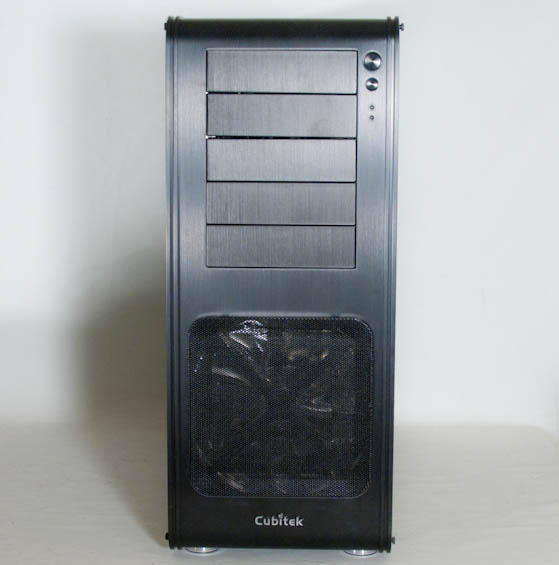
If anything, I do feel like Cubitek may have been a bit too conservative. Stop me if you've heard this before: one large fan grille at the bottom front that hides a 200mm blue LED intake fan, with a series of 5.25" bays above it, two LED indicator lights (power and IDE activity), and the power and reset buttons. On the top of the enclosure, two fan grilles for the 140mm blue LED exhaust fans, a pair of USB 2.0 and 3.0 ports, and audio jacks. Completely blank, solid sides. Nobody's going to accuse the HPTX ICE of being gaudy, but the design just isn't distinctive either.
Cubitek does change the program with the way the side panels are mounted, but unfortunately it's not an improvement. The side panels are simple and flat with nothing that really catches them on the rest of the enclosure other than that they basically line up with the trim of the HPTX ICE. Worse still are the screws Cubitek opts to use to secure them: one at each corner, but with a hex socket instead of the garden variety Phillips head. Even though Cubitek includes a basic allen wrench with the case, it's an unnecessary deviation from established convention. [Ed: And I'd rather have slightly larger thumbscrews.]
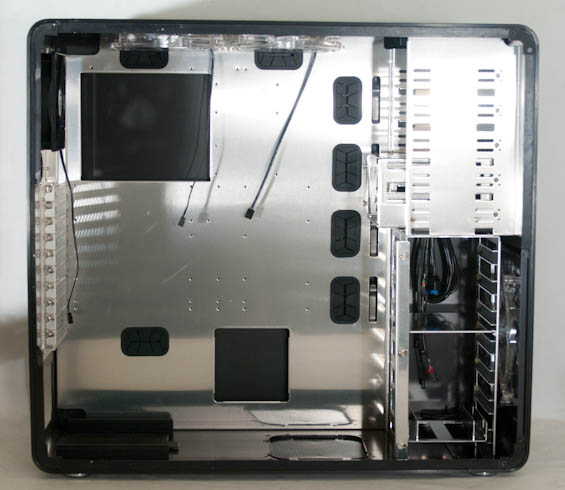
When you do open up the HPTX ICE, you'll see the basic enclosure layout, scaled up to accommodate HPTX-class motherboards. The power supply bay is at the bottom, but the fan filter is flimsy and difficult to actually keep lined up. There's a three thumbscrew locking mechanism for the internal 3.5" bays that's very similar to what Lian Li employs, rubber-lined cable routing holes in the motherboard tray, and a decent amount of space behind the tray for routing cables. The cutout in the tray is also substantial and should allow for just about any aftermarket heatsink's backplate to be installed without issue.
At this point, I need to register my misgivings with the HPTX ICE's packaging and, honestly, the construction materials. The styrofoam used to hold my review sample in place was broken in multiple places; it was just too thin. The box needed to be bigger and the styrofoam corner pads, by extension, needed to be thicker. Some of the hex screws that were holding the side panel in place had also actually fallen out in transit. I was told the packaging is being revised and beefed up so end users may not have the same problems I did. If this had been a steel enclosure these might not be such big issues anyhow, but that leads to my other problem: the aluminum itself.


For smaller enclosures I think an all-aluminum design is probably fine, but aluminum really brings with it a lot of issues most people don't think about initially. Aluminum is a relatively soft metal and it is extremely easy to scuff, scratch, or otherwise damage. In the basic manipulation the HPTX ICE went through in my testing, I actually managed to chip the finish in one place, and there are a couple of scuffs and scratches on the enclosure. Aluminum is a beautiful material and theoretically a good choice for radiating heat off of a powerful desktop, but the HPTX ICE felt flimsier than I would've liked--I'm not quite sure where the "thicker" materials are supposed to be.
Originally published at https://www.anandtech.com/show/5816/cubitek-hptx-ice-review-how-far-aluminum-can-go (Wayback Machine).