
Eurocom Monster 1.0: Clevo's Little Monster
- Posted in
- Laptops
- Clevo
- Eurocom
- Ivy Bridge
- Kepler
Gaming On the Go? Not Quite
This is where you end up paying for the upgrade to the quad-core CPU when compared to the M11x. The Monster comes with a 62Wh battery, and ends up delivering battery life slightly better than the Alienware M14x but well short of the M11x. The ULV Sandy Bridge chips were phenomenal under idle conditions, so the M11x R3 had awesome idle battery life, but in our real world use case scenarios, the M11x R3 had battery life about 20% better than the Monster. The two previous generations of M11x were similarly more power efficient than the Monster, but it’s a sacrifice worth making for the vastly more powerful CPU.
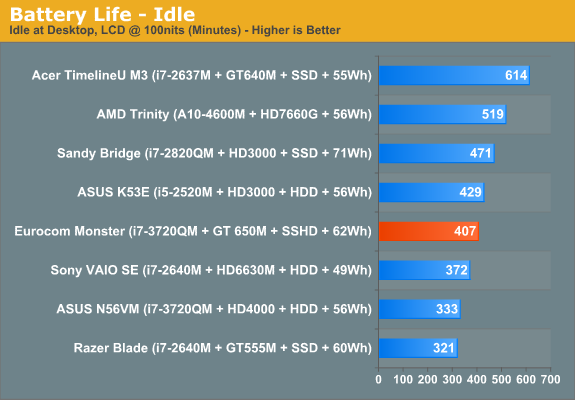
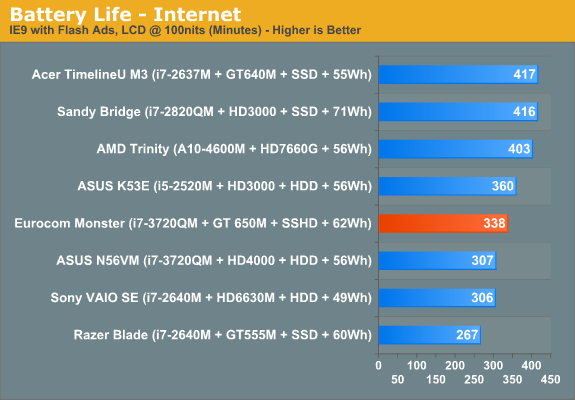
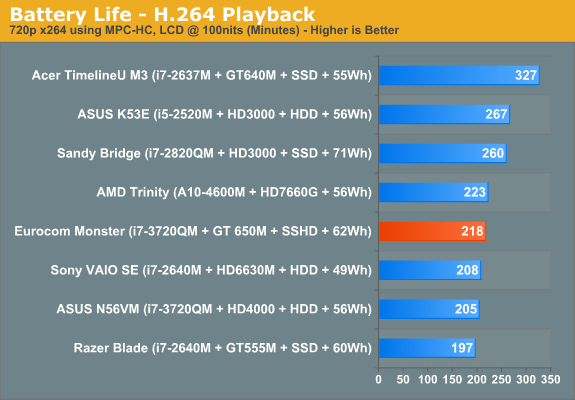
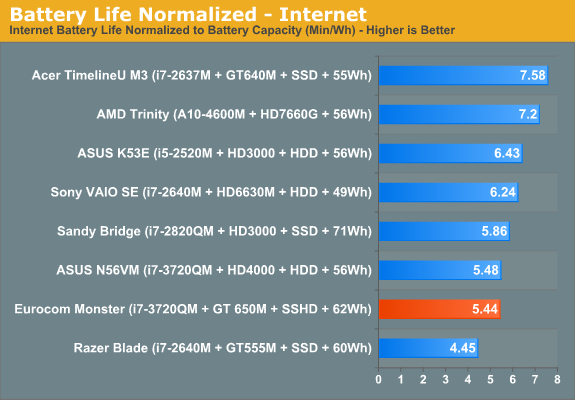
Clevo and Eurocom claim 410 minutes of runtime, and the Monster gets very close to that in our idle battery test, which is the absolute maximum you can expect from the system in an ideal case. Our internet battery test is a much more relevant real world use case scenario, and gives a more realistic estimate of day-to-day battery life, and it slots in at just above 5.5 hours of usable life. I’ve used the Monster as my primary portable for the last ten days or so (including a trip to China) and it’s definitely acquitted itself better than I could have expected.
In terms of gaming battery life (looping 3DMark06), I saw 75 minutes of battery runtime, which is actually pretty decent because we were running the GT 650 in the "prefer maximum performance" setting. For comparison, the ASUS N56VM that served as our IVB test platform ran out of juice at 77 minutes using the HD 4000. But generally, if you're gaming, expect runtime to suffer accordingly.

From a heat standpoint, the numbers aren’t necessarily happy. At idle, temperatures hover in the 60 C range, but load the CPU and GPU and the temperatures climb to the low 90s. I started Furmark and wPrime 1024M (in a loop) and kept it going for a while. After about 10 minutes, temperatures leveled out around 90C for the CPU and motherboard, and 83C for the GPU. That’s….a lot, even higher than the Razer Blade that we tested previously. Do anything more strenuous than surfing and it gets simply too hot to have on your lap. And even under near idle situations like browsing or word processing, the system gets pretty warm to the touch and the fan noticeably kicks in at regular intervals, though unfortunately I don’t have an infrared thermometer to measure the case temps, nor a setup for testing fan noise.

What is very clear though is that the hardware packed into this system is definitely pushing the thermal envelope of the design. There just isn’t enough space to properly ventilate and cool the system via conventional methods. The mechanical engineer in me can think of a few ways that could probably aid in the heat transfer mechanism, but they’re unconventional at best. Quite simply, there needs to either be more surface area to dissipate heat or more airflow to allow for a greater amount of convective heat transfer. Assuming they’re close to constrained for the footprint (which they are, or at least close to it—there’s not too much room to fiddle with the x and y dimensions unless they change the screen size), they just really need to push air through the case. It’s not enough to have a fan for the CPU and GPU, there need to be legitimate case fans, along with a lot more venting. One vent on the left side and a handful of smaller vents on the bottom are clearly not cutting it. Taking certain cooling concepts from desktop cases wouldn’t be a bad idea.
Originally published at https://www.anandtech.com/show/5812/eurocom-monster-10-clevos-little-monster (Wayback Machine).