
Eurocom Monster 1.0: Clevo's Little Monster
- Posted in
- Laptops
- Clevo
- Eurocom
- Ivy Bridge
- Kepler
Everything But the Kitchen Sink?
While the internal hardware is basically second to none, I have mixed feelings about the Monster from a device hardware standpoint. Clevo has never been mistaken for a design powerhouse, and the Monster does nothing to change that. Like most other Clevo notebooks, the design is a bit staid. It’s inoffensive, but relatively boring. The word that comes to mind is generic. In stark contrast to the heavily design-centric ultrabooks coming out these days, it’s a bit jarring. Obviously, the form factor isn’t conducive to a sleek and beautiful design, but even so, there aren’t any distinguishing characteristics to the design in general.
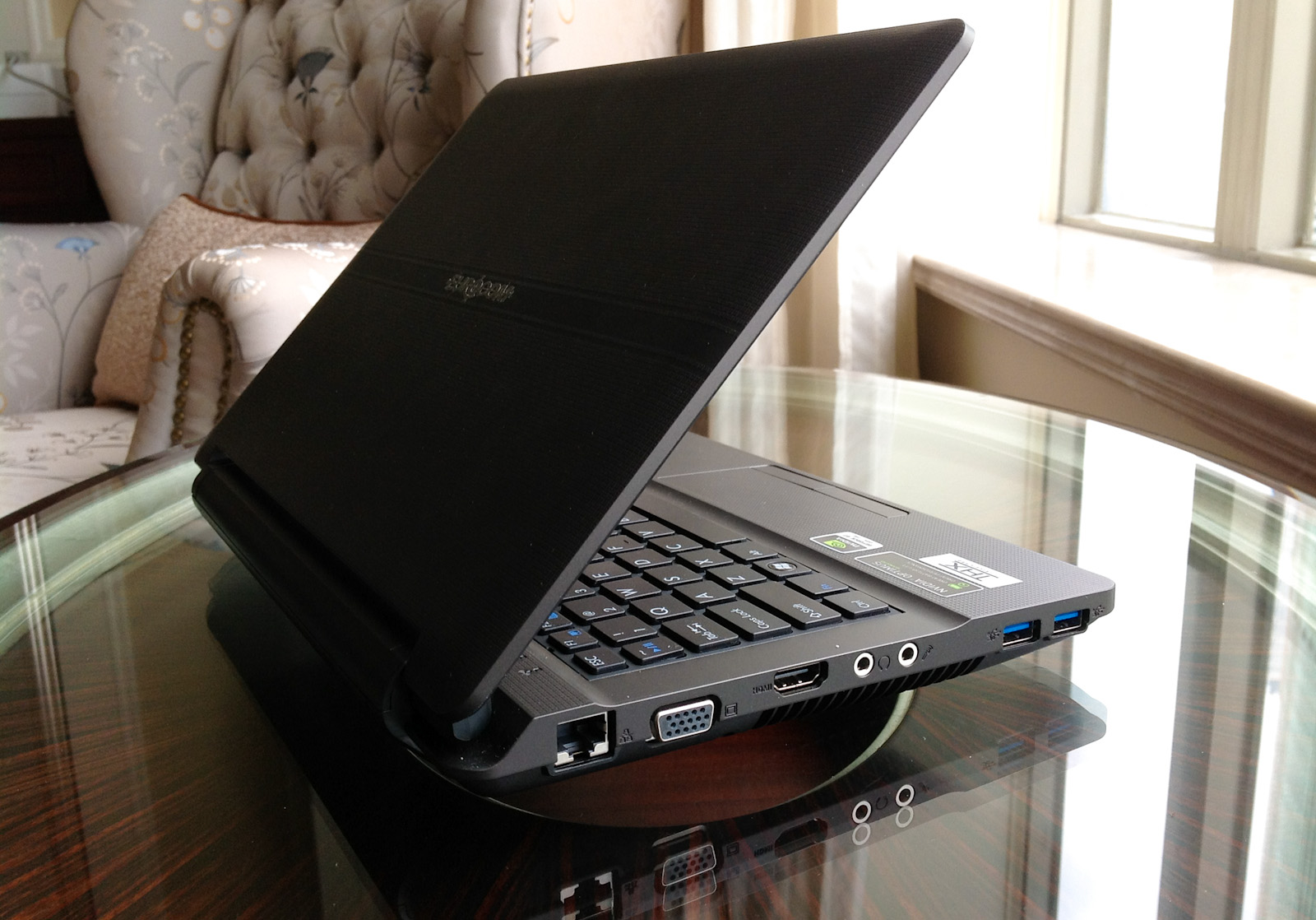


The chassis is constructed primarily of plastic, with a rubberized soft-touch finish on the interior and lid. There’s a square patterning on the palmrest, touchpad, and lid, giving all the surfaces you touch a subtle texture that feels nice to the touch. It feels pretty solid, no creaks or anything of the sort, and the lid is pretty resistant to torsion. It’s a pretty chunky laptop, and it’s built to match. I wouldn’t necessarily say it’s rugged or tough in the same way as a ThinkPad, but this is a notebook that can take some abuse, something you can toss around without being afraid of scratching or denting.

From a form factor standpoint, the Monster is pretty interestingly situated. It has a smaller footprint than the M11x (the W110ER comes in at a quarter of an inch wider but almost an inch less deep), though a little bit thicker. The LCD bezel is thankfully not nearly as large or as distracting as the one on the M11x, but a major complaint we had with the smallest Alienware was that it had a chassis large enough to accommodate a bigger screen; that holds true for the W110ER as well. While a 13.3” screen would have required too many dimensional changes to fit (unlike the M11x, which already had the depth to fit a 13” screen), a 12.5” screen could easily fit within a slightly widened chassis (see the 12.5” Samsung Series 3 or ThinkPad X220 at 11.75” and 12.0” wide, respectively). The 1.8kg/3.95lb weight is roughly where one would expect, heavier than Sony’s 13” SA-series but a half pound lighter than the outgoing M11x R3. Considering the computing prowess on tap here, the weight and thickness are small sacrifices to make. Still, it would be nice if the next person to make a notebook in this vein would drop the pretense of a gaming 11.6” ‘ultraportable’ and spec a screen that fit the chassis better.

The thickness actually makes a surprising difference. There’s a steep taper near the front of the notebook that allows Eurocom to quote 0.51” at thinnest point, but it’s basically 1.25-1.5” thick through most of the body. Hilariously, it’s more than twice as thick as the ASUS Zenbook UX21. Compared to ultrabooks and even newer non-ultrabook thin and lights, this feels like a notebook from a different era. Specifically, it reminds me a lot of the 12-13” notebooks from around five years ago—Dell’s XPS M1210, the ASUS W5F and W7J/W7S (a notebook that I have a lot of affection for), even the Lenovo V100 and MSI S262. Note that all of these systems came out with Core Duo processors (and were later upgraded to Merom), so we’re talking the early-mid 2006 timeframe. Alienware had a similarly chunky system in the M11x, but it had styling and details that made it look and feel like a modern system, and the design language made it instantly recognizable as an Alienware. The Monster simply lacks that distinctive characteristic.

OriginPC offers a custom lid design with their W110ER (called the EON11-S), a sleek looking part that’s actually very reminiscent of the M11x lid. They offer it in matte black, matte red, or glossy metallic silver, and based on the pictures, it seems like a nice improvement over the stock lid. However, it’s worth noting that the EON11-S is more expensive than Eurocom’s Monster and doesn’t offer the upgraded screen as an option either (at least not at the time of writing).
Looking around the Monster, we see a healthy allocation of ports—Gigabit LAN, VGA, HDMI, headphone/mic, and two USB 3.0 ports on the left side, along with a USB 2.0 and the AC port on the right. The left side also has a large vent, while the back is dominated by the removable 62Wh battery. The front has notification LEDs for power, battery, and disk usage but is otherwise clean. The Synaptics touchpad works as expected and features multitouch gestures and scrolling—two finger scroll works well, and the presence of physical mouse buttons is a relief.
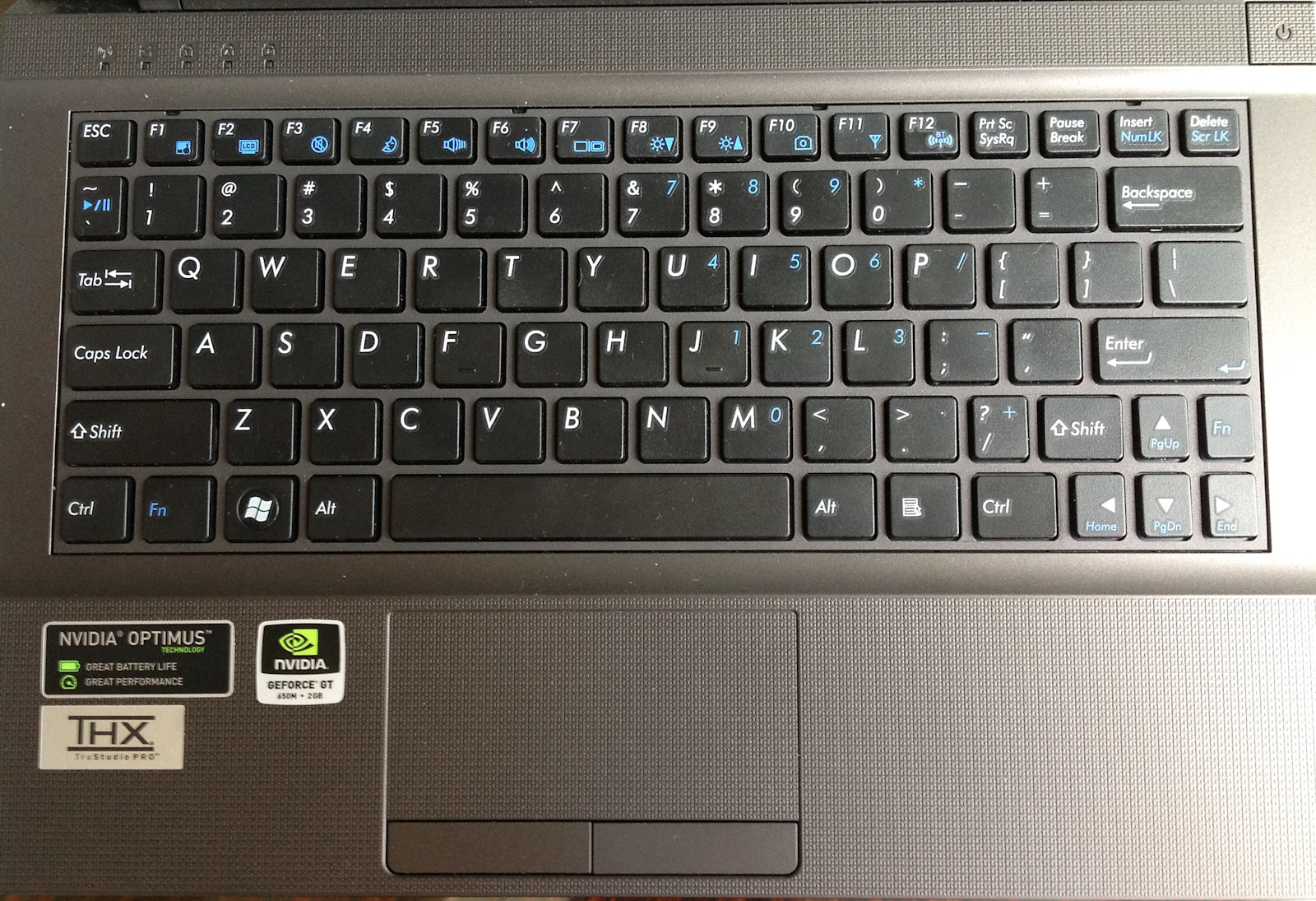
The most offensive part of the design is actually the keyboard, which has slightly shrunken keys and a layout designed to confuse and frustrate. The entire right-hand side feels truncated, with the forward slash and right shift keys narrower than normal and the arrow keys also narrow (but still full height). For reasons I cannot fathom, there is a second Fn key on the right hand side, located just above the right arrow key. Page up/down and home/end both exist only in the land of Fn keys, and the Esc key is also oddly small. Safe to say, I’m not a fan. The downsized keys don’t bother me much at all, though I suspect that a larger guy like Jarred would probably curse the keyboard anytime he had to use it. On the bright side, the keypresses are positive, with a decent amount of travel in the z-direction, and there's a pleasing lack of flex in the keyboard overall. Once you get used to the layout of the secondary keys, it's a decent keyboard.
Originally published at https://www.anandtech.com/show/5812/eurocom-monster-10-clevos-little-monster (Wayback Machine).